https://ift.tt/eA8V8J
Calls on your iPhone being diverted to voicemail and don't know why? Here's how to stop missing calls and find out why your iPhone is going straight to voicemail
from Latest iPhone Articles from Macworld UK https://ift.tt/2JdL0wn
Wednesday, January 15, 2020

How to tell if someone is using Do Not Disturb on iPhone
https://ift.tt/eA8V8J
How can you tell if the person who isn't picking up your calls or answering your texts is using Do Not Disturb mode on their iPhone? And if they are, is there any way to override Do Not Disturb and call them anyway? Yes - here's how
from Latest iPhone Articles from Macworld UK https://ift.tt/30nONxU
Spotify's New Feature Builds Playlists for Your Pets Based on Their Personality Traits and Your Listening History
https://ift.tt/2Tt5sP9
Spotify today announced "Pet Playlists," which builds custom playlists for a cat, dog, iguana, hamster, or bird (via The Verge). The playlist generator combines your pet's personality traits with your own listening history on Spotify, building a list of songs that the company says both you and your pet can enjoy.
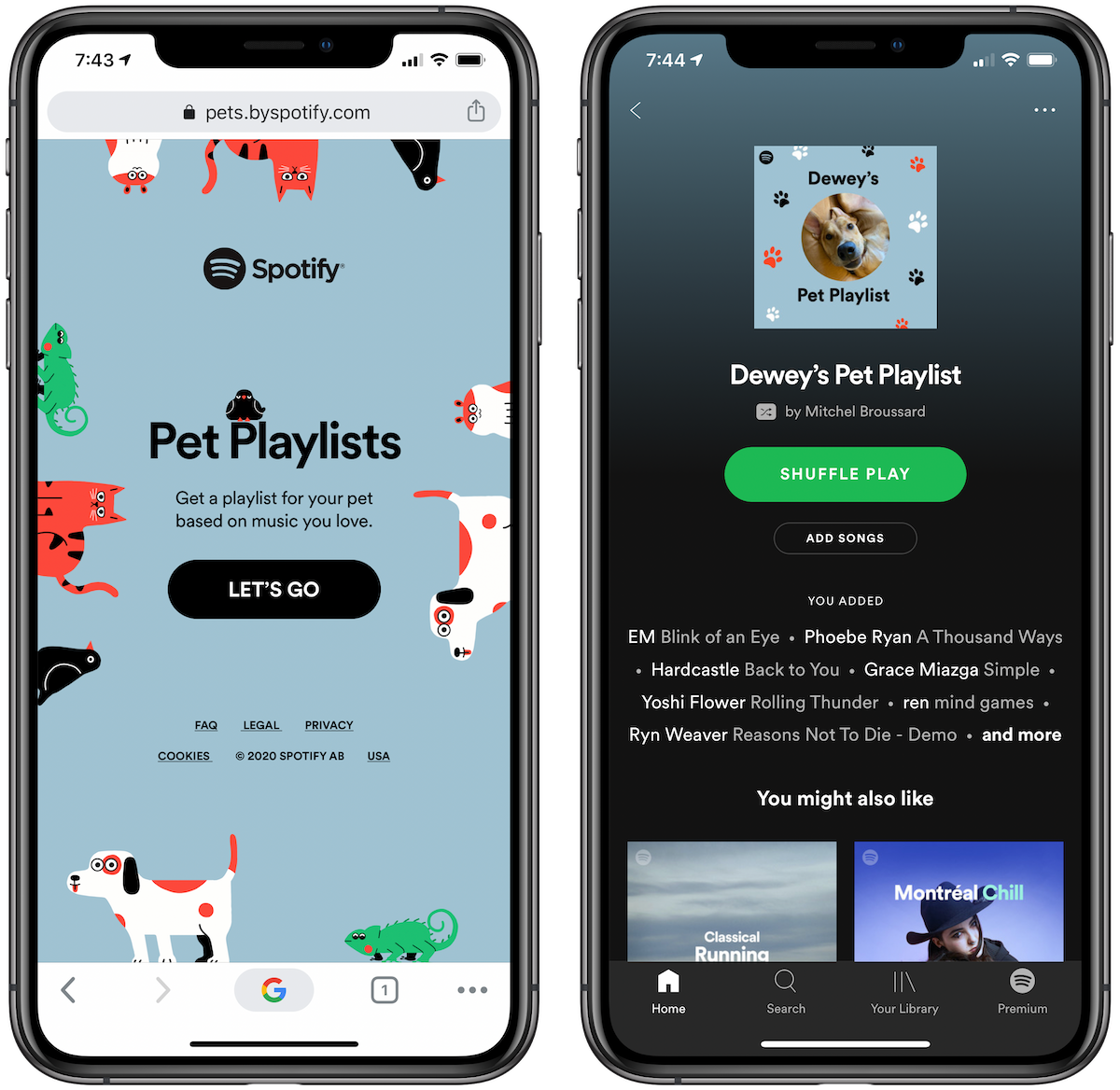
To get your Pet Playlist, visit Spotify's new Pet Playlist website, choose an animal, and then answer questions about their personality and temperament. Spotify will combine this information with your listening habits to create a Pet Playlist that's automatically added to your library, filled with about 30 songs.
Apple Music finally caught up to Spotify in one area in 2019, introducing a "Replay" feature that let its users track their most-played songs from the previous year, as well as every single year since they started using Apple Music.
This article, "Spotify's New Feature Builds Playlists for Your Pets Based on Their Personality Traits and Your Listening History" first appeared on MacRumors.com
Discuss this article in our forums


from MacRumors: Mac News and Rumors - All Stories https://ift.tt/2TrUjOE
Spotify today announced "Pet Playlists," which builds custom playlists for a cat, dog, iguana, hamster, or bird (via The Verge). The playlist generator combines your pet's personality traits with your own listening history on Spotify, building a list of songs that the company says both you and your pet can enjoy.
To get your Pet Playlist, visit Spotify's new Pet Playlist website, choose an animal, and then answer questions about their personality and temperament. Spotify will combine this information with your listening habits to create a Pet Playlist that's automatically added to your library, filled with about 30 songs.
While music for pets isn’t an exact science, we consulted with experts in the pet industry for the best approximation for what might work best for our featured animals. Incidentally, we only use the information you provide us to create your Pet Playlist. The information is not stored and is not used for any other purpose.When subscribers were last counted, Spotify had 113 million Premium subscribers as of October 2019, compared to Apple Music's 60 million as of June 2019. According to Spotify, the streaming service is growing twice as fast as Apple Music.
Apple Music finally caught up to Spotify in one area in 2019, introducing a "Replay" feature that let its users track their most-played songs from the previous year, as well as every single year since they started using Apple Music.
Tag: Spotify
This article, "Spotify's New Feature Builds Playlists for Your Pets Based on Their Personality Traits and Your Listening History" first appeared on MacRumors.com
Discuss this article in our forums
from MacRumors: Mac News and Rumors - All Stories https://ift.tt/2TrUjOE
Calls for Apple to Bring iPhone-Style Low Power Mode to MacBooks
https://ift.tt/38b0ryO
Following rumors of a performance-boosting "Pro Mode" coming in the next update to macOS Catalina, developer Marco Arment has argued that Apple should bring an iPhone-style Low Power Mode to MacBooks as well.

Since iOS 9, Apple has included a Low Power Mode on iPhones that reduces the amount of power that the device uses when the battery gets low, and Arment this week shared his experience with his own self-styled equivalent for macOS.
His method involves the use of a third-party app called Turbo Boost Switcher Pro that enables users to disable Intel Turbo Boost on a Mac's processor. According to Arment, disabling Turbo Boost has increased his 16-inch MacBook Pro's battery life by an estimated 30-50 percent and made it "a much better laptop" the vast majority of the time he uses it.

An iPhone's Low Power Mode reduces battery usage by disabling background app refreshing and automatic downloads, locking the screen after 30 seconds, and via other methods. Would you be happy to see an optional Low Power Mode in a future version of macOS, too? Let us know in the comments.
This article, "Calls for Apple to Bring iPhone-Style Low Power Mode to MacBooks" first appeared on MacRumors.com
Discuss this article in our forums

from MacRumors: Mac News and Rumors - All Stories https://ift.tt/2tYdntg
Following rumors of a performance-boosting "Pro Mode" coming in the next update to macOS Catalina, developer Marco Arment has argued that Apple should bring an iPhone-style Low Power Mode to MacBooks as well.
Since iOS 9, Apple has included a Low Power Mode on iPhones that reduces the amount of power that the device uses when the battery gets low, and Arment this week shared his experience with his own self-styled equivalent for macOS.
His method involves the use of a third-party app called Turbo Boost Switcher Pro that enables users to disable Intel Turbo Boost on a Mac's processor. According to Arment, disabling Turbo Boost has increased his 16-inch MacBook Pro's battery life by an estimated 30-50 percent and made it "a much better laptop" the vast majority of the time he uses it.
With Turbo Boost disabled, peak CPU power consumption drops by 62%, with a correspondingly huge reduction in temperature. This has two massive benefits:Arment claims that despite the reduction in processing power, his MacBook Pro is "still fast enough to do everything I need (including significant development with Xcode)." His only concern is that the app which allows him to enjoy these benefits is on borrowed time: Turbo Boost Switcher Pro relies on a legacy kernel extension that likely won't be supported in future versions of macOS.
- The fans never audibly spin up. When Turbo Boost is enabled, the fans annoyingly spin up every time the system is under a heavy sustained load. Disable it, and it’s almost impossible to get them to be audible.
- It runs significantly cooler. Turbo Boost lets laptops get too hot to comfortably hold in your lap, and so much heat radiates out that it can make hands sweaty. Disable it, and the laptop only gets moderately warm, not hot, and hands stay comfortably dry.
"I suspect that this is the last year I'll get to run the latest OS and be able to turn off Turbo Boost at will, making all of my future laptop usage significantly worse," says Arment.
An iPhone's Low Power Mode reduces battery usage by disabling background app refreshing and automatic downloads, locking the screen after 30 seconds, and via other methods. Would you be happy to see an optional Low Power Mode in a future version of macOS, too? Let us know in the comments.
Related Roundup: MacBook Pro
Tag: Marco Arment
Buyer's Guide: MacBook Pro (Buy Now)
This article, "Calls for Apple to Bring iPhone-Style Low Power Mode to MacBooks" first appeared on MacRumors.com
Discuss this article in our forums
from MacRumors: Mac News and Rumors - All Stories https://ift.tt/2tYdntg
How to block ads on iPhone & iPad
https://ift.tt/eA8V8J
If irritating adverts are getting in your way while browsing online you can always use an ad blocker on your iPhone or iPad. We show you how to set this up (and why you might choose not to)
from Latest iPhone Articles from Macworld UK https://ift.tt/39rsn35
If irritating adverts are getting in your way while browsing online you can always use an ad blocker on your iPhone or iPad. We show you how to set this up (and why you might choose not to)
from Latest iPhone Articles from Macworld UK https://ift.tt/39rsn35
How to tell if someone has blocked your number on iPhone
https://ift.tt/eA8V8J
Think someone has blocked your number on their iPhone? Here's how to find out why your calls aren't being answered
from Latest iPhone Articles from Macworld UK https://ift.tt/3703eec
Think someone has blocked your number on their iPhone? Here's how to find out why your calls aren't being answered
from Latest iPhone Articles from Macworld UK https://ift.tt/3703eec
iPhones Can Now Be Used to Generate 2FA Security Keys for Google Accounts
https://ift.tt/382rsEG
 A new update to Google's Smart Lock iOS app lets users set up their iPhone or iPad as a security key for two-factor authentication when signing into native Google services via Chrome browser.
Once the feature is set up in the app, attempting to log in to a Google service via Chrome on another device such as a laptop results in a push notification being sent to their iOS device.
The user then has to unlock their iPhone or iPad using Face ID or Touch ID and confirm the log-in attempt via the Smart Lock app before it can complete on the other device.
After installing the update, users are asked to select a Google account to set up their phone's built-in security key. According to a Google cryptographer, the feature makes use of Apple's Secure Enclave hardware, which securely stores Touch ID, Face ID, and other cryptographic data on iOS devices.
The Smart Lock app requires that Bluetooth is enabled on both the iPhone/iPad and the other device for two-factor authentication to work, so they have to be in close proximity, but the advantage of the system is that it ensures the process is localized and can't be leaked onto the internet.
The Google Smart Lock app is a free download for iPhone and iPad on the App Store. [Direct Link]
(Via 9to5Google.com)
This article, "iPhones Can Now Be Used to Generate 2FA Security Keys for Google Accounts" first appeared on MacRumors.com
Discuss this article in our forums

from MacRumors: Mac News and Rumors - All Stories https://ift.tt/2TrthXG
A new update to Google's Smart Lock iOS app lets users set up their iPhone or iPad as a security key for two-factor authentication when signing into native Google services via Chrome browser.Once the feature is set up in the app, attempting to log in to a Google service via Chrome on another device such as a laptop results in a push notification being sent to their iOS device.
The user then has to unlock their iPhone or iPad using Face ID or Touch ID and confirm the log-in attempt via the Smart Lock app before it can complete on the other device.
After installing the update, users are asked to select a Google account to set up their phone's built-in security key. According to a Google cryptographer, the feature makes use of Apple's Secure Enclave hardware, which securely stores Touch ID, Face ID, and other cryptographic data on iOS devices.
The Smart Lock app requires that Bluetooth is enabled on both the iPhone/iPad and the other device for two-factor authentication to work, so they have to be in close proximity, but the advantage of the system is that it ensures the process is localized and can't be leaked onto the internet.
The Google Smart Lock app is a free download for iPhone and iPad on the App Store. [Direct Link]
(Via 9to5Google.com)
This article, "iPhones Can Now Be Used to Generate 2FA Security Keys for Google Accounts" first appeared on MacRumors.com
Discuss this article in our forums
from MacRumors: Mac News and Rumors - All Stories https://ift.tt/2TrthXG
Subscribe to:
Posts (Atom)