Friday, December 21, 2018

10 of the Best macOS and iOS Apps of 2018

http://bit.ly/nvEILJ

It's the end of the year, and 2018 is coming to a close. Over the course of the last several months, we've highlighted several useful Mac and iOS apps in our YouTube series, and for December, we've picked our favorites.

In the video and the article below, you'll find a selection of some of the best apps that we've used over the course of the year.


Subscribe to the MacRumors YouTube channel for more videos.

Mac


  • Paste ($14.99) - Paste is a copy paste manager that keeps track of and organizes all the files, photos, URLs, and text snippets that you've copied and pasted on your Mac. Paste is described as a sort of Time Machine for your clipboard, because it saves everything and offers robust search capabilities so you can always find what you're looking for. Pinboards also give you access to things you copy and paste often, while custom shortcuts make it easier to copy and paste. Paste is a Mac App Store app, but a free trial is also available on the Paste website.


  • Station (Free) - Station is an app that's designed to house and aggregate all of your web applications in one easy to access location. Instead of having dozens of tabs open with things like Gmail, Twitter, Instagram, and Slack, you can relocate them all to Station for quicker, more streamlined access. Station is essentially a web browser that has a better layout for accessing web apps.


  • Sip ($9.99) - Sip is a niche app, but it's useful for artists, designers, interior decorators, app developers, and other content creators who like to create and maintain color palettes. Sip lets you create and organize color palettes that can be accessed right in the menu bar of your Mac and shared to all of your favorite design apps like Photoshop, Xcode, Illustrator, Sketch, and more. Choosing colors from any source is as simple as a key press, and a color dock makes all of your palettes readily available.


  • Bartender 3 ($15) - Bartender 3 is a popular Mac app that lets you rearrange and hide icons on the menu bar of your Mac. With Bartender, you can put the menu bar items you use most often front and center, while minimizing all of the rest behind the Bartender icon for a more streamlined menu bar.


  • NightOwl (Free) - NightOwl is a super simple Mac app that's designed to give you more control over Dark Mode. It adds a Dark Mode toggle to the menu bar so you can turn Dark Mode on and off without needing to open up System Preferences. You can also set Dark Mode to a timer or have it come on when the sun sets using NightOwl.


iOS


  • Procreate ($9.99) - Procreate is a popular and well-known sketching, drawing, and painting app. Because it's been available on the iPad for years, the Procreate team has had a lot of time to make improvements and refinements to the app, making it the go-to for many artists who work on the iPad. It has been optimized for Apple Pencil, so you can create works of art with Apple's stylus. It features customizable brushes, support for layers, and a 64-bit painting engine that supports high-resolution artwork.


  • LumaFusion ($19.99) - If you want to edit video on an iPad but want something more than iMovie, LumaFusion is a powerful video editing option that you'll want to take a look at. Using LumaFusion, you can do everything you might do with a desktop app, like trimming clips, adding transitions, correcting color, adding effects and titles, audio, and using slow-motion, fast forward, and reverse.


  • Bear (Free) - Bear is a writing, coding, and note taking app that has a simple interface and a rich feature set. It's available on iOS and Mac devices, and it offers Apple Pencil support, to-dos, multiple export options, an advanced markup editor with support for more than 20 programming languages, SmartData Recognition, in-line images and photos, hashtags for organization, and more. Bear is free to download, but if you want to sync your notes between your devices, unlock themes, and use advanced exporting options, you'll need to pay $1.49 per month or $14.99 per year for a subscription.


  • Alto's Odyssey ($4.99) - Alto's Odyssey is the highly-anticipated sequel to popular 2015 game Alto's Adventure. Like the original, Alto's Odyssey is an endless runner with gorgeous graphics, but this time it takes place in the sand instead of the snow.


  • Grimvalor ($5.99) - Grimvalor, from the team that developed popular game Swordigo, is a traditional hack n' slash platformer with solid virtual controls, great graphics, and plenty of content to get through. As with most games of this type, the idea is to fight monsters, explore dungeons, and gather loot to progress through the story. Grimvalor costs $5.99, and there are no additional in-app purchases.


What were your favorite Mac and iOS apps in 2018? Let us know in the comments.
Discuss this article in our forums


from MacRumors: Mac News and Rumors - All Stories http://bit.ly/2EI2yzD

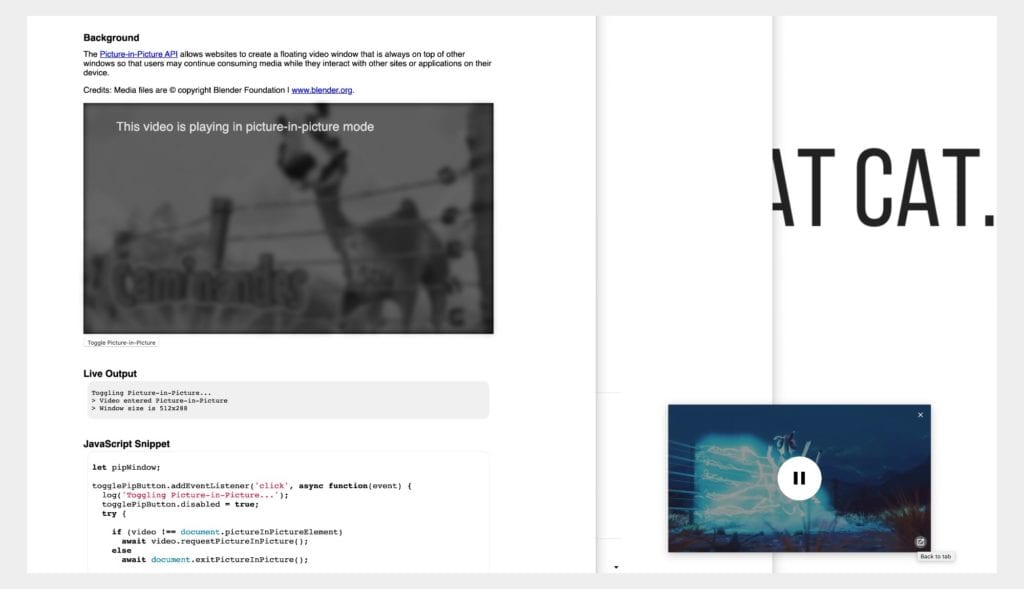
Chrome 73 Brings “Back To Tab” Button For PIP Video Windows


via Chrome Unboxed – The Latest Chrome OS News http://bit.ly/2EJgJEt

MacRumors Giveaway: Win a 5-Coil 'PowerDual' Qi Wireless Charger That Can Charge 2 iPhones at Once from Choetech

http://bit.ly/2rMBwP6

For this week's giveaway, we've teamed up with Choetech to offer MacRumors readers a chance to win one of the company's new PowerDual 5-coil Qi wireless chargers, capable of charging two devices at one time.

The PowerDual is a flat, oblong-shaped pad that is equipped with five overlapping wireless coils inside. It is big enough to accommodate two smartphones at once, and because of the overlapping coils, the two devices should charge regardless of placement on the charger.


With flat chargers, placement can be an issue because the iPhone needs to be placed right over a coil to properly charge. That's a problem that's addressed with the PowerDual. It can accommodate two devices placed vertically or one device placed horizontally.


For iPhones, 7.5W charging is supported, and if you put two iPhones on the charger at one time, both will charge at the faster 7.5W charging speed. For Samsung devices that support faster charging speeds, 10W charging is available.


An anti-slip surface prevents your iPhone from sliding or slipping off of the charger, and anti-slip pads at the bottom keep the charger itself in place. Heat dissipation holes at the bottom of the device keep your phone cool while it's charging to speed up the process.


Choetech is offering the charger, priced at $35.99, in either a smooth black finish or a faux wood grain finish.

Powering the charger is done through an included USB-C port, but a power adapter is not included. You will need to supply a 5V Quick Charge 3.0 power adapter.


Choetech has also provided a discount code for the five coil wireless charging, discounting the price from $39.99 to $30.99. Just enter the code MACRU535 when checking out on Choetech's website.

We have 10 of Choetech's PowerDual Wireless Charging Pads to give away. To enter to win, use the Rafflecopter widget below and enter an email address. Email addresses will be used solely for contact purposes to reach the winners and send the prizes. You can earn additional entries by subscribing to our weekly newsletter, subscribing to our YouTube channel, following us on Twitter, following us on Instagram, or visiting the MacRumors Facebook page.

Due to the complexities of international laws regarding giveaways, only U.S. residents who are 18 years or older and Canadian residents (excluding Quebec) who have reached the age of majority in their province or territory are eligible to enter. To offer feedback or get more information on the giveaway restrictions, please refer to our Site Feedback section, as that is where discussion of the rules will be redirected.

a Rafflecopter giveaway
The contest will run from today (December 21) at 11:00 a.m. Pacific Time through 11:00 a.m. Pacific Time on December 28. The winners will be chosen randomly on December 28 and will be contacted by email. The winners will have 48 hours to respond and provide a shipping address before new winners are chosen.

Note: MacRumors is an affiliate partner with Choetech of these vendors. When you click a link and make a purchase, we may receive a small payment, which helps us keep the site running.


Discuss this article in our forums


from MacRumors: Mac News and Rumors - All Stories http://bit.ly/2EDfFkI

Chrome OS 72 Dev Channel adds tablet site option to view mobile versions of web pages


via About Chromebooks http://bit.ly/2T3weKu

Apple's Dan Riccio Says 2018 iPad Pro 'Meets or Exceeds' Quality Standards of Design and Precision, More Info to Come

http://bit.ly/2Gv9j9E

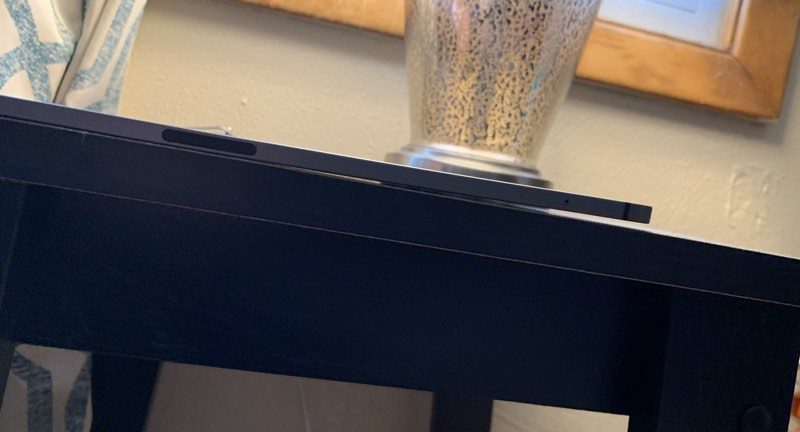
Earlier this week, Apple told The Verge that some 2018 iPad Pro models are shipping with a slight bend in the aluminum chassis, which is a side effect of the manufacturing process that is not expected to worsen over time or negatively impact the iPad's performance.

Many MacRumors readers were concerned about Apple's position that a noticeable bend is not a manufacturing issue, prompting MacRumors reader Craig to send an email to Apple CEO Tim Cook to express his concerns.

Image via MacRumors reader Bwrin1

While Cook didn't respond, Craig did get a reply from Apple's VP of hardware engineering, Dan Riccio, which he shared with MacRumors and we which we have confirmed to be from Apple's corporate mail servers in Cupertino, California.

In the email, Riccio says that the iPad Pro's design "meeds or exceeds" all of Apple's quality and precision standards.

Apple's specification for iPad Pro flatness is up to 400 microns, which is "even tighter than previous generations." Riccio reiterates that this level of flatness won't change during normal use, nor does it affect function. From the email:
Relative to the issue you referenced regarding the new iPad Pro, its unibody design meets or exceeds all of Apple's high quality standards of design and precision manufacturing. We've carefully engineered it and every part of the manufacturing process is precisely measured and controlled.

Our current specification for iPad Pro flatness is up to 400 microns which is even tighter than previous generations. This 400 micron variance is less than half a millimeter (or the width of fewer than four sheets of paper at most) and this level of flatness won't change during normal use over the lifetime of the product. Note, these slight variations do not affect the function of the device in any way.

Again, thanks for reaching out and I hope the above explanation addresses your concerns.
Riccio's email also says that a company statement was not included in the original information disseminated by The Verge, and that Apple will be reaching out to media outlets to comment officially.

The original email was sent late on December 20 and suggested a comment would come "later today," but that didn't happen, so it's not quite clear when Apple will provide more info to the media. We may be hearing an official, more reassuring statement on the 2018 iPad Pro before the end of the day.

Minor bending of the new iPad Pro models first came to light shortly after the devices launched, and new iPad Pro owners who noticed bends shared their concerns on the MacRumors forums.

Apple was quiet on the issue until this week, when the company told The Verge that the bending is a side effect of the manufacturing process and not a defect that impacts iPad performance.

The bend is said to be the result of a cooling process involving the iPad Pro's metal and plastic components during manufacturing. iPad Pro models experiencing this issue are exhibiting the problem right out of the box, according to Apple, so it's not an issue that shows up or worsens over time.

Apple told The Verge that concerns over the structural rigidity of the iPad Pro are unfounded and that it stands by the product.

Related Roundup: iPad Pro

Discuss this article in our forums


from MacRumors: Mac News and Rumors - All Stories http://bit.ly/2BwXw53

Apple Expands 10% Bonus When Adding Funds to Apple ID to More Countries Through December 24

http://bit.ly/2Ra4975

Apple has extended and expanded its 10 to 15 percent bonus offer when adding funds directly to an Apple ID account.


The offer was initially available in the U.S. only and set to expire December 20, but the bonus is now available through December 24 in the U.S., Australia, Canada, Germany, Japan, and the United Kingdom, according to Thrifter.

The bonus can be applied once on up to $200 in Apple ID funds, which can be used towards purchases on the iTunes Store, Apple Books Store, App Store, a recurring iCloud storage subscription, and so forth.

To add funds directly to an Apple ID, go to Settings > Your Name > iTunes & App Store and tap your Apple ID > View Apple ID. Sign in if necessary, tap "Add Funds to Apple ID," tap the amount that you want to add, and confirm your selection. There's also a shortcut available at the bottom of the App Store.

Or, in iTunes on a Mac or PC, click on Account > View My Account… in the menu bar and then click on the Add Funds to Apple ID link. Adding funds requires a valid payment method on file and is particularly useful for prepaid credit cards.


Discuss this article in our forums


from MacRumors: Mac News and Rumors - All Stories http://bit.ly/2SeMs3z

Xiaomi Redmi 5A Finally Starts Receiving the Android 8.1 Oreo-Based MIUI 10 Stable Update


via News – MySmartPrice http://bit.ly/2QMTqjN