Wednesday, June 12, 2019

Hands-On With Apple's New iPadOS Software

http://bit.ly/nvEILJ

With the launch of iOS 13, Apple decided to split iOS 13 for the iPad into its own dedicated operating system called iPadOS. Going forward, iPadOS will be the version of iOS that runs on Apple's iPad devices.

iPadOS includes all of the features of iOS 13, plus some additional tweaks and changes made specifically for a device with a larger display. In our latest video, we went hands-on with iPadOS to check out the new features.

Subscribe to the MacRumors YouTube channel for more videos.

As mentioned above, iPadOS includes almost all of the iOS 13 features, such as Dark Mode, Find My, new app updates, Sign In with Apple, and more.

There are also iPad-specific features, though, such as a new Home screen that features smaller app icons so you can fit more apps on each page. The new Home screen also lets you move the Today view widgets from the left side of the screen onto the Home screen itself so you can see at-a-glance info like weather, upcoming events, news headlines, and more, whenever your iPad is in landscape mode.

Multitasking features specific to the iPad have also been overhauled. Split View now supports multiple windows from the same app, so you can do things like view two Safari pages side by side, and in Slide Over, you can now have multiple Slide Over windows open, flipping between them as needed for quicker swapping between apps.

You can keep all the apps you need to access occasionally stored in Slide Over, dragging upwards on the display to see everything that's open. App Exposé, a new feature available when you press on an app's icon, is designed to show you all of the windows from a particular app.

Apple improved Apple Pencil latency, dropping it from 20ms to 9ms, and Markup is more deeply integrated everywhere in iPadOS. You can tap on the corner of the display with an Apple Pencil to open up Markup, which can be used for webpages, documents, screenshots, emails, and more. A redesigned tool palette offers up quick access to tools and color palettes, and there's a new ruler and a new pixel eraser.

Like iOS 13, iPadOS brings support for external drives to the Files app, along with new folder sharing capabilities. A Column View lets you see previews of your files, and Quick Actions support allows you to do things like mark up and rotate images and create PDFs right from the Files app.

Safari has a new download manager and will always load the desktop version of a site, and there are new gestures that while also available on iPhone, work well on the iPad's larger display. Scrolling through long documents and webpages is faster through a new gesture that lets you grab the scroll bar and drag it, and selecting text can now be done by dragging a finger over it.

Selecting a word can be done with a double tap, selecting a sentence can be done with a triple tap, and a quadruple tap selects a paragraph at once. Double tapping selects elements like phone numbers and email addresses, and you can now pick up the cursor and move it wherever you want. There are new pinch-based gestures for copy and paste, and a new three finger swipe for undoing and redoing.

Both iPadOS and iOS 13 introduce a new swipe-based keyboard called the QuickPath keyboard, but in iPadOS, you can grab the keyboard and move it wherever you want on the display for a floating keyboard that offers one-handed typing access.

Used with macOS Catalina, the iPad can become a second display for your Mac thanks to the new Sidecar functionality, and the iPad now supports both mice and Xbox/PS4 game controllers.

For more detail on iPadOS, make sure to check out our iPadOS roundup.

Related Roundups: iOS 13, iPadOS

This article, "Hands-On With Apple's New iPadOS Software" first appeared on MacRumors.com

Discuss this article in our forums


from MacRumors: Mac News and Rumors - All Stories http://bit.ly/2WCxk1k

Google Confirms Pixel 4 Will Feature Square-Shaped Camera Bump

http://bit.ly/2IInshw

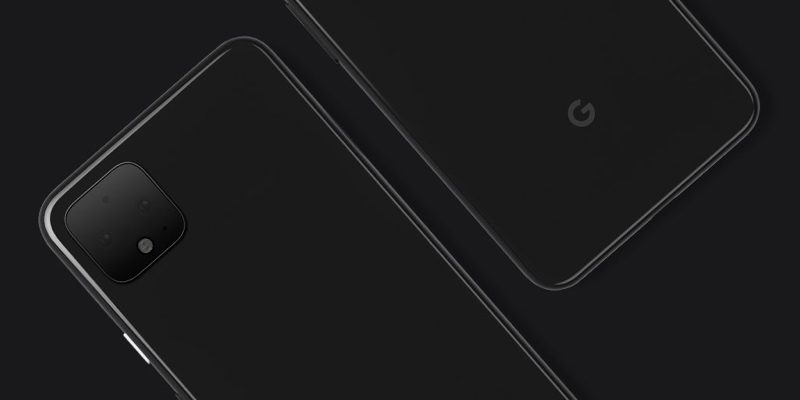
Google today confirmed that its upcoming Pixel 4 devices will feature a square-shaped rear camera bump, a feature also rumored to be coming to the 2019 iPhones.

A case maker's mockup for the Pixel 4 smartphones leaked earlier this week, and today, Google confirmed the news itself in a tweeted image showing off the new design.


Google's rear camera setup appears to include two lenses, a microphone, a flash, and a "spectral sensor" at the top that accounts for things like light flicker when filming an LCD display.

Apple too is planning to use a square-shaped camera bump for its 2019 devices, based on leaked rumors, renders, and cases. Just this week we checked out some cases designed for the 2019 iPhone lineup that have large square cutouts to accommodate the new camera arrangement.

Subscribe to the MacRumors YouTube channel for more videos.

Apple's square-shaped camera bump is expected to house triple-lens camera setups for the iPhone XS and XS Max successors, along with a dual-lens camera setup for the iPhone XR successor.


Based on leaked information, the three lenses in Apple's camera arrangement are set into a triangle shape. There are two lenses at the left as on the current flagship iPhones, along with one lens in between them set off to the right and a flash above that.

Google's setup, meanwhile, has the two lenses for its camera arranged horizontally with a flash at the bottom. Both of these setups provide more space between the flash and the lenses and there may be other benefits to square-shaped arrangement that both companies are taking advantage of.

Apple is expected to launch its 2019 iPhones in September, while Google's are also rumored to be coming in the fall. Historically, Google's new Pixel phones have come out in October, so while Google has beaten Apple to the punch officially showing off a square-shaped rear camera design first, Apple's 2019 flagship smartphones should launch first.


This article, "Google Confirms Pixel 4 Will Feature Square-Shaped Camera Bump" first appeared on MacRumors.com

Discuss this article in our forums


from MacRumors: Mac News and Rumors - All Stories http://bit.ly/2RcgaGY

Deals Spotlight: Get the Latest 2019 MacBook Pros for Up to $220 Off (Starting at $1,699)

http://bit.ly/2XMPU8A

The latest MacBook Pro models have received new discounts this week, with savings on the notebooks offered by retailers like B&H Photo and Amazon via Expercom. Many of these deals currently represent the lowest prices available online for the latest MacBook Pros, which Apple just updated ahead of WWDC in May.

Note: MacRumors is an affiliate partner with these vendors. When you click a link and make a purchase, we may receive a small payment, which helps us keep the site running.
At B&H Photo you'll find discounts on the 13-inch MacBook Pro models from 2019, with savings of $100 on each notebook. If you're looking for the bigger models you'll find 15-inch MacBook Pros on Amazon and sold by Apple reseller Expercom. Across the board, these are the best prices you'll find for each model among the major Apple resellers online.

2019 MacBook Pro Discounts


These MacBook Pros are less than one month old, making today's discounts particularly notable for anyone on the hunt for the latest and greatest Apple notebook. The updated devices include the Touch Bar, new 8th and 9th-generation Intel processors, an updated keyboard, and more.

You can check out more sales and bargains in our full Deals Roundup.

Related Roundup: Apple Deals

This article, "Deals Spotlight: Get the Latest 2019 MacBook Pros for Up to $220 Off (Starting at $1,699)" first appeared on MacRumors.com

Discuss this article in our forums


from MacRumors: Mac News and Rumors - All Stories http://bit.ly/31s6axR

Google Login Chief Lauds Apple Sign In as 'Better for the Internet,' Says Google's Sign In Feature Doesn't Collect Data Either

http://bit.ly/2MrxngK

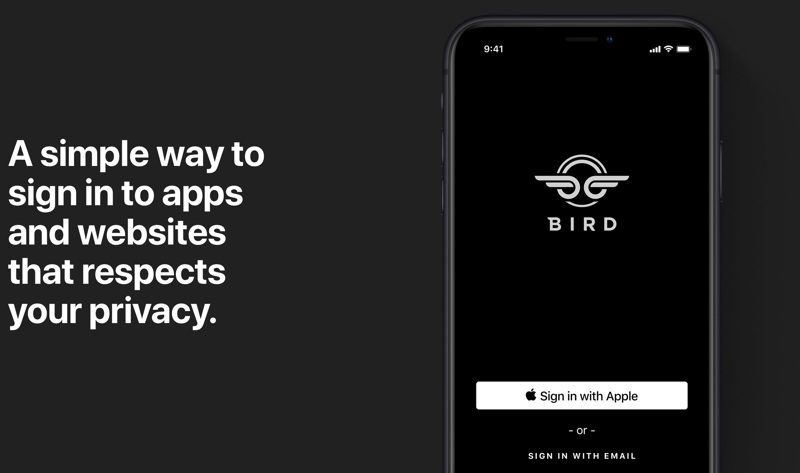
Apple last week unveiled a new Sign In with Apple option, offering up a convenient, privacy-focused alternative to sign-in options from companies like Google, Facebook, and Twitter.

Apple collects no data and provides little data to the apps and websites you use with the feature, and it even offers an option to keep your email safe. In an interview with The Verge, Google product management director Mark Risher, who oversees Google's secure sign in tool, shared his thoughts on Apple's new feature.


Risher says that Google's own tool is not as data hungry as it was made out to be, and that it's not used for advertising or re-targeting. "There was a bunch of innuendo wrapped around the release that suggested that only one of them is pure and the rest of them are kind of corrupt, and obviously I don't like that," he said.

The only moment logged is the moment of authentication, according to Risher, info that's not distributed anywhere. Risher also suggested Apple's feature is more invasive because it will be logging emails received from companies when the email obscuring feature is used. "We'll see how the details work out," he said.

Risher went on to explain that Google tries to "set a very high bar" but is judged by the "worst behavior" in the Android ecosystem. He said the innuendo from Apple that Google's tool is less privacy focused "was a little annoying" because Google is "trying to really hold [itself] to a high standard."

Ultimately, Risher said that he believes the technology will make people safer.
I honestly do think this technology will be better for the internet and will make people much, much safer. Even if they're clicking our competitors button when they're logging into sites, that's still way better than typing in a bespoke username and password, or more commonly, a recycled username and password.
Risher likened log-in protection offered by Google and Apple to storing money in a bank to alleviate fears people might have about having all of their login data handled by a single company like Apple or Google.
People often push back against the federated model, saying we're putting all our eggs into one basket. It sort of rolls off the tongue, but I think it's the wrong metaphor. A better metaphor might be a bank. There are two ways to store your hundred dollars: you could spread it around the house, putting one dollar in each drawer, and some under your mattress and all of that. Or you could put it in a bank, which is one basket, but it's a basket that is protected by 12-inch thick steel doors. That seems like the better option!
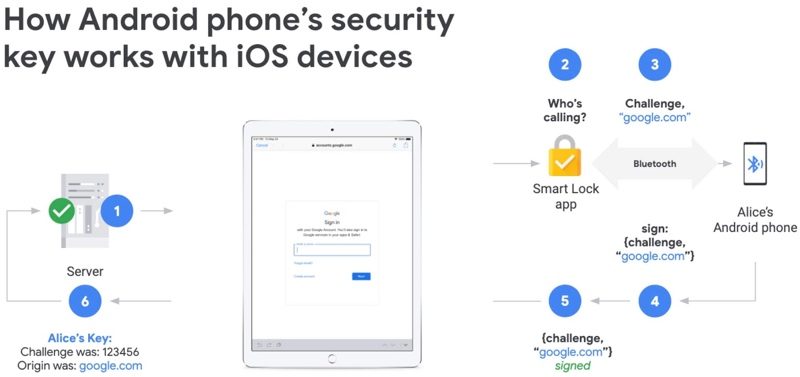
Risher's full interview with is available on The Verge website and is worth checking out, but Google today is also making its own privacy-focused feature announcement for iOS users - the ability to use an Android smartphone as a two-factor verification key for logging into Google accounts.

Starting today, iPhone and iPad users with an Android smartphone can use the Android security key feature to verify their logins to Google accounts from the Android device.


The feature utilizes Google's Smart Lock App as part of a two-step verification system designed to keep Google accounts safer. After the security key feature is added to an Android device, it can be set up to pair with the iPhone to confirm logins over Bluetooth.


This article, "Google Login Chief Lauds Apple Sign In as 'Better for the Internet,' Says Google's Sign In Feature Doesn't Collect Data Either" first appeared on MacRumors.com

Discuss this article in our forums


from MacRumors: Mac News and Rumors - All Stories http://bit.ly/2KM3GEO

How to fix 'iPhone is disabled. Connect to iTunes' errors

https://ift.tt/eA8V8J

If your iPhone says 'iPhone is disabled. Try again in 1 minute' or, worse, 'iPhone is disabled. Connect to iTunes', help is at hand. Here's how to fix those error messages and get your phone working again

from Latest iPhone Articles from Macworld UK http://bit.ly/2WFESVP

The Next iPhone XR Will Supposedly Have a Nearly 6% Larger Battery

http://bit.ly/2KgYGZ1

While the iPhone XR already has the longest battery life of any iPhone ever, a new supplier-focused report from Korean website The Elec claims that the 2019 version of the device will feature an even larger battery capacity.

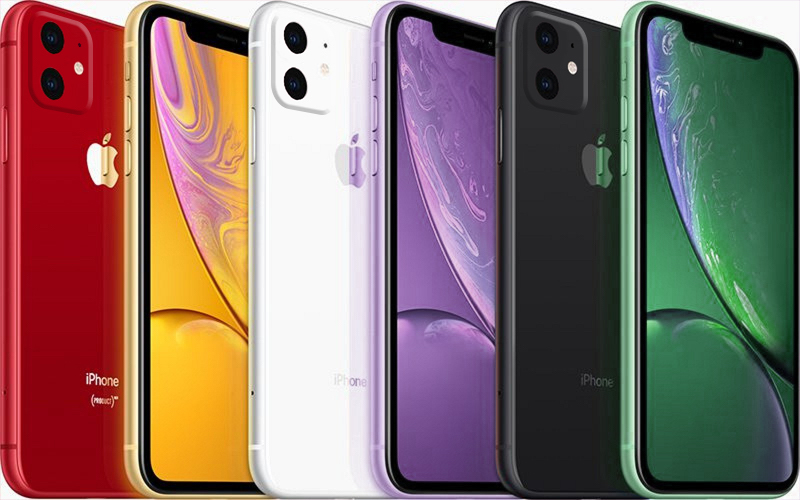
MacRumors mockup of 2019 iPhone XR in new green and lavender colors

The report claims the next iPhone XR will have a 3,110 mAh battery, around 5.7 percent larger than the 2,942 mAh battery in the current model:
China's ATL (Ameperx Technology Limited) has kicked off mass production of batteries for the successor to Apple's iPhone XR forecast to be unveiled later this year, according to those close to the matter on June 9. Battery packaging will be done by another Chinese firm, Huapu Technology.

The new batteries will have a capacity of 3110mAh, which is more than a 5% improvement from the 2942mAh of the iPhone XR.
That means the next iPhone XR's battery would still have slightly less capacity than the 3,174 mAh battery in the current iPhone XS Max, but the latter device consumes more power overall. Moreover, the next-generation iPhone XS Max is expected to gain a larger battery too.

Back in April, reputable analyst Ming-Chi Kuo said that battery capacities for the next iPhone XS, iPhone XS Max, and iPhone XR could increase by 20 to 25 percent, 10 to 15 percent, and up to five percent respectively to accomodate the rumored two-way wireless charging feature on all three devices.

Apple is widely expected to unveil its trio of 2019 iPhones in September as usual. The next iPhone XR is expected to be upgraded to a dual-lens rear camera system and is rumored to be available in new green and lavender colors.

Of note, The Elec is not a site with an established track record in relation to Apple rumors. Last month, the website claimed that Samsung is in talks with Apple about supplying OLED displays for a 16-inch MacBook Pro and future iPad Pro models. For now, treat these rumors with at least some skepticism.

Via: PhoneArena

Related Roundup: iPhone XR
Buyer's Guide: iPhone XR (Neutral)

This article, "The Next iPhone XR Will Supposedly Have a Nearly 6% Larger Battery" first appeared on MacRumors.com

Discuss this article in our forums


from MacRumors: Mac News and Rumors - All Stories http://bit.ly/2KlbcHl

Samsung Galaxy J7 Nxt, J7 Pro, J7 (2017) Get Android 9 Pie Update With One UI, Galaxy S9 Gets Camera Night Mode


via News – MySmartPrice http://bit.ly/2MJA0uj