Thursday, June 27, 2019

Google Maps for iOS Gains Live Traffic Info for Buses, Transit Crowdedness Predictions

https://ift.tt/2KGuCXe

Google today announced a major update for Google Maps on both Android and iOS, introducing new transit-related features.

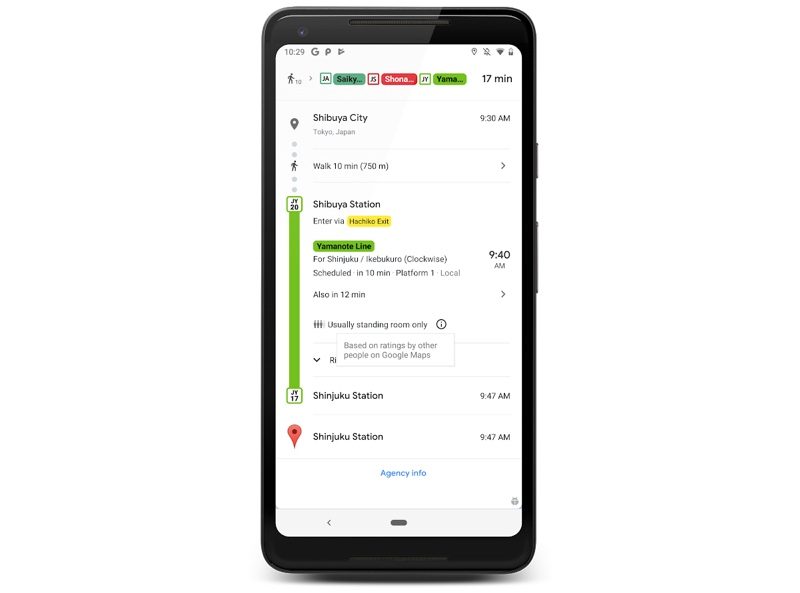
Google Maps will now provide details on live traffic delays for buses in places where real-time information doesn't exist from local transit agencies, which will let Maps users see if a bus will be late, how long the delay might be, and how long travel might take.


The app will provide details on exactly where delays are on the map so riders will know what to expect before getting on a bus.

Along with live traffic information for buses, Google is adding crowdedness predictions for transit routes. Based on past ride information, Google Maps will offer up details on how crowded a bus, train, or subway is likely to be.


The new Google Maps features are rolling out today on Android and iOS in close to 200 cities around the world.


This article, "Google Maps for iOS Gains Live Traffic Info for Buses, Transit Crowdedness Predictions" first appeared on MacRumors.com

Discuss this article in our forums


from MacRumors: Mac News and Rumors - All Stories https://ift.tt/2XDdwiX

Review: Ultimate Ears' Wonderboom 2 Speaker Offers Louder Sound, New Outdoor Mode and More

https://ift.tt/31Wyuc4

The Wonderboom is one of Ultimate Ears' most popular speakers due to its small size that doesn't compromise on sound, and earlier this month, Ultimate Ears launched the Wonderboom 2, an updated version of the Wonderboom with some new functionality.

Design wise, the Wonderboom 2 features the same general size and shape as the original Wonderboom, though it's a bit taller. Ultimate Ears says the design was kept the same because customers loved the look of the Wonderboom. The Wonderboom's small size, affordable price tag, and big sound have always made it my favorite speaker in the Ultimate Ears lineup, and now the Wonderboom 2 is a new favorite.


Ultimate Ears kept everything that was great about the Wonderboom in the Wonderboom 2, but added some useful new features like better weatherproofing, stereo sound capabilities when using two speakers, and better sound both indoors and out.

The Wonderboom 2 measures in at about four inches tall and about 3.75 inches wide, so it's just about palm-sized. There are big volume control buttons at the front (an Ultimate Ears signature look), a stretchy loop for hanging it up at the back, and a covered micro-USB port for charging purposes. Physical controls for playing/pausing music, activating features, and powering the speaker on and off are located at the top.


Ultimate Ears didn't change the size or the shape of the Wonderboom 2, but there are new colors and a new two-tone knit fabric that looks more premium than the fabric used for the Wonderboom. It comes in Deep Space Black, Crushed Ice, Radical Red, Bermuda Blue, and Just Peach, along with a gray and white camo edition that's available exclusively from Apple.


Like all Ultimate Ears speakers, the Wonderboom 2 was designed to deliver 360 degree sound thanks to its rounded design, and it delivers with impressively loud volume for its price point. Even with the volume cranked up, the sound is crisp and clear in the midrange with excellent bass for such a small speaker.


I'm no audiophile, but I've always appreciated the sound that the Ultimate Ears products are able to deliver, and the same goes for the Wonderboom 2. Ultimate Ears actually bumped up the bass in the new model thanks to upgraded internals, and compared to the Wonderboom, it stands out. Despite the bass boost, the sound is still well balanced overall. I don't think the Wonderboom 2's sound matches Ultimate Ears' more expensive speakers, but it's not too far off.


The Wonderboom 2 maxes out at 86 decibels in standard mode, but Ultimate Ears added a new Outdoor mode that boosts things even further. Outdoor Boost mode bumps the sound up to 87 decibels, and while it doesn't sound like a huge boost, it does make a difference when playing music outdoors. You can tell when the outdoor mode is activated when the little tree on the bottom is lit up.


Outdoor mode cuts down on the bass and plays the midrange louder since bass isn't effective outdoors anyway, and this shift works pretty well when you're in the backyard, out at the pool, at the beach, or anywhere else where there's a wide open area. You're not going to want to use the new Outdoor mode when inside, though, because it sounds terrible indoors.

The original Wonderboom was rated IPX7, and while the new Wonderboom is just as water resistant, it also has a new IP67 rating for dust. That makes it both water and dust resistant, so you can take it to the beach and other areas where sand or dust might be issues without worrying about ruining it.


I took the Wonderboom 2 in the shower and floated it in the sink and had no issues with the water resistance, which is what I'd expect as all of Ultimate Ears' products are meant to hold up to water.

The Wonderboom 2 has a few other neat tricks worth mentioning, including Double Up mode. This is standard in most Ultimate Ears speakers, but a new feature in the upgraded model lets you use two Wonderboom 2 speakers in stereo mode, which is a cool new addition.


Unfortunately, Double Up's stereo speaker mode is limited to the new Wonderboom 2 speakers, so while you can pair an original Wonderboom and a Wonderboom 2 to play the same sound, using them in stereo mode requires two of the new models. Double Up can be activated by pressing down on the top button of each Wonderboom 2 at the same time, no app required.


It's simple to get going and it sounds excellent, so it's a neat way to get stereo sound indoors or outdoors. By the way, once linked, if you turn on outdoor mode, it's activated on both speakers rather than just one.


Ultimate Ears also boosted up the battery in the Wonderboom 2 so it's able to last for 13 hours, which is basically all day battery life. That's up from 10 hours in the previous-generation Wonderboom.

Bottom Line


The Wonderboom 2 is a great little speaker that's perfect for both indoor and outdoor use. It's super portable, puts out impressive sound, and it's not too expensive at $100.

Compared to the original Wonderboom, this model is louder, has the Outdoor mode, three hour longer battery life, and the Double Up stereo mode, making it a solid upgrade overall.


I probably wouldn't shell out for a Wonderboom 2 if I already had a Wonderboom unless I wanted those specific features, but for someone looking for a small, versatile speaker that doesn't compromise on sound and can be used virtually anywhere, the Wonderboom 2 is worth considering.

If you don't need the Wonderboom 2's features, you can pick up an original Wonderboom from Amazon for right around $55, which is an excellent price.

How to Buy


The Wonderboom 2 can be purchased from the Ultimate Ears website or from Amazon.com for $99.99. The Apple-exclusive camo model will be available in July.

Note: Ultimate Ears provided MacRumors with two of the Wonderboom 2 speakers for the purpose of this review. No other compensation was received.


This article, "Review: Ultimate Ears' Wonderboom 2 Speaker Offers Louder Sound, New Outdoor Mode and More" first appeared on MacRumors.com

Discuss this article in our forums


from MacRumors: Mac News and Rumors - All Stories https://ift.tt/2KGYSkE
Apple Head of Security Engineering to Speak About iOS and Mac Security at 2019 Black Hat Event

https://ift.tt/2XaLAU9

Apple's Head of Security Engineering and Architecture Ivan Krstić will be attending the Black Hat 2019 event where he will give a "Behind the Scenes" look at iOS and macOS security.

Black Hat is an annual event that's designed for the global InfoSec community, providing security professionals with a place to meet up and gain training on new techniques.


According to the webpage for the upcoming event, Krstić will be covering "several key technologies" new to iOS 13 and the Mac, including Pointer Authentication Codes in Apple's latest iPhone chips, the T2 security chip in Macs, and the cryptography behind the Find My feature in iOS 13 and macOS Catalina.
Code integrity enforcement has long been a critical part of the iOS security architecture. Starting with iPhone 7, we began to fortify core pieces of this security mechanism with new features built directly into Apple silicon. We will delve into the history of code and memory integrity technologies in the iOS kernel and userland, culminating in Pointer Authentication Codes (PAC) in the Apple A12 Bionic and S4 chips. PAC prohibits modification of function pointers, return addresses and certain data, preventing traditional exploitation of memory corruption bugs. We will take a close look at how PAC is implemented, including improvements in iOS 13. We will also discuss previously-undisclosed VM permission and page protection technologies that are part of our overall iOS code integrity architecture.

The T2 Security Chip brought powerful secure boot capabilities to the Mac. Comprehensively securing the boot process required protections against sophisticated direct memory access (DMA) attacks at every point, even in the presence of arbitrary Option ROM firmware. We will walk through the boot sequence of a Mac with the T2 Security Chip and explain key attacks and defenses at each step, including two industry-first firmware security technologies that have not been publicly discussed before.

The Find My feature in iOS 13 and macOS Catalina enables users to receive help from other nearby Apple devices in finding their lost Macs, while rigorously protecting the privacy of all participants. We will discuss our efficient elliptic curve key diversification system that derives short non-linkable public keys from a user's keypair, and allows users to find their offline devices without divulging sensitive information to Apple.
The 2019 Black Hat event will take place from August 3 to August 8 at the Mandalay Bay resort in Las Vegas, Nevada. Krstić has hosted similar talks in the past, including a look at new features in iOS 10 back in 2016.


This article, "Apple Head of Security Engineering to Speak About iOS and Mac Security at 2019 Black Hat Event" first appeared on MacRumors.com

Discuss this article in our forums


from MacRumors: Mac News and Rumors - All Stories https://ift.tt/320cgpg

Mophie Juice Pack Air Battery Cases for iPhone XS and XS Max Now Available From Amazon for $100

https://ift.tt/2RG5ikB

As part of a promotion for Amazon's upcoming Prime Day, the site is now offering exclusive Prime member access to Mophie's new Juice Pack Air Battery Pack Cases designed for the iPhone X, XS, and XS Max.

The Juice Pack Air battery cases for Apple's newest iPhones are similar to the Juice Pack Air battery case for the iPhone X that Mophie released back in November. Mophie's battery cases are designed to provide extra battery life for Apple's newest iPhones and are offered as an alternative to Apple's own Smart Battery Cases.


Priced at $99.95 for both the iPhone XS and the iPhone XS Max versions, the new Juice Pack Air cases are able to charge using a Qi-based wireless charger or a Lightning cable, a first for the Mophie battery case line.


Mophie says that the Juice Pack Air was designed to be slim and lightweight, but as it is a battery case, it does add a decent amount of bulk to Apple's thin and light iPhones. An LED light at the back lets you know charge level, as this case is not able to integrate with the iPhone in the same way as the Apple-designed cases.


Both versions of the case come equipped with 1,720mAh batteries inside, which Mophie claims will extend the iPhone's battery life to a total of 34 hours, which is presumably talk time. That's similar to what Apple promises from the Smart Battery Cases.

Amazon is offering up the Juice Pack Air cases in graphite, black, red, and rose gold, and only Amazon Prime members are able to make a purchase at this time.

Tag: Mophie

This article, "Mophie Juice Pack Air Battery Cases for iPhone XS and XS Max Now Available From Amazon for $100" first appeared on MacRumors.com

Discuss this article in our forums


from MacRumors: Mac News and Rumors - All Stories https://ift.tt/2JnDT3t

2015 15" MacBook Pro Recall Applies to About 432,000 Units, Apple Received 26 Reports of Batteries Overheating

https://ift.tt/2KK1f6i

Last week, Apple launched a worldwide recall and replacement program for select 2015 15-inch MacBook Pro units, sold primarily between September 2015 and February 2017, due to batteries that "may overheat and pose a fire safety risk." Apple will replace affected batteries free of charge.


The U.S. Consumer Product Safety Commission or CPSC has since indicated that Apple has received 26 reports of batteries overheating in affected notebooks, including five reports of minor burns and one report of smoke inhalation, as well as 17 reports of minor damage to nearby personal property.

About 432,000 potentially affected MacBook Pro units were sold in the United States, plus 26,000 in Canada, according to the CPSC. As of June 4, 2019, Apple has received one report of a consumer incident and no reports of injuries in Canada.

Apple has asked customers to stop using affected MacBook Pro models and to contact the company to initiate a replacement. Read here for more details.

Related Roundup: MacBook Pro
Tag: recall
Buyer's Guide: MacBook Pro (Buy Now)

This article, "2015 15" MacBook Pro Recall Applies to About 432,000 Units, Apple Received 26 Reports of Batteries Overheating" first appeared on MacRumors.com

Discuss this article in our forums


from MacRumors: Mac News and Rumors - All Stories https://ift.tt/2IRZO3C

Prime Day Is Coming: How To Find The Best Deals


via Chrome Unboxed – The Latest Chrome OS News https://ift.tt/2KHTYnm

Chrome OS 75 Rolls Out, New Features and Fixes in Tow


via Chrome Unboxed – The Latest Chrome OS News https://ift.tt/2RyPXlO