Thursday, February 6, 2020

iOS 13.4 Beta Reveals 'CarKey' Feature That Would Turn Your iPhone or Apple Watch Into a Car Key

https://ift.tt/382qIQw

Apple yesterday seeded the first beta of iOS 13.4 with several new features, such as iCloud folder sharing, new Memoji stickers, and a redesigned Mail toolbar. While not mentioned in the release notes, the update also includes early signs of an interesting feature that would turn an iPhone or Apple Watch into a car key.

As first reported by 9to5Mac, and confirmed by MacRumors contributor Steve Moser, the iOS 13.4 beta contains strings of code that reference an unreleased "CarKey" framework that would enable an iPhone or Apple Watch to lock or unlock compatible vehicles and start the engine to drive.
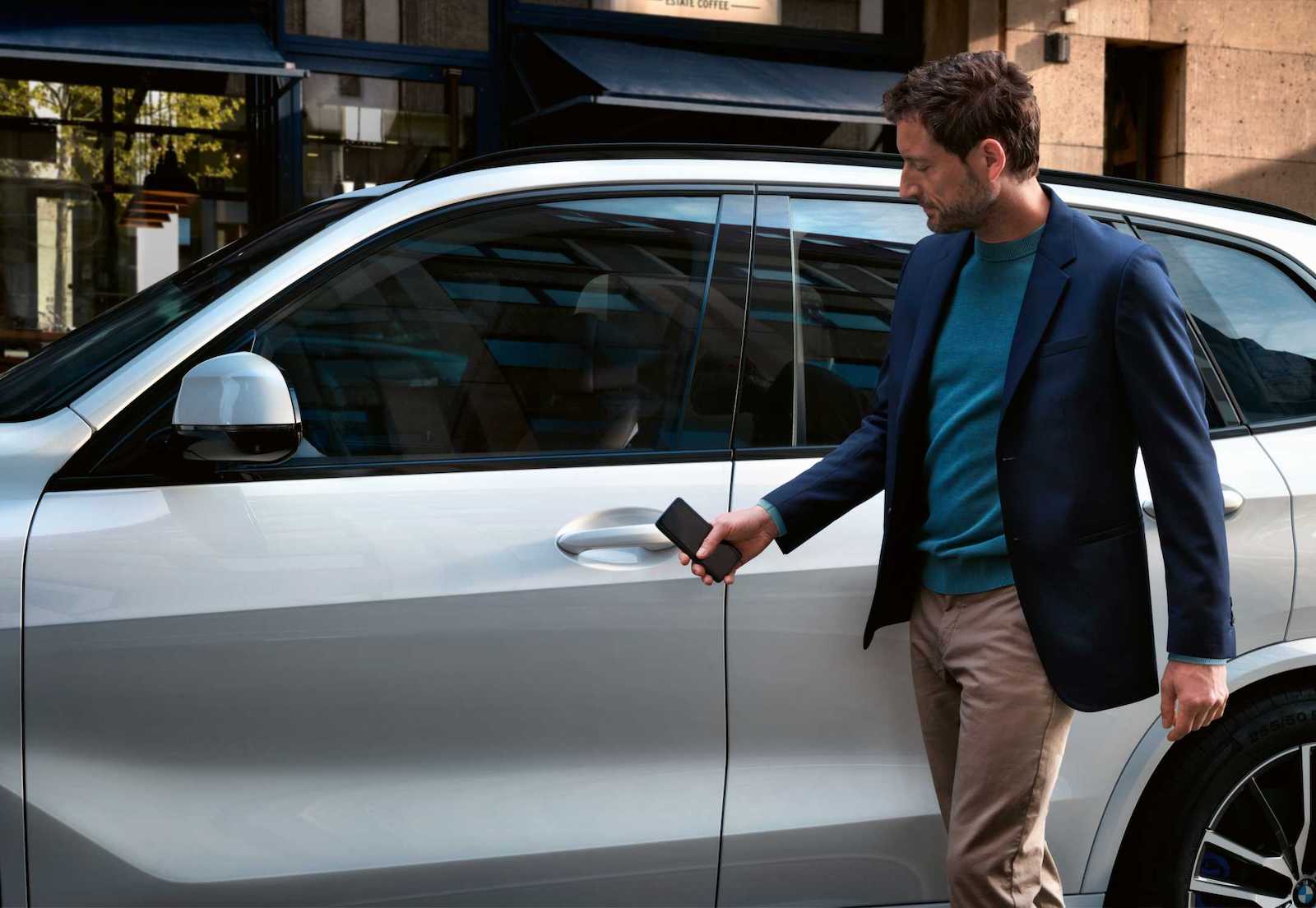

The code indicates that "CarKey" would essentially be a digital car key stored in the Wallet app. This would allow you to approach your vehicle, hold your iPhone or Apple Watch near an NFC reader in the vehicle, authenticate with Face ID, and have the vehicle unlock automatically. Similar to Apple Pay for transit, Express Mode would be an option, eliminating the need to authenticate.
To use CarKey, hold iPhone or Apple Watch to reader. It will work automatically, without requiring Face ID. You can change express mode settings in Wallet.
To set up CarKey, you will need to place your iPhone on top of the NFC reader in your vehicle, according to the strings. Apple says the process may take several minutes to complete. Then, you will need to enter a pairing code provided by your local dealership, or connect using your vehicle brand's app.
Place this iPhone on top of the NFC reader in your car. Pairing process may take several minutes, do not remove it from the reader until pairing is done.
Enter the CarKey code provided by your car dealer or connect using the [Vehicle Brand's] app.
Conveniently, it will be possible to share a CarKey with others, giving them full or restricted unlocking and driving capabilities.
[Vehicle Owner] invited you to use their [Vehicle Model] with unlock & drive access. This allows you to use your iPhone and Apple Watch to unlock/lock the car, start the engine and drive.
Apple would be partnering with automakers on this initiative, suggesting that CarKey could become a factory-installed option like CarPlay. The feature would require an NFC-enabled vehicle, so it would likely be limited to newer models. It is unclear when CarKey may begin rolling out, but perhaps it is planned for the public release of iOS 13.4 within the next few months.

Notably, Apple is a member of the Car Connectivity Consortium, or CCC, which recently announced a new NFC-based Digital Key 2.0 specification that it said would be made available by the end of 2019. The CCC said this specification establishes a secure connection between mobile devices and vehicles using NFC, which continues to operate even when a compatible device's battery is low.

Next, the consortium is developing a Digital Key 3.0 specification based on both Bluetooth LE and Ultra Wideband to enable passive, location-aware keyless access. This would allow you to leave your iPhone in your pocket or backpack when accessing or starting your vehicle. Apple added Ultra Wideband support to its iPhone 11 lineup and promised it would lead to "amazing new capabilities."

The above evidence coupled with related patents is quite compelling evidence that Apple has big plans for digital car keys.

Related Roundups: iOS 13, iPadOS

This article, "iOS 13.4 Beta Reveals 'CarKey' Feature That Would Turn Your iPhone or Apple Watch Into a Car Key" first appeared on MacRumors.com

Discuss this article in our forums


from MacRumors: Mac News and Rumors - All Stories https://ift.tt/36ZZqZL

Chrome 80 arrives for Android and desktop: Check out what’s new


via Chrome Unboxed – The Latest Chrome OS News https://ift.tt/2H2alHO

Samsung Galaxy M31 Specifications Leaked; 6000mAh Battery, 64MP Camera and More in Tow


via News – MySmartPrice https://ift.tt/2S1SRkY

The best waterproof iPhone cases

https://ift.tt/eA8V8J

Since the iPhone 7, all Apple smartphones have been water-resistant, with the latest models supporting the IP68 standard. But what if you have an older model, or want to spend extended periods in deep water? These cases should do the trick.

from Latest iPhone Articles from Macworld UK https://ift.tt/2FBP45a

Latest Twitter for iPad Update Adds Option to Disable Multi-Column View

https://ift.tt/2OytbdI

Twitter has updated its official iPad app, introducing a change to the main interface that many users will welcome.

Twitter for ‌iPad‌ with multi-column view disabled (right)

The last major update to Twitter for ‌iPad‌ attempted to make better use of the iOS device's larger screen by introducing a multi-column view that placed the timeline on the left and the search bar with trending topics on the right.

That's become an optional layout in the latest update, and users can now hide the right-hand column altogether so that their attention is centered on the content of their timeline.

The new layout option can be activated in the Twitter app by going to "Settings and privacy" then toggling the "Show search column" switch under the "Display and sound" preferences.

Turning off the right-hand column does revert Twitter on ‌iPad‌ back to the same interface as on the iPhone, which means you're presented with a single timeline with two big unused spaces on either side of it.

Most users will agree that it's not an ideal use of screen space by any means, but at least the option now exists to turn off trending content if you find it distracting.

Version 8.7.1 of the Twitter for iOS app rolls out today, and also includes a fix for a bug that meant polls wouldn't appear for users on ‌iPhone‌.

Tag: Twitter

This article, "Latest Twitter for iPad Update Adds Option to Disable Multi-Column View" first appeared on MacRumors.com

Discuss this article in our forums


from MacRumors: Mac News and Rumors - All Stories https://ift.tt/2UyvHnZ

Redmi 9A with Dual Rear Cameras, 5000mAh Battery Launching in India on February 11


via News – MySmartPrice https://ift.tt/2vNUnOW

Google Maps Gains New Navigation System, Crowd-Sourced Transit Info, and More

https://ift.tt/2Sqjmzp

This week marks 15 years since Google Maps first launched, and Google is celebrating with some notable new features and updates for the mapping service app on iOS and Android.

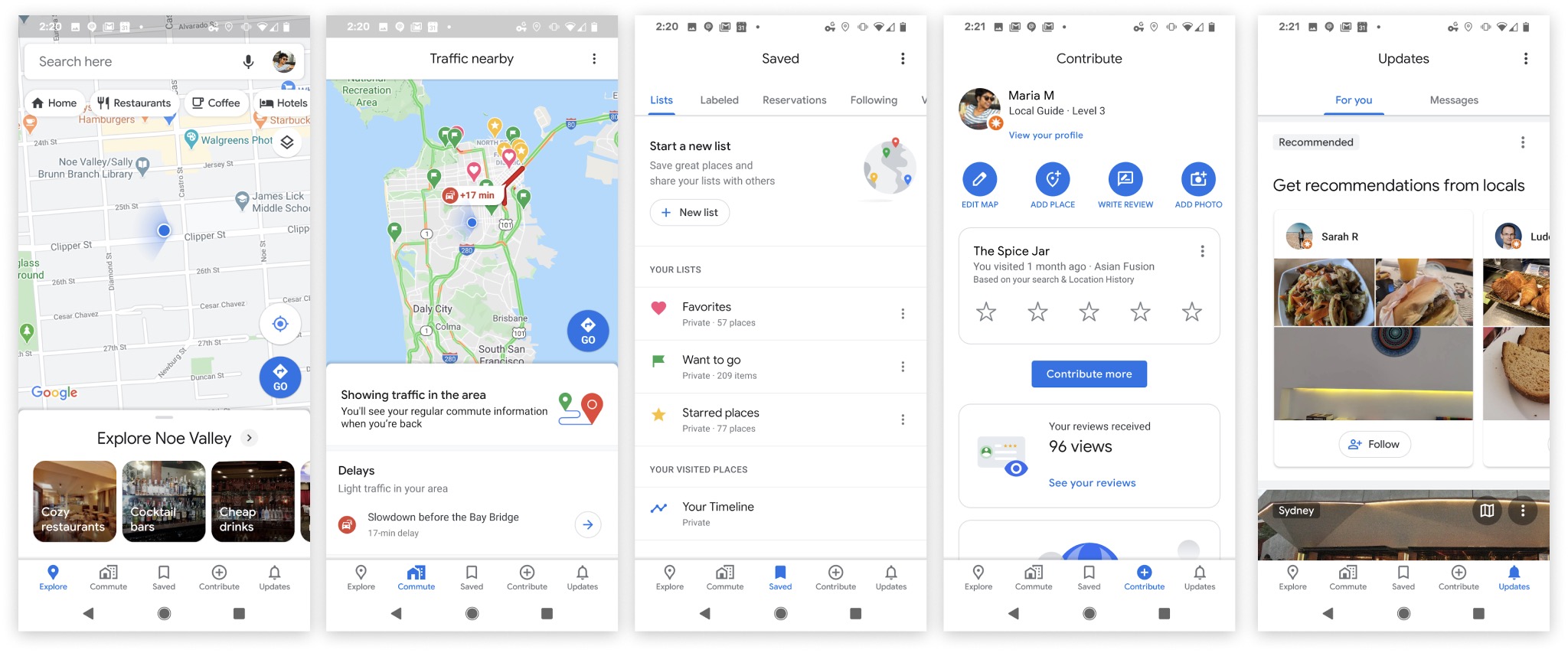
The five tabs on the new Google Maps navigation screen

Starting today, the Google Maps will feature a new navigation system across the bottom of the interface including five icons, two of which are completely new: Saved, which is home to all the lists and locations you've bookmarked, and Contribute, which prompts you to add photos and reviews to places you may have visited.

The change means Google has gotten rid of the side-loading menu that was previously accessible from the search bar.

In the transit directions screen, Google has also brought in some new features crowdsourced from Maps users. These can include details shared by other passengers, like how crowded it is, how hot/cold it is, accessibility, women's-only carriages, the presence of security onboard, and how many cars a train is pulling.

There are also some notable changes to the AR-powered Live View that Google launched last year. The big blue directional arrows showing you where you're going have become optional, and Live View can now drop a big red pin on your destination and tell you how far away you are from it instead.

Lastly, the Google Maps app has a new icon – it's a four-color take on the location pin that the mapping service has used for years.

The new-look Google Maps update should be rolling out to iOS and Android users today, with the exception of the Live View changes that Google says are coming soon. Google Maps can be downloaded from the App Store for free. [Direct Link]


This article, "Google Maps Gains New Navigation System, Crowd-Sourced Transit Info, and More" first appeared on MacRumors.com

Discuss this article in our forums


from MacRumors: Mac News and Rumors - All Stories https://ift.tt/3bihf9K