via News – MySmartPrice https://ift.tt/3bHxey3
Saturday, February 15, 2020
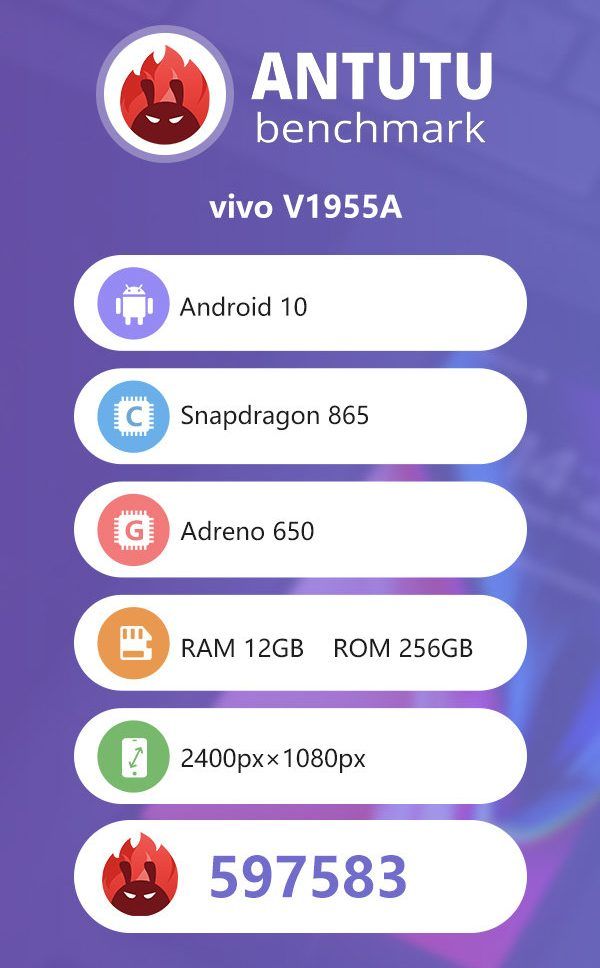
iQOO 3 5G Beats Realme X50 Pro and Mi 10 in AnTuTu Benchmark Score, Key Specifications Revealed

via News – MySmartPrice https://ift.tt/38u27nX
Samsung Galaxy S20, S20 Plus, S20 Ultra Preorders to Begin Today at 12PM: Price in India, Specifications

via News – MySmartPrice https://ift.tt/2uMOEZI
Friday, February 14, 2020
The Chrome Cast 48: Google, Microsoft, Apple and the benefits of cloud computing

via Chrome Unboxed – The Latest Chrome OS News https://ift.tt/2HrnUAJ
Review: Infiniti Joins the CarPlay Club With the 2020 QX50
https://ift.tt/3bCPokx
Apple touts that there are now over 500 car models supporting CarPlay, and Nissan's luxury brand Infiniti is one of the most recent (and perhaps the last significant brand in the U.S. other than Tesla) to add the feature with the 2020 Q50 and Q60 sedans, QX50 crossover, and QX80 SUV.
I've had an opportunity to spend some time with a 2020 Infiniti QX50 and check out how the updated InTouch infotainment system and CarPlay work with the dual screens dominating the center of the dashboard, and I've come away fairly impressed with the performance and ease of use.

The 2020 QX50 comes in five trim levels starting at $37,250 for the base Pure trim and topping out at a little over $60,000 for a fully loaded Autograph trim. All trims are available with either front-wheel drive or all-wheel drive, with the latter costing an extra $2,000. CarPlay and Android Auto are standard on all trims, and dual center touchscreens with an 8-inch display on top and a 7-inch display on the bottom are uniform throughout the lineup.
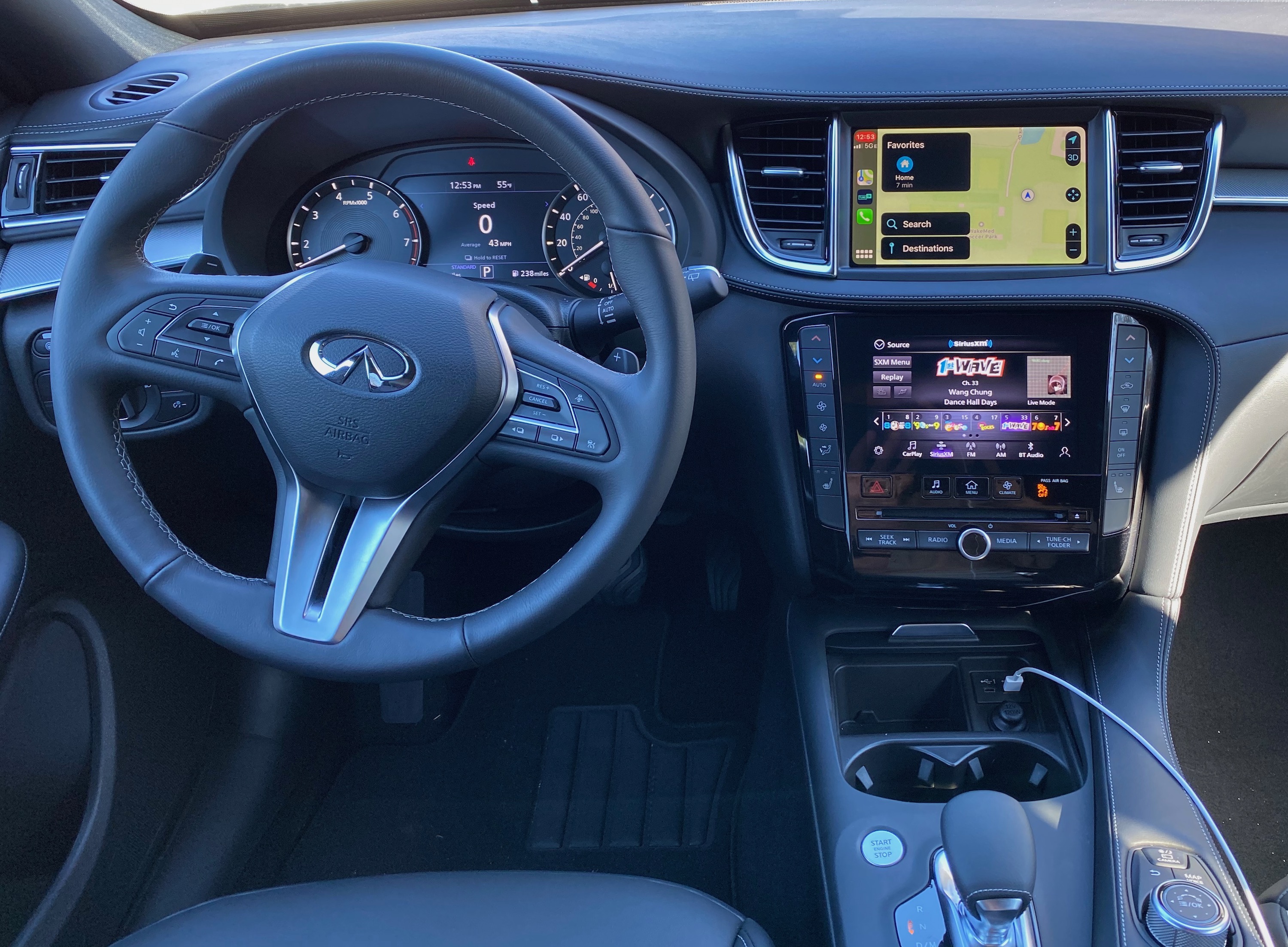
My test vehicle was an all-wheel drive Essential trim, which is the middle of the five available trims, and it came with a $1,200 "Edition 30" appearance package that also bundles in the ProASSIST features such as distance control, intelligent control, blind spot monitoring, lane departure prevention, and adaptive front lighting. Toss in upgraded Majestic White paint and some welcome lighting and cargo packages, and my tester checked in at just under $50,000.
Infiniti is certainly not the only manufacturer to pursue a dual-display infotainment solution, and I've had some previous experience with such a system in the Audi A7. Part of what sets Infiniti apart here, however, is that hardware buttons were thankfully not sacrificed in favor of all-screen controls. The lower screen of the InTouch system is surrounded by hardware controls, including climate controls along the left and right sides and some hardware audio buttons and a knob along the bottom just below the CD drive.
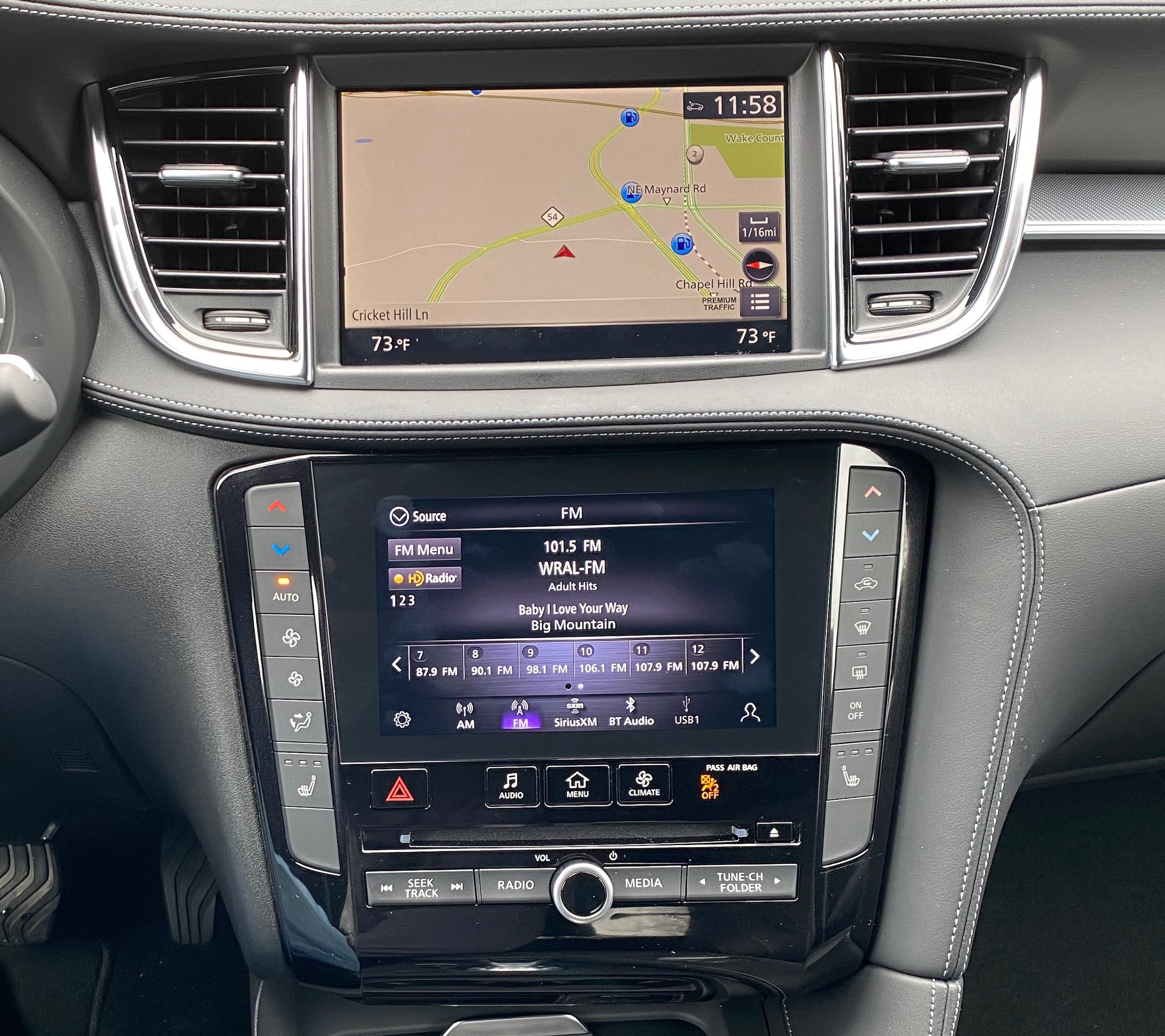
Infiniti's dual-screen InTouch infotainment system
There are also some quick-access hardware buttons for jumping between the main InTouch home screen, the audio screen, and the climate screen where only a few digital adjustments like manual fan speed can be made, but almost all of these are also accessible through the hardware buttons on either side of the screen. Add in the usual bevy of steering wheel controls, and you can accomplish a heck of a lot just by feel, which is fantastic.
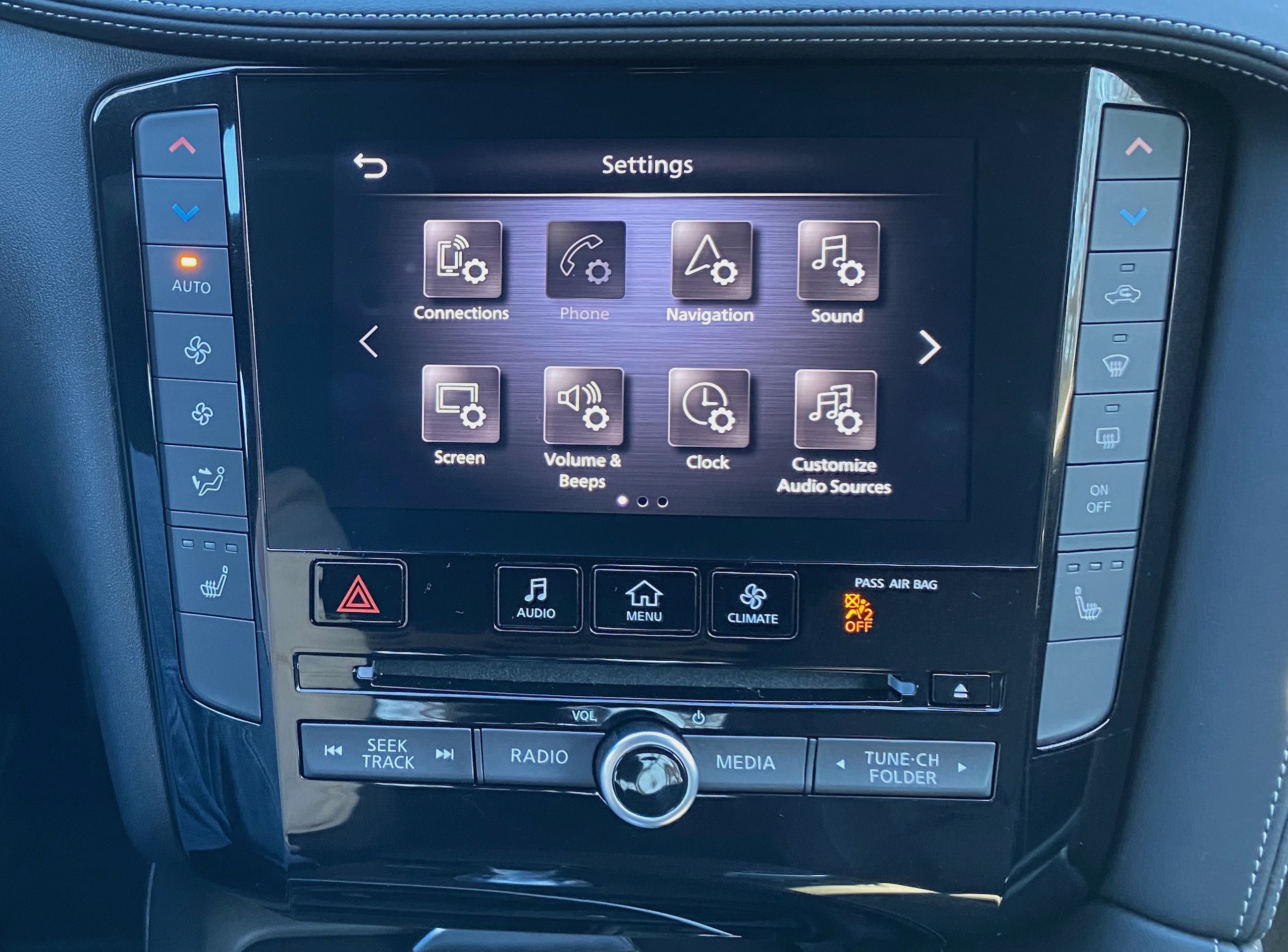
Settings screen typical of high-level menus
The upper screen is largely dedicated to the built-in navigation that's standard on Essential and higher trims and optional on the second-level Luxe trim, and this is also where CarPlay shows up. Even here, Infiniti provides options for interacting with the content, supporting both touch directly on the screen and indirect control via a knob and a few buttons on the center console. I generally prefer using touch or voice for interacting with CarPlay and built-in navigation systems, but it's nice to have another indirect method available for quick adjustment or for those who prefer it on a more regular basis.
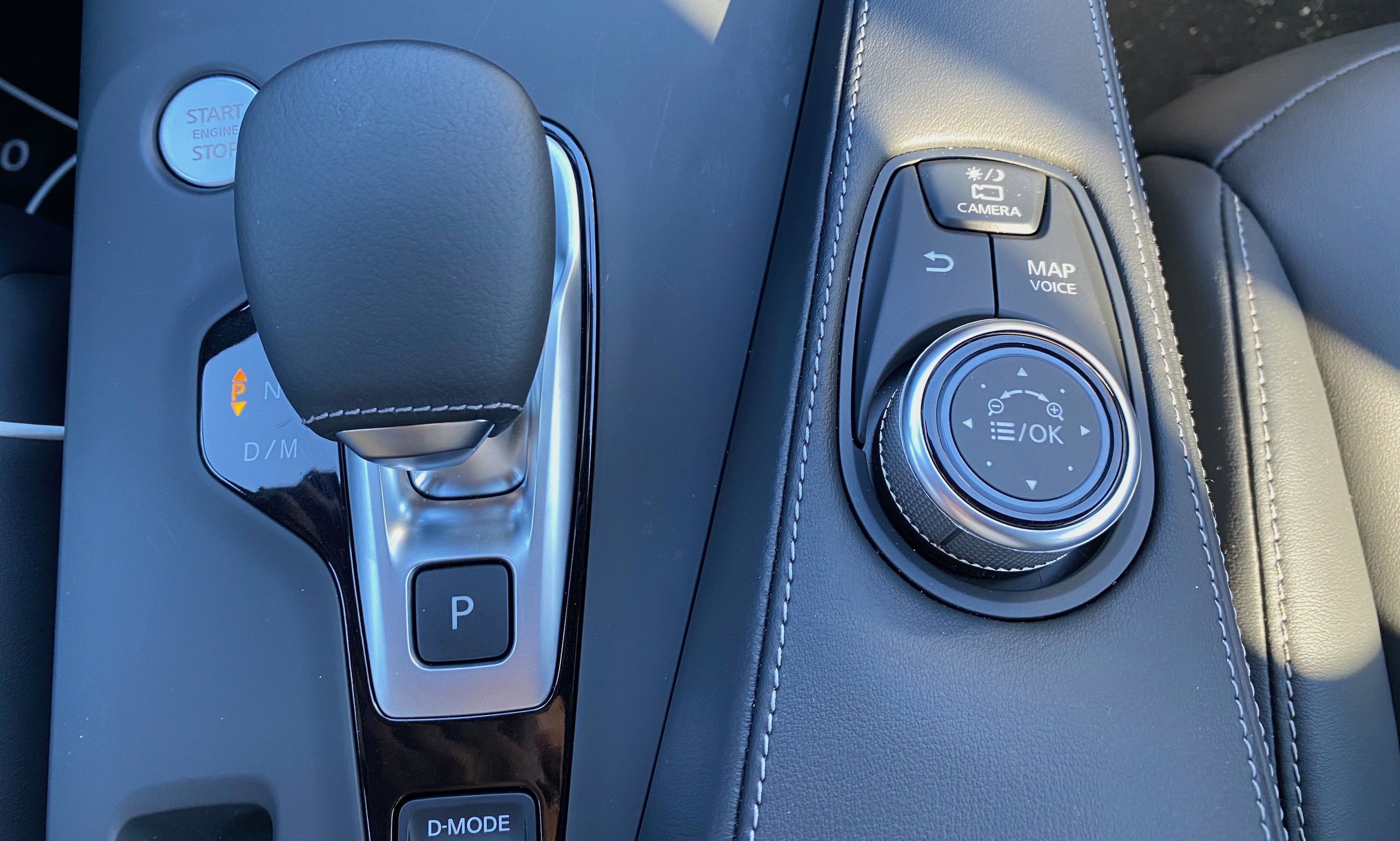
Infotainment control knob next to gearshift offers quick access buttons for map, camera, and back functions, plus twist-to-scroll and select for navigating the system
Infiniti's InTouch software bears some distinct similarities to the NissanConnect infotainment system of the brand's parent company, which I previously looked at in the Leaf and Altima, but it's been augmented with some higher-end features and of course optimized for the dual-display setup.
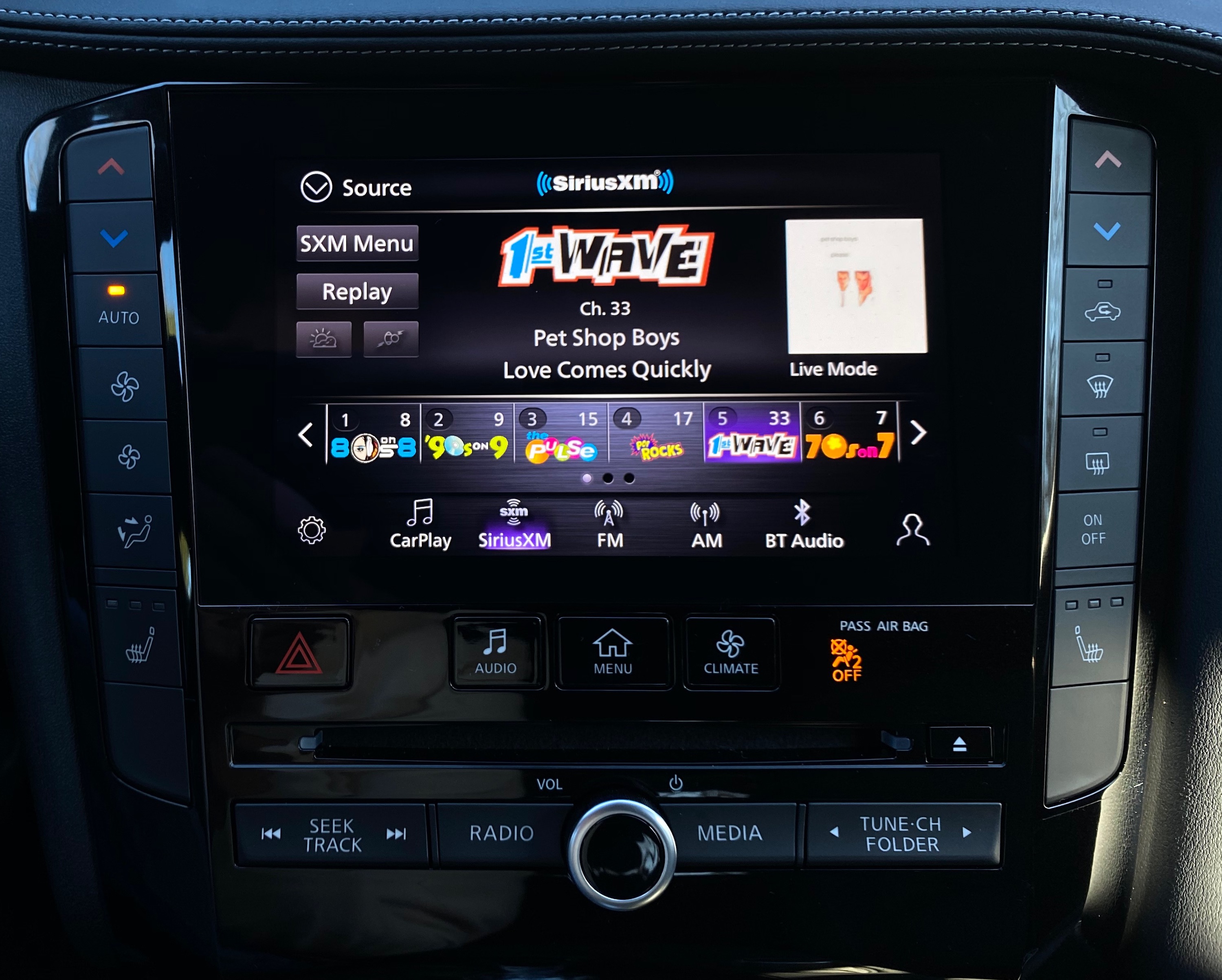
InTouch audio app shares a lot of similarities with NissanConnect
The audio setup is very similar to the NissanConnect system I've used in other vehicles, with a relatively straightforward layout and a customizable bottom menu bar to set up and quickly access your preferred audio sources. SiriusXM content in particular looks good with colorful channel logos and album art visible on the screen. The interface for terrestrial radio stations is a bit simpler, but still offers a clean look with station and song information when available and support for HD radio.
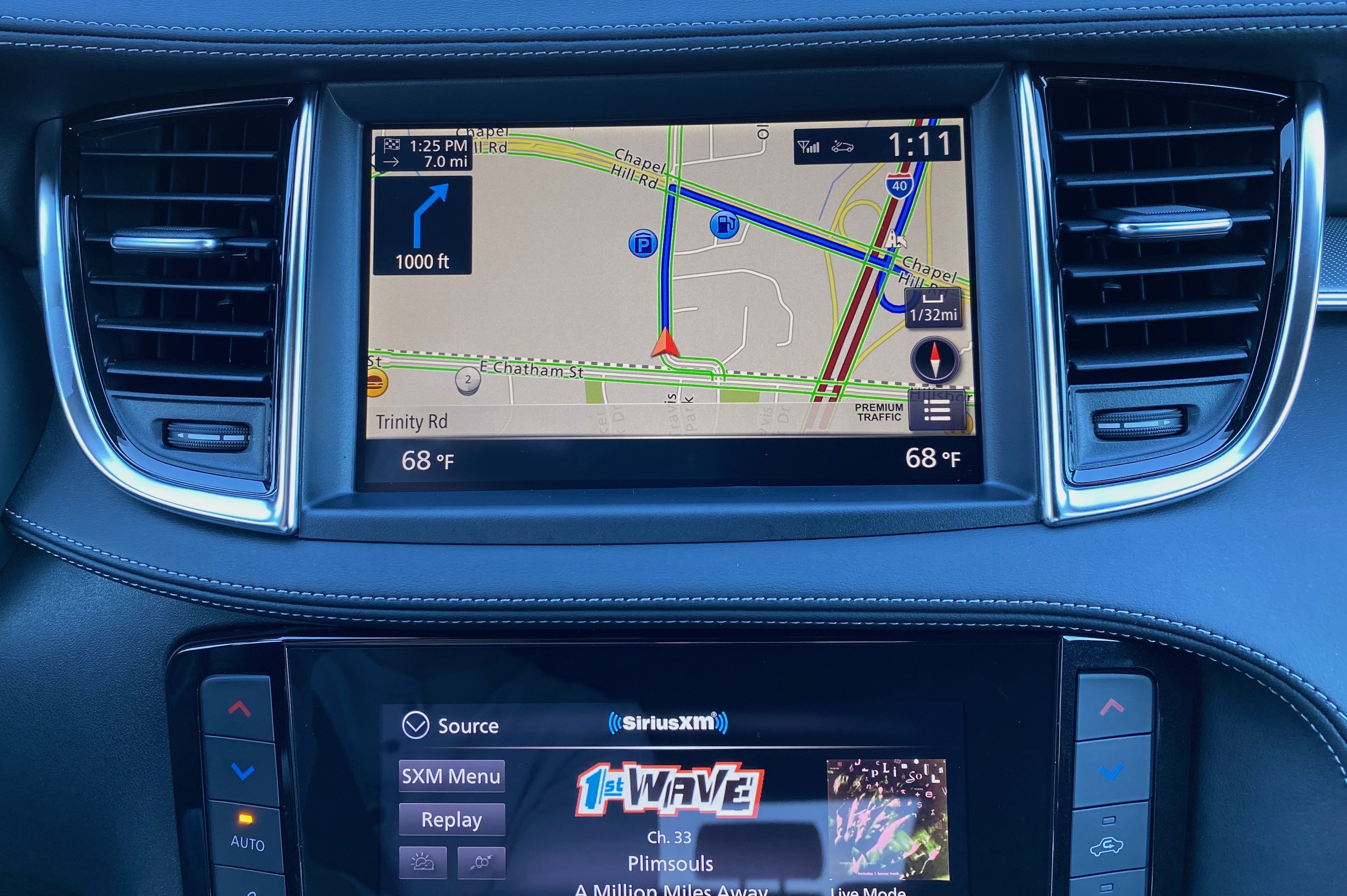
Embedded navigation route guidance
The onboard navigation works well with 3D city views, lane guidance, exit signs, and a variety of available views to customize the navigation experience, although the overall look could stand to see some modernization. There's support for street and satellite views, real-time traffic, and Destinations by Google, which offers an improved POI search experience compared to the embedded system's database. Over-the-air map updates are also available. The overall look of the maps isn't as modern as what you see with Apple or Google Maps, for example, but functionally it's a pretty solid system. Of course, with CarPlay and Android Auto, you may not even want to use the onboard navigation, but it's there if you want or need it.
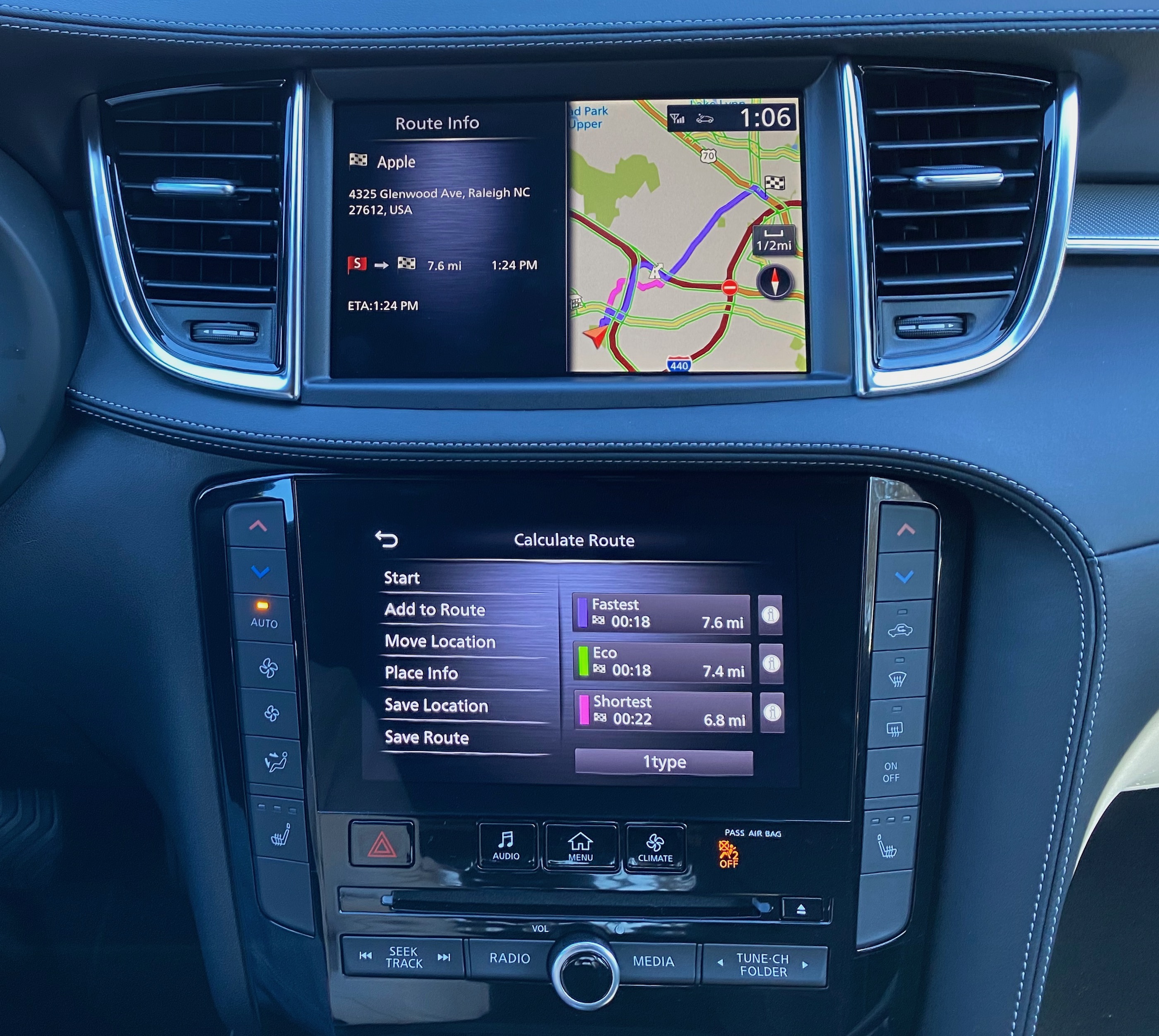
Embedded navigation route selection and overview showing the two displays working together
In addition to the dual displays in the center stack, there's also a digital display for the driver between a pair of analog gauges. The display offers a number of different views including speed, audio information, navigation, ProPILOT Assist driver assistance features, and more, so that can serve to augment the at-a-glance availability of information from the various vehicle systems. A head-up display is also available standard on the top-end Autograph trim and as part of a package option on the step-down Sensory trim.
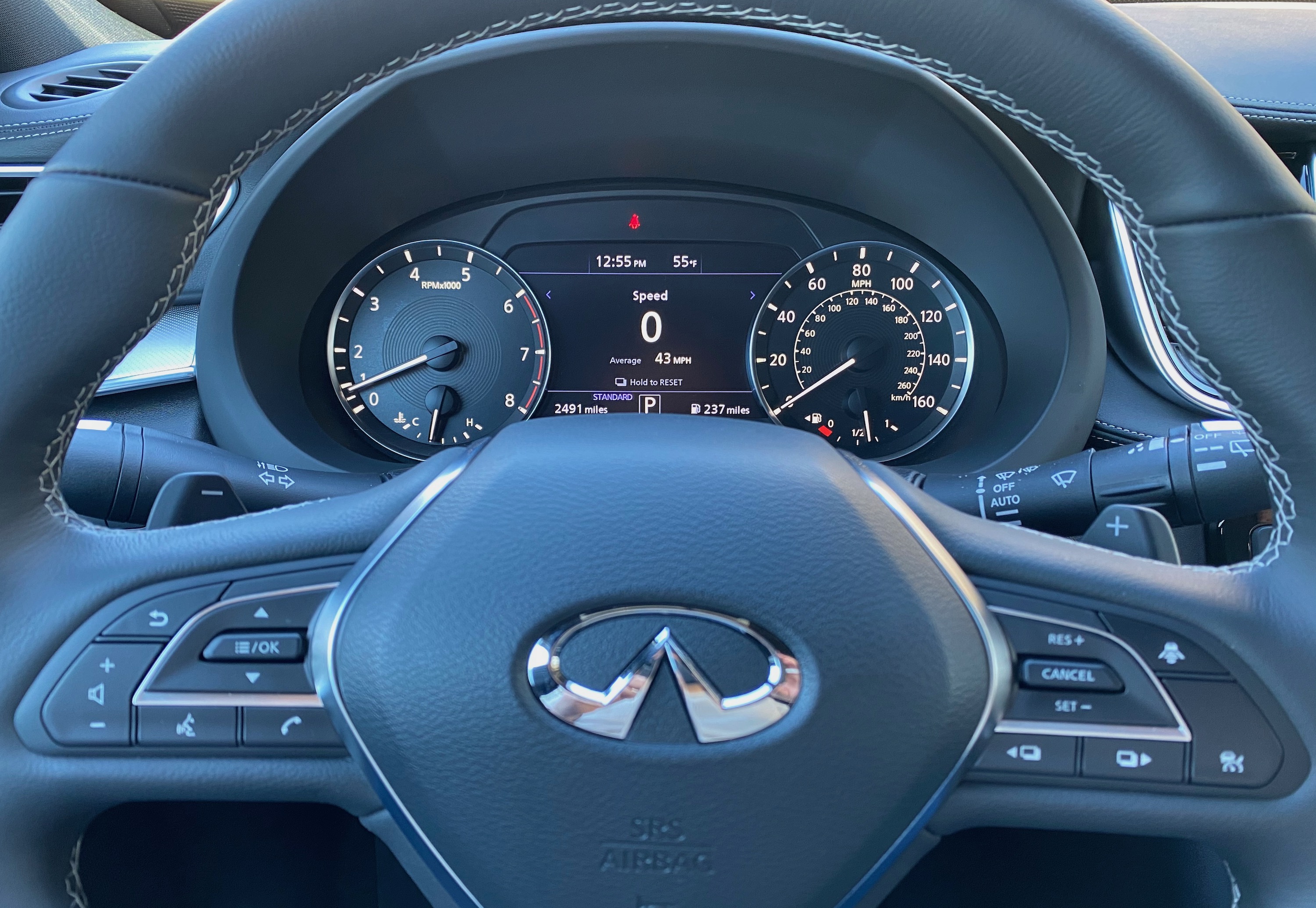
Customizable digital driver display in center, and dedicated Siri/voice control button at bottom of left steering wheel button cluster
The QX50 includes the usual array of steering wheel controls for accessing functions like volume, cruise control, phone calls, and more, and the dedicated voice control button serves dual duty with a short press activating the InTouch voice system and a long press bringing up Siri for either Siri Eyes Free or CarPlay.
CarPlay on the 2020 QX50 does require a wired connection, which is a little unfortunate at a time when more and more luxury brands including Audi, BMW, and Porsche are supporting wireless CarPlay and it's on the verge of rolling out to more mainstream brands from the likes of Ford, GM, and Fiat Chrysler. Infiniti does tell me that wireless CarPlay is coming in the "near future," but it would have been nice to see it from the very start.
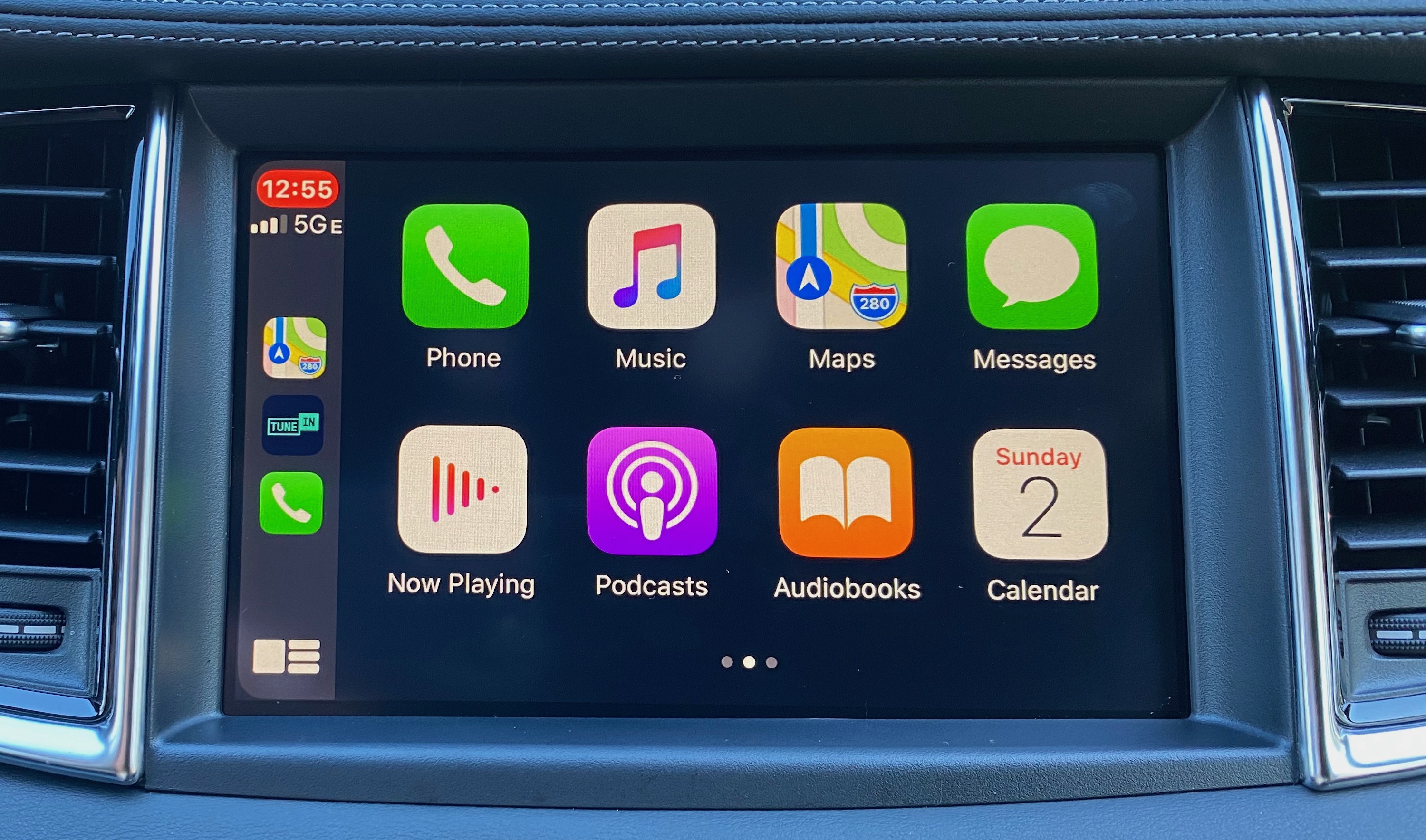
CarPlay home screen
Setting the lack of wireless support aside, CarPlay works quite well on the dual-screen InTouch system, and it's great being able to dedicate the top display to CarPlay while native functions like audio and other features remain fully visible and accessible on the lower display. The 8-inch top screen provides ample room for the CarPlay interface, and everything looks big and bright sitting fairly high on the dashboard so it's not too far out of the driver's line of sight.
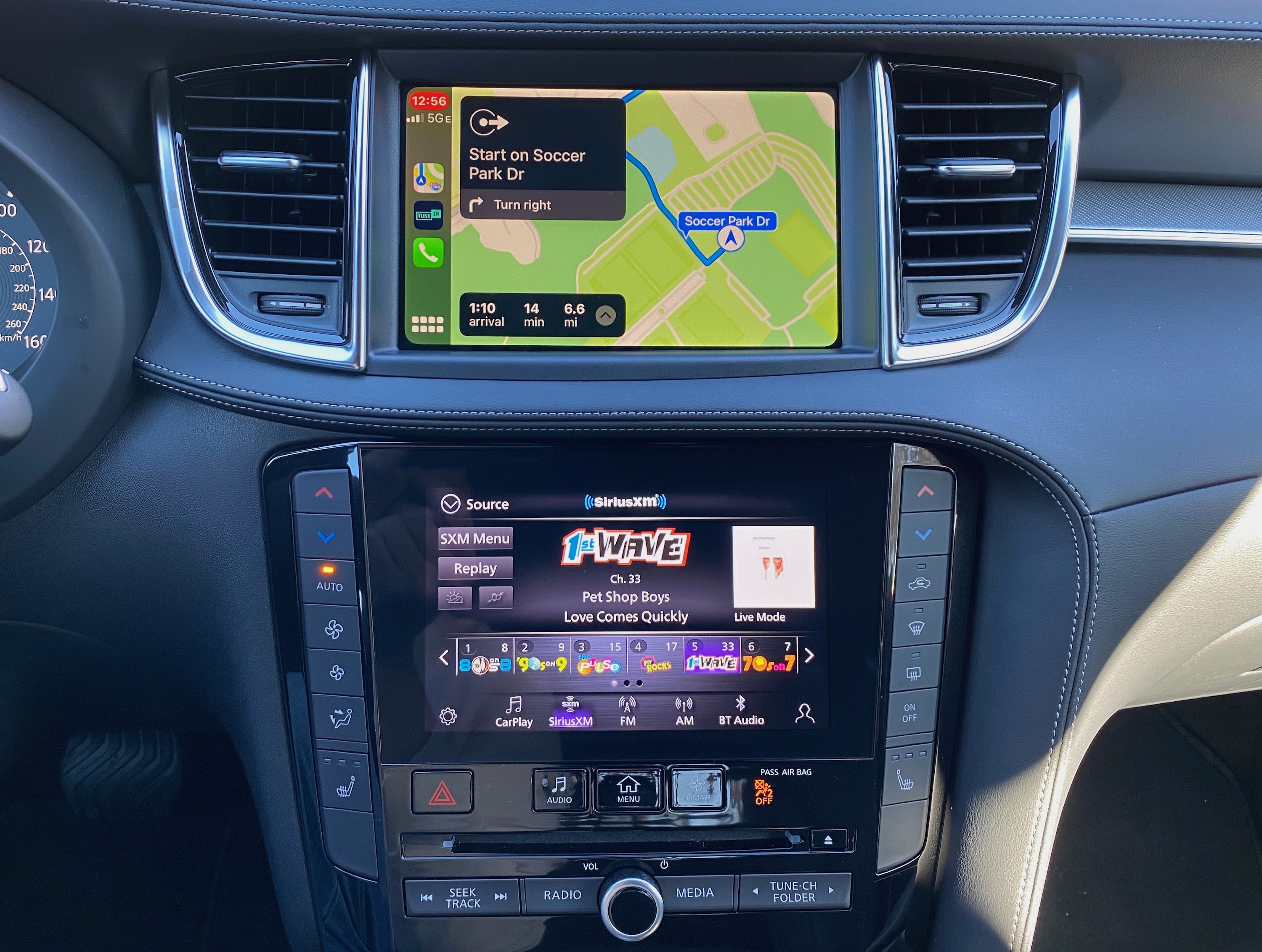
Dual-screen setup gives full access to CarPlay maps on top and native audio on bottom
I had no problems reaching all parts of the screen to manipulate CarPlay by touch, or you can use the control knob on the center console to scroll through the various interface elements and select the one you want.
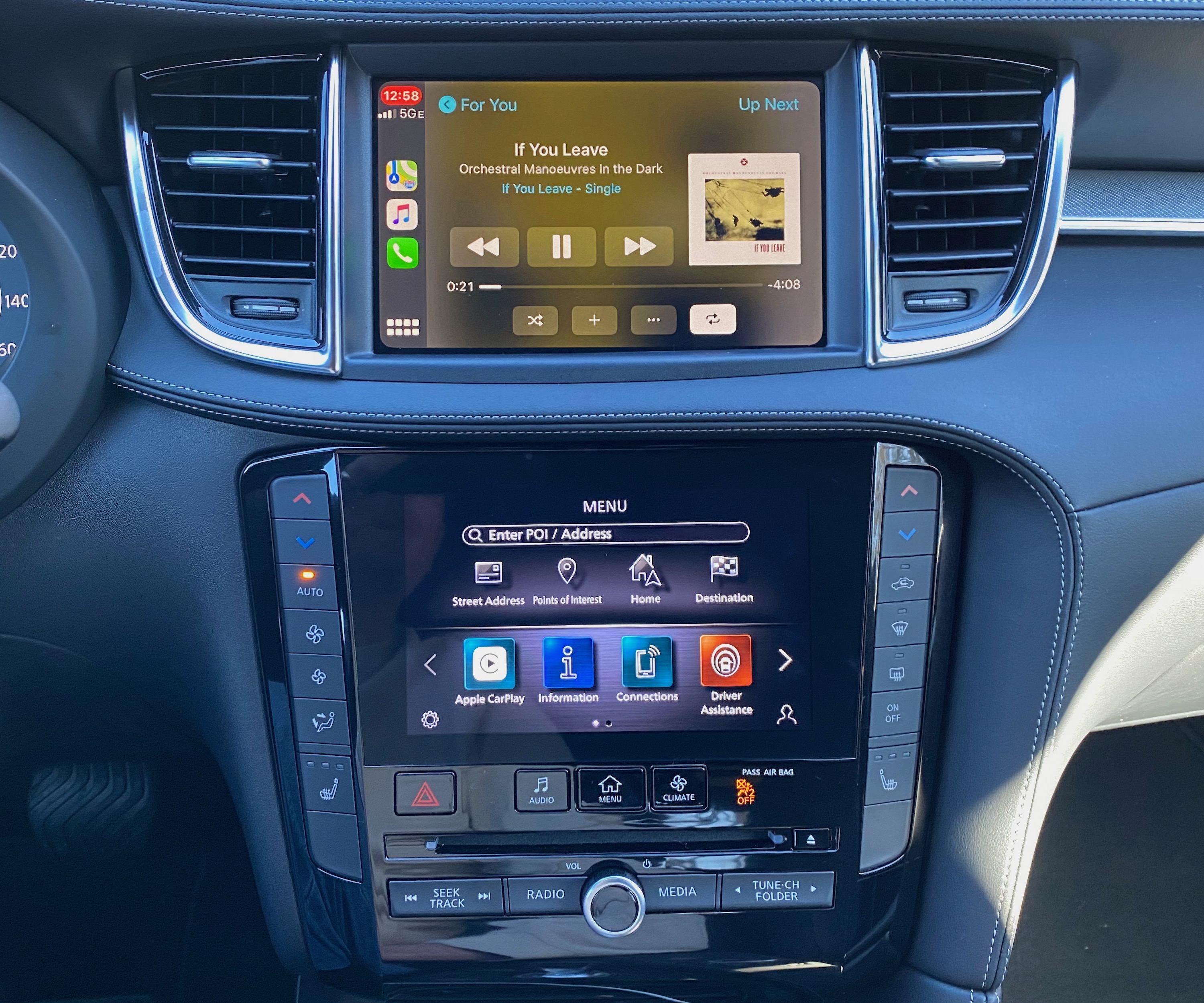
CarPlay "Now Playing" on top, main InTouch home screen on bottom
The flexibility of having dual displays and the redundancy of many of the native system functions between them really lets CarPlay shine, as you really don't have to worry about switching away from it to access the Infiniti system. Some adjustments will trigger a brief overlay on the CarPlay screen, but other than that you're free to tweak audio, climate, and vehicle settings without disrupting the CarPlay experience.
All QX50 trims come equipped with four USB ports, highlighted by one USB-C and one USB-A at the front of the center console next to the cupholders, and both ports support data connections for CarPlay. The other two ports are charge-only USB-A ports, with one located inside the center console compartment and one on the rear of the console to provide power for backseat passengers.
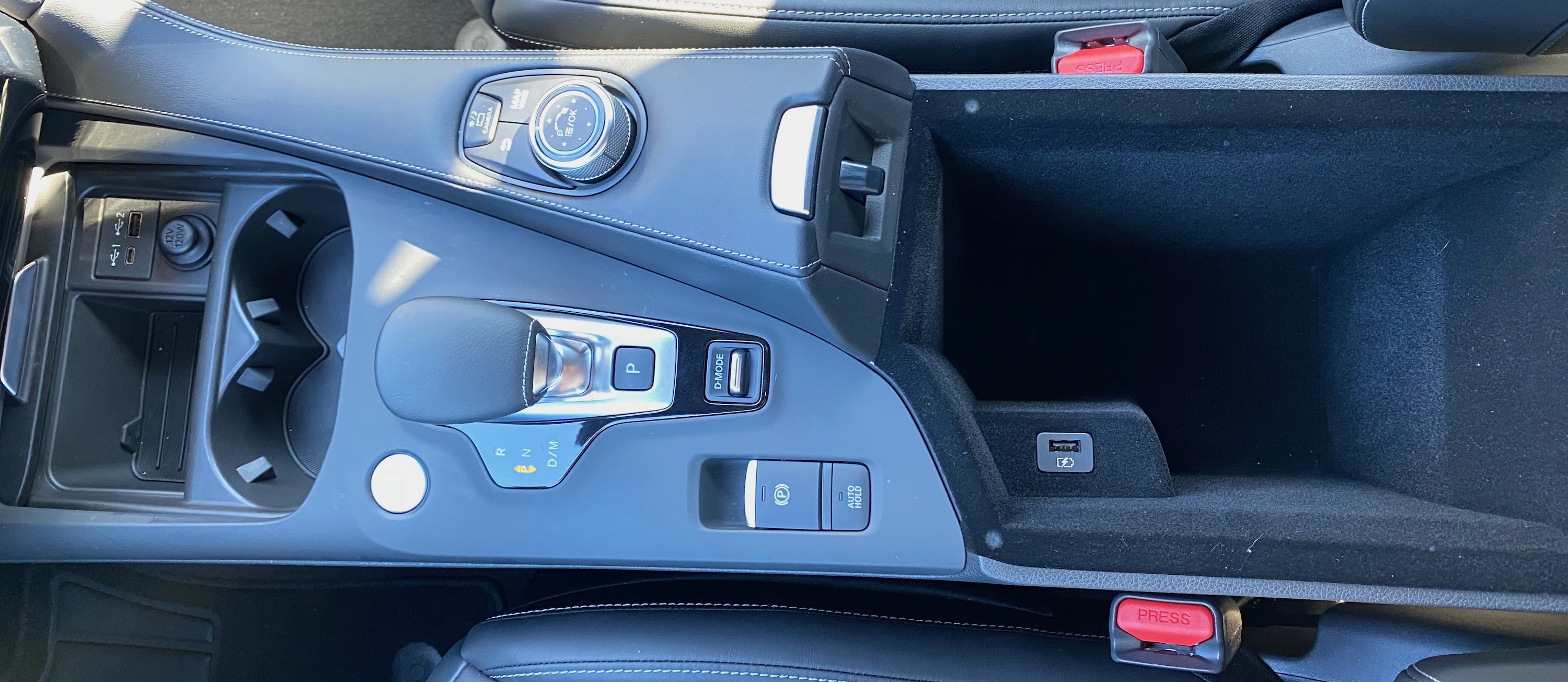
Center console with USB-C/USB-A ports up front, infotainment control knob, and console compartment with charge-only USB-A
One downside is the lack of a good place for phone storage, as there is little space near the front USB ports other than a pair of cupholders and a small storage tray that isn't big enough to fit a phone without obstructing at least one of the cupholders. Storing your phone in the center console compartment is also an option, but it requires more effort to get in and out of the compartment and involves running the USB cable into the compartment, so it at least would have been nice if the USB port inside that compartment supported data transfer so everything could be tucked away inside. Wireless phone charging is not available on any QX50 trims.

One charge-only USB-A port and a 12V power port for rear passengers
Vehicles equipped with onboard navigation do include Wi-Fi hotspot functionality for up to seven devices, letting your passengers connect to the Internet with a data plan from AT&T.
Infiniti may have been late to the CarPlay game, but it's come through in a solid way in the 2020 QX50, and also the Q50, Q60, and QX80, which all have nearly identical layouts with dual displays and a host of hardware controls. Infiniti has done a good job of building on the bones of the NissanConnect infotainment to take it to the next level, and iPhone users will be pleased at the prominence CarPlay receives on the dashboard.
The flexibility of the new InTouch system that lets you interact with the system in the way you prefer is fantastic, giving you the choice of touchscreen, hardware buttons, voice, and even a control knob. I also like that there's a bit of future-proofing for the primary USB ports up front, with one USB-C and one USB-A.
There are always a few nits to pick, however, and phone storage in the QX50 is one for me. There's no great place to put your phone while it's plugged in, and the USB port inside the center console compartment can't be used for CarPlay. And with wireless CarPlay quickly becoming more common, particularly on luxury brands, it would have been nice to see that included here, but hopefully Infiniti will follow through and make that upgrade soon.
The QX50 is of course a luxury brand, so it has a bit of price tag starting in the mid to high $30K range, roughly on par with the Acura RDX that I took a look at a little over a year ago, but a decent amount less than other small luxury crossovers it aims to compete against like the Audi Q5 and the BMW X3. With five available trims, there's a range of price points that can push things to nearly $50,000, but the good news for iPhone users is that CarPlay is standard on all trims, so you won't need to jump up a level or two or add an option package to get it.
This article, "Review: Infiniti Joins the CarPlay Club With the 2020 QX50" first appeared on MacRumors.com
Discuss this article in our forums

from MacRumors: Mac News and Rumors - All Stories https://ift.tt/2StleZA
Apple touts that there are now over 500 car models supporting CarPlay, and Nissan's luxury brand Infiniti is one of the most recent (and perhaps the last significant brand in the U.S. other than Tesla) to add the feature with the 2020 Q50 and Q60 sedans, QX50 crossover, and QX80 SUV.
I've had an opportunity to spend some time with a 2020 Infiniti QX50 and check out how the updated InTouch infotainment system and CarPlay work with the dual screens dominating the center of the dashboard, and I've come away fairly impressed with the performance and ease of use.

The 2020 QX50 comes in five trim levels starting at $37,250 for the base Pure trim and topping out at a little over $60,000 for a fully loaded Autograph trim. All trims are available with either front-wheel drive or all-wheel drive, with the latter costing an extra $2,000. CarPlay and Android Auto are standard on all trims, and dual center touchscreens with an 8-inch display on top and a 7-inch display on the bottom are uniform throughout the lineup.

My test vehicle was an all-wheel drive Essential trim, which is the middle of the five available trims, and it came with a $1,200 "Edition 30" appearance package that also bundles in the ProASSIST features such as distance control, intelligent control, blind spot monitoring, lane departure prevention, and adaptive front lighting. Toss in upgraded Majestic White paint and some welcome lighting and cargo packages, and my tester checked in at just under $50,000.
InTouch Hardware and Software
Infiniti is certainly not the only manufacturer to pursue a dual-display infotainment solution, and I've had some previous experience with such a system in the Audi A7. Part of what sets Infiniti apart here, however, is that hardware buttons were thankfully not sacrificed in favor of all-screen controls. The lower screen of the InTouch system is surrounded by hardware controls, including climate controls along the left and right sides and some hardware audio buttons and a knob along the bottom just below the CD drive.
There are also some quick-access hardware buttons for jumping between the main InTouch home screen, the audio screen, and the climate screen where only a few digital adjustments like manual fan speed can be made, but almost all of these are also accessible through the hardware buttons on either side of the screen. Add in the usual bevy of steering wheel controls, and you can accomplish a heck of a lot just by feel, which is fantastic.
The upper screen is largely dedicated to the built-in navigation that's standard on Essential and higher trims and optional on the second-level Luxe trim, and this is also where CarPlay shows up. Even here, Infiniti provides options for interacting with the content, supporting both touch directly on the screen and indirect control via a knob and a few buttons on the center console. I generally prefer using touch or voice for interacting with CarPlay and built-in navigation systems, but it's nice to have another indirect method available for quick adjustment or for those who prefer it on a more regular basis.
Infiniti's InTouch software bears some distinct similarities to the NissanConnect infotainment system of the brand's parent company, which I previously looked at in the Leaf and Altima, but it's been augmented with some higher-end features and of course optimized for the dual-display setup.
The audio setup is very similar to the NissanConnect system I've used in other vehicles, with a relatively straightforward layout and a customizable bottom menu bar to set up and quickly access your preferred audio sources. SiriusXM content in particular looks good with colorful channel logos and album art visible on the screen. The interface for terrestrial radio stations is a bit simpler, but still offers a clean look with station and song information when available and support for HD radio.
The onboard navigation works well with 3D city views, lane guidance, exit signs, and a variety of available views to customize the navigation experience, although the overall look could stand to see some modernization. There's support for street and satellite views, real-time traffic, and Destinations by Google, which offers an improved POI search experience compared to the embedded system's database. Over-the-air map updates are also available. The overall look of the maps isn't as modern as what you see with Apple or Google Maps, for example, but functionally it's a pretty solid system. Of course, with CarPlay and Android Auto, you may not even want to use the onboard navigation, but it's there if you want or need it.
In addition to the dual displays in the center stack, there's also a digital display for the driver between a pair of analog gauges. The display offers a number of different views including speed, audio information, navigation, ProPILOT Assist driver assistance features, and more, so that can serve to augment the at-a-glance availability of information from the various vehicle systems. A head-up display is also available standard on the top-end Autograph trim and as part of a package option on the step-down Sensory trim.
The QX50 includes the usual array of steering wheel controls for accessing functions like volume, cruise control, phone calls, and more, and the dedicated voice control button serves dual duty with a short press activating the InTouch voice system and a long press bringing up Siri for either Siri Eyes Free or CarPlay.
CarPlay
CarPlay on the 2020 QX50 does require a wired connection, which is a little unfortunate at a time when more and more luxury brands including Audi, BMW, and Porsche are supporting wireless CarPlay and it's on the verge of rolling out to more mainstream brands from the likes of Ford, GM, and Fiat Chrysler. Infiniti does tell me that wireless CarPlay is coming in the "near future," but it would have been nice to see it from the very start.
Setting the lack of wireless support aside, CarPlay works quite well on the dual-screen InTouch system, and it's great being able to dedicate the top display to CarPlay while native functions like audio and other features remain fully visible and accessible on the lower display. The 8-inch top screen provides ample room for the CarPlay interface, and everything looks big and bright sitting fairly high on the dashboard so it's not too far out of the driver's line of sight.
I had no problems reaching all parts of the screen to manipulate CarPlay by touch, or you can use the control knob on the center console to scroll through the various interface elements and select the one you want.
The flexibility of having dual displays and the redundancy of many of the native system functions between them really lets CarPlay shine, as you really don't have to worry about switching away from it to access the Infiniti system. Some adjustments will trigger a brief overlay on the CarPlay screen, but other than that you're free to tweak audio, climate, and vehicle settings without disrupting the CarPlay experience.
Ports and Connectivity
All QX50 trims come equipped with four USB ports, highlighted by one USB-C and one USB-A at the front of the center console next to the cupholders, and both ports support data connections for CarPlay. The other two ports are charge-only USB-A ports, with one located inside the center console compartment and one on the rear of the console to provide power for backseat passengers.
One downside is the lack of a good place for phone storage, as there is little space near the front USB ports other than a pair of cupholders and a small storage tray that isn't big enough to fit a phone without obstructing at least one of the cupholders. Storing your phone in the center console compartment is also an option, but it requires more effort to get in and out of the compartment and involves running the USB cable into the compartment, so it at least would have been nice if the USB port inside that compartment supported data transfer so everything could be tucked away inside. Wireless phone charging is not available on any QX50 trims.
Vehicles equipped with onboard navigation do include Wi-Fi hotspot functionality for up to seven devices, letting your passengers connect to the Internet with a data plan from AT&T.
Wrap-up
Infiniti may have been late to the CarPlay game, but it's come through in a solid way in the 2020 QX50, and also the Q50, Q60, and QX80, which all have nearly identical layouts with dual displays and a host of hardware controls. Infiniti has done a good job of building on the bones of the NissanConnect infotainment to take it to the next level, and iPhone users will be pleased at the prominence CarPlay receives on the dashboard.
The flexibility of the new InTouch system that lets you interact with the system in the way you prefer is fantastic, giving you the choice of touchscreen, hardware buttons, voice, and even a control knob. I also like that there's a bit of future-proofing for the primary USB ports up front, with one USB-C and one USB-A.
There are always a few nits to pick, however, and phone storage in the QX50 is one for me. There's no great place to put your phone while it's plugged in, and the USB port inside the center console compartment can't be used for CarPlay. And with wireless CarPlay quickly becoming more common, particularly on luxury brands, it would have been nice to see that included here, but hopefully Infiniti will follow through and make that upgrade soon.
The QX50 is of course a luxury brand, so it has a bit of price tag starting in the mid to high $30K range, roughly on par with the Acura RDX that I took a look at a little over a year ago, but a decent amount less than other small luxury crossovers it aims to compete against like the Audi Q5 and the BMW X3. With five available trims, there's a range of price points that can push things to nearly $50,000, but the good news for iPhone users is that CarPlay is standard on all trims, so you won't need to jump up a level or two or add an option package to get it.
Related Roundup: CarPlay
Tag: Infiniti
This article, "Review: Infiniti Joins the CarPlay Club With the 2020 QX50" first appeared on MacRumors.com
Discuss this article in our forums
from MacRumors: Mac News and Rumors - All Stories https://ift.tt/2StleZA
Apple 'Suffocates the Creation of New Technologies,' Claims Former Chip Designer Being Sued for Breach of Contract
https://ift.tt/38F1A2g
Apple has been in an ongoing legal fight with Gerard Williams III, who worked at Apple until February 2019 when he left to start up a new company called Nuvia with other Apple developers.
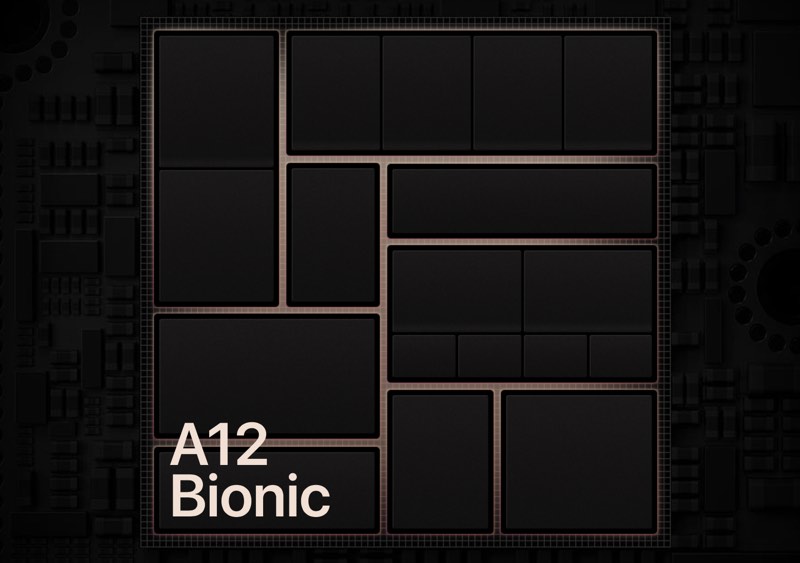
Williams was Apple's lead chip designer, working on the A7 to A12X chips that Apple used in its mobile devices, and his new company develops processors for use in data centers. Apple first sued Williams in August 2019, claiming that his contracts with Apple prevented him from engaging in business activities that are directly related to Apple's business.

Since then, Williams has claimed that Apple invaded his privacy and monitored his texts, while Apple complained that Williams had been planning and developing Nuvia while still at Apple, and also soliciting Apple employees.
In January, Williams tried to get the lawsuit brought against him by Apple rejected by the court, but he was unsuccessful, and now he's back with a new claim that Apple has been recruiting engineers from Nuvia.
According to Bloomberg, Williams says that Apple is aiming to lure his staff away and is also preventing its own employees from leaving to pursue their own ventures. He claims that Apple's lawsuit against him for breach of contract aims to "suffocate the creation of new technologies and solutions by a new business, and to diminish the freedom of entrepreneurs to seek out more fulfilling work."
He goes on to accuse Apple of improperly deterring employees "from making even preliminary and legally protected preparations to form a new business - whether competitive or otherwise."
There has been no final word on whether the case will progress to trial yet, though a judge has already dismissed Apple's bid for punitive damages against Williams as Apple failed to show how Williams intentionally tried to harm the company by being disloyal.
This article, "Apple 'Suffocates the Creation of New Technologies,' Claims Former Chip Designer Being Sued for Breach of Contract" first appeared on MacRumors.com
Discuss this article in our forums

from MacRumors: Mac News and Rumors - All Stories https://ift.tt/37rj0hy
Apple has been in an ongoing legal fight with Gerard Williams III, who worked at Apple until February 2019 when he left to start up a new company called Nuvia with other Apple developers.
Williams was Apple's lead chip designer, working on the A7 to A12X chips that Apple used in its mobile devices, and his new company develops processors for use in data centers. Apple first sued Williams in August 2019, claiming that his contracts with Apple prevented him from engaging in business activities that are directly related to Apple's business.

Since then, Williams has claimed that Apple invaded his privacy and monitored his texts, while Apple complained that Williams had been planning and developing Nuvia while still at Apple, and also soliciting Apple employees.
In January, Williams tried to get the lawsuit brought against him by Apple rejected by the court, but he was unsuccessful, and now he's back with a new claim that Apple has been recruiting engineers from Nuvia.
According to Bloomberg, Williams says that Apple is aiming to lure his staff away and is also preventing its own employees from leaving to pursue their own ventures. He claims that Apple's lawsuit against him for breach of contract aims to "suffocate the creation of new technologies and solutions by a new business, and to diminish the freedom of entrepreneurs to seek out more fulfilling work."
He goes on to accuse Apple of improperly deterring employees "from making even preliminary and legally protected preparations to form a new business - whether competitive or otherwise."
There has been no final word on whether the case will progress to trial yet, though a judge has already dismissed Apple's bid for punitive damages against Williams as Apple failed to show how Williams intentionally tried to harm the company by being disloyal.
Tag: lawsuit
This article, "Apple 'Suffocates the Creation of New Technologies,' Claims Former Chip Designer Being Sued for Breach of Contract" first appeared on MacRumors.com
Discuss this article in our forums
from MacRumors: Mac News and Rumors - All Stories https://ift.tt/37rj0hy
MacRumors Giveaway: Win an Air Duffel Carry-On Bag for Mac From Waterfield Designs
https://ift.tt/31WuXuM
For this week's giveaway, we've teamed up with Waterfield Designs to offer MacRumors readers a chance to win a pocket-laden Air Duffel Carry-On Bag for carrying your Mac, iPad, iPhone, and other related accessories.

WaterField Designs created the Air Duffel as the perfect bag to use for air travel. It was designed in collaboration with more than 1,200 WaterField Designs customers and seasoned travelers with the aim of optimizing for space and convenience.
Priced starting at $399, the Air Duffel is available in brown waxed canvas or black ballistic nylon with a full-grain leather flap and detailing.

The Air Duffel is equipped with a padded laptop compartment that can fit Mac notebooks ranging in size from the 12-inch MacBook to the 16-inch MacBook Pro, plus there's a main compartment that was designed for maximum carry-on capacity.

The main compartment can hold one to two days of clothing, headphones, toiletries, and other items. Two mesh pockets inside the compartment are available for organizing small items, a key fob makes it easy to keep track of keys, and three open-top pockets offer up additional organizational space.

The laptop compartment also includes a wide pocket with soft foam for papers or a tablet, two open-top pockets for chargers and cords, three pen slots, and a central slot for files or magazines. A front pocket has interior organizational pockets secured with a leather flap equipped with magnets.

At the sides, there are two arced zippers for the expandable end pockets. The end pockets are designed to remain flat to utilize interior bag space when available and are positioned for quick access to travel documents, a water bottle, and other necessities when the bag is positioned under a seat or on top of luggage.

Inside, a gold liner makes it easy to find what you're looking for, and there are four D-rings for attaching a comfortable shoulder strap or a carabiner to hold pouches and accessories. It can also be fitted over the handle of a suitcase.

WaterField Designs also sells an optional Air Caddy, which is custom fitted for the front pocket of the Air Duffel and is sized to fit devices like the iPad Pro. The Air Duffel measures in at 10.25 x 16 x 8.25 inches and is sized to fit perfectly under an airplane seat.

We have one of the Air Duffels to give away to a MacRumors reader. To enter to win the giveaway, use the Gleam.io widget below and enter an email address. Email addresses will be used solely for contact purposes to reach the winners and send the prizes. You can earn additional entries by subscribing to our weekly newsletter, subscribing to our YouTube channel, following us on Twitter, following us on Instagram, or visiting the MacRumors Facebook page.
Due to the complexities of international laws regarding giveaways, only U.S. residents who are 18 years or older and Canadian residents (excluding Quebec) who have reached the age of majority in their province or territory are eligible to enter. To offer feedback or get more information on the giveaway restrictions, please refer to our Site Feedback section, as that is where discussion of the rules will be redirected.
WaterField Designs
The contest will run from today (February 14) at 11:00 a.m. Pacific Time through 11:00 a.m. Pacific Time on February 21. The winner will be chosen randomly on February 14 and will be contacted by email. The winner will have 48 hours to respond and provide a shipping address before a new winner is chosen.
This article, "MacRumors Giveaway: Win an Air Duffel Carry-On Bag for Mac From Waterfield Designs" first appeared on MacRumors.com
Discuss this article in our forums

from MacRumors: Mac News and Rumors - All Stories https://ift.tt/3bGp9JY
For this week's giveaway, we've teamed up with Waterfield Designs to offer MacRumors readers a chance to win a pocket-laden Air Duffel Carry-On Bag for carrying your Mac, iPad, iPhone, and other related accessories.

WaterField Designs created the Air Duffel as the perfect bag to use for air travel. It was designed in collaboration with more than 1,200 WaterField Designs customers and seasoned travelers with the aim of optimizing for space and convenience.
Priced starting at $399, the Air Duffel is available in brown waxed canvas or black ballistic nylon with a full-grain leather flap and detailing.

The Air Duffel is equipped with a padded laptop compartment that can fit Mac notebooks ranging in size from the 12-inch MacBook to the 16-inch MacBook Pro, plus there's a main compartment that was designed for maximum carry-on capacity.

The main compartment can hold one to two days of clothing, headphones, toiletries, and other items. Two mesh pockets inside the compartment are available for organizing small items, a key fob makes it easy to keep track of keys, and three open-top pockets offer up additional organizational space.

The laptop compartment also includes a wide pocket with soft foam for papers or a tablet, two open-top pockets for chargers and cords, three pen slots, and a central slot for files or magazines. A front pocket has interior organizational pockets secured with a leather flap equipped with magnets.

At the sides, there are two arced zippers for the expandable end pockets. The end pockets are designed to remain flat to utilize interior bag space when available and are positioned for quick access to travel documents, a water bottle, and other necessities when the bag is positioned under a seat or on top of luggage.

Inside, a gold liner makes it easy to find what you're looking for, and there are four D-rings for attaching a comfortable shoulder strap or a carabiner to hold pouches and accessories. It can also be fitted over the handle of a suitcase.

WaterField Designs also sells an optional Air Caddy, which is custom fitted for the front pocket of the Air Duffel and is sized to fit devices like the iPad Pro. The Air Duffel measures in at 10.25 x 16 x 8.25 inches and is sized to fit perfectly under an airplane seat.

We have one of the Air Duffels to give away to a MacRumors reader. To enter to win the giveaway, use the Gleam.io widget below and enter an email address. Email addresses will be used solely for contact purposes to reach the winners and send the prizes. You can earn additional entries by subscribing to our weekly newsletter, subscribing to our YouTube channel, following us on Twitter, following us on Instagram, or visiting the MacRumors Facebook page.
Due to the complexities of international laws regarding giveaways, only U.S. residents who are 18 years or older and Canadian residents (excluding Quebec) who have reached the age of majority in their province or territory are eligible to enter. To offer feedback or get more information on the giveaway restrictions, please refer to our Site Feedback section, as that is where discussion of the rules will be redirected.
Tag: giveaway
This article, "MacRumors Giveaway: Win an Air Duffel Carry-On Bag for Mac From Waterfield Designs" first appeared on MacRumors.com
Discuss this article in our forums
from MacRumors: Mac News and Rumors - All Stories https://ift.tt/3bGp9JY
Subscribe to:
Comments (Atom)