 Have you ever woken up to your iPhone or iPad alerting you to the fact that "You Have a New Memory" on this day, in the form of photos and videos you shot years ago? If the answer is yes, you've been the willing (or unwilling) recipient of a Photos feature notification called Memories.
In iOS 12, the Photos app automatically curates photos and videos that you've taken into specific memory collections. Essentially, these are homemade movies of past events like family gatherings or vacations which your device generates without any input required on your part (although you can edit them). Despite Apple's good intentions, the risks inherent in its Memories feature are pretty obvious. So if you're less than enthusiastic about the idea of your iOS device digging up bygones from the annals of your Photo library, here's how to switch off those Memory alerts.
How to Disable Memories Alerts in iOS 12
- Launch the Settings app on your iPhone or iPad.
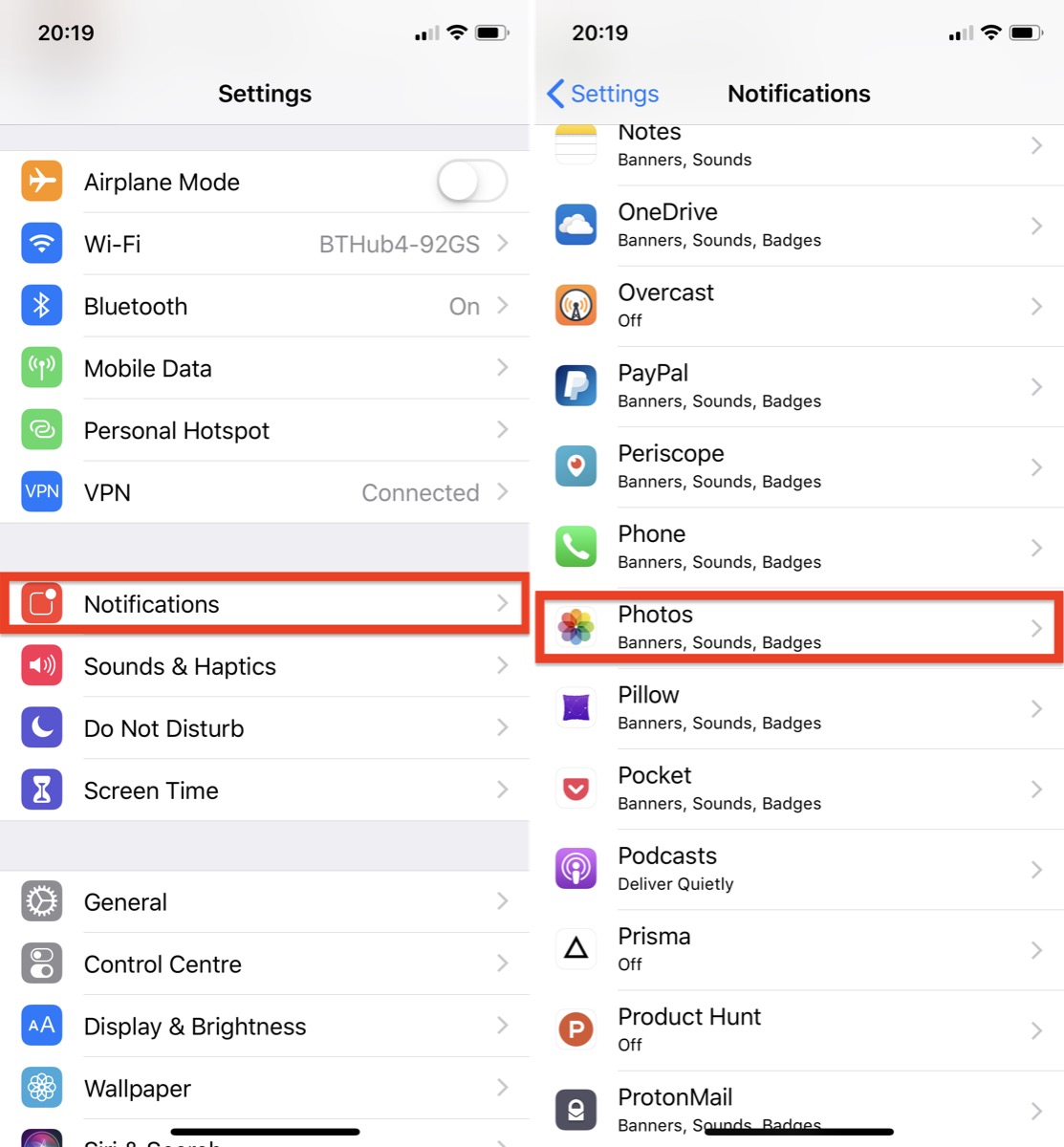
- Tap Notifications.
- Select Photos from the list of apps.

- Tap Memories.
- Toggle the Allow Notifications switch to the OFF position.
Related Roundup: iOS 12
Tag: Photos
Discuss this article in our forums
from MacRumors: Mac News and Rumors - All Stories https://ift.tt/2BpoknS

No comments:
Post a Comment
Leave your thoughts....