Tuesday, November 20, 2018

Video: We Turned an iPad Pro Into a Mac Mini Display With the Luna Display Adapter

https://ift.tt/nvEILJ

Last week, the team behind the Luna Display adapter that's designed to turn the iPad into a second display for any Mac published an article outlining how the adapter was used to morph a current iPad Pro into a display for Apple's newest Mac mini.

The Mac mini ships sans display, which means if you have an iPad, it can be used as the Mac mini's sole display. We thought the idea was interesting, so we decided to try it out in our latest YouTube video.

Subscribe to the MacRumors YouTube channel for more videos.

The Luna Display is a little adapter that plugs into the USB-C port on your Mac (for older Macs, there's a Mini DisplayPort version). So to use the iPad Pro as a Mac mini display, you need to plug the adapter into the Mac mini and then download the appropriate software.

There's Luna software for both the iPad and the Mac, which you'll need to download to get this setup working. For setup, you're going to need a separate external display for the Mac mini so you can get the software installed, but once it's set up, the iPad Pro can be used as the only display.

Because the iPad and the adapter in the Mac mini work via WiFi, you'll need a strong connection for seamless performance and a zero lag experience.

Once the iPad Pro is set up as the Mac mini's display, it's a neat example of what it's like to use a touchscreen with a Mac machine. You can display full Mac apps on the iPad Pro, from Photoshop to Final Cut Pro.

What's neat is that you can control apps on your Mac mini through the iPad using the Luna Display app and then swipe out of it to access all of your standard apps. Switching between the two is flawless.

The iPad Pro is, of course, a super expensive display for the Mac mini so this is only useful if you happen to have both of these devices. Buying an iPad Pro just to use as a Mac mini display probably isn't a good idea since you can get a bigger display at a cheaper price.

You can also use the Luna Display with other Macs to turn the iPad into a secondary display. If you want your own Luna Display, it's available for $79.

What do you think of the iPad Pro as a touch display for Mac mini? Let us know in the comments.

Related Roundups: iPad Pro, Mac mini

Discuss this article in our forums


from MacRumors: Mac News and Rumors - All Stories https://ift.tt/2PIeO9a

First Benchmarks for MacBook Pro With New Radeon Pro Vega Graphics Surface

https://ift.tt/2TsALaq

Apple last week introduced new upgrade options for the high-end 15-inch MacBook Pro, allowing customers to add Radeon Pro Vega 16 and 20 graphics cards to the device for superior graphics performance.

Benchmarks for the 15-inch MacBook Pro models equipped with the Radeon Pro Vega 20 option have been shared by a MacRumors reader, giving us an idea of the performance improvements over 15-inch MacBook Pro models with the standard Radeon Pro 560X graphics card that was previously the highest-end option available.


The machine, which includes a 2.6GHz Core i7 Intel processor, a Radeon Pro Vega 20 graphics card, 16GB RAM, and a 1TB SSD, earned an OpenCL score of 72799. Additional benchmarks found on Geekbench with a similar machine using an upgraded Core i9 processor demonstrated OpenCL scores of 75817, 76017, and 80002.

In a separate benchmark uploaded to Geekbench, the new high-end MacBook Pro with Core i9 processor also earned a Metal score of 73953.

Comparatively, machines with similar specs and Radeon Pro 560X graphics cards on Geekbench earned maximum OpenCL scores of right around 65000 and Metal scores of approximately 57000, suggesting much higher graphics performance with the new Radeon Pro Vega 20 card.

At the current time, benchmarks are only available for the higher-end Radeon Pro Vega 20 card, with no data available for the Radeon Pro Vega 16 card. CPU benchmarks on Geekbench between machines using the new cards and the existing cards are similar because there have been no changes to the CPU.

The new Radeon Pro Vega graphics cards can only be added to the high-end 15-inch MacBook Pro model, which starts at $2,799. The Radeon Pro Vega 16 costs an additional $250, while the Radeon Pro Vega 20 costs an additional $350.

Related Roundup: MacBook Pro
Buyer's Guide: MacBook Pro (Neutral)

Discuss this article in our forums


from MacRumors: Mac News and Rumors - All Stories https://ift.tt/2qXqRAD

Apple Debuts New 'Share Your Gifts' Holiday Ad

https://ift.tt/nvEILJ

Apple this afternoon shared one of its iconic holiday ads, many of which have won awards and accolades in the past. This year's video, entitled "Share Your Gifts," is a three minute animated spot featuring music by 16-year-old songwriter Billie Eilish.


The ad features music written by a girl who keeps her creations secret, until they're let out into the world by her dog and enjoyed by everyone around her. The "Share Your Gifts" theme encourages Mac and iPad users to share their creativity with others.

Apple has also shared a behind the scenes video that highlights the making of the "Share Your Gifts" ad spot.


Several additional videos from the behind the scenes of the "Share Your Gifts" ad delve into how the people who worked on the spot use their devices to create content.


Apple's ad features a new Billie Eilish song that's being debuted in the spot, called "Come Out and Play." The new song is available via iTunes and on Apple Music.


Discuss this article in our forums


from MacRumors: Mac News and Rumors - All Stories https://ift.tt/2Bmckon

Razer launches BlackWidow Lite mechanical keyboard, designed for work and play


via News – MySmartPrice https://ift.tt/2Dzfczt

PlayStation 5 Rumored To Be Powered By A Ryzen Eight-Core CPU


via News – MySmartPrice https://ift.tt/2QdzBAQ

Dolby Dimension launched with ‘cinematic’ sound, comes with a price tag of $600


via News – MySmartPrice https://ift.tt/2Dzf571

Review: WaterField Designs' Time Travel Apple Watch Case Organizes Your Apple Watch Accessories

https://ift.tt/2zlYvVi

WaterField Designs is a San Francisco-based company that makes a range of different cases and bags for Apple's product lineup, from the iPhone and iPad to Macs, Apple TV, and Apple Watch.

For Apple Watch, WaterField Designs has the Time Travel Case, which is designed to organize your Apple Watch accessories into one easy place for commuting and traveling so nothing gets misplaced or lost.


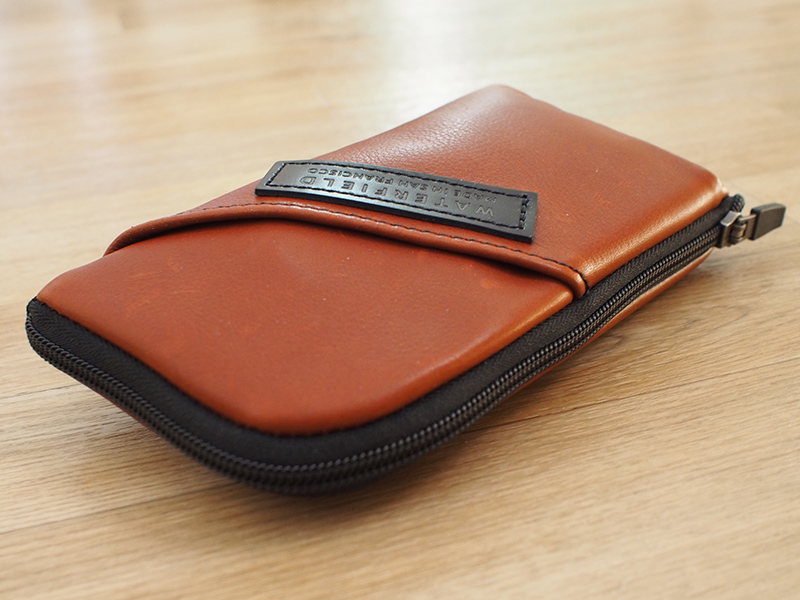
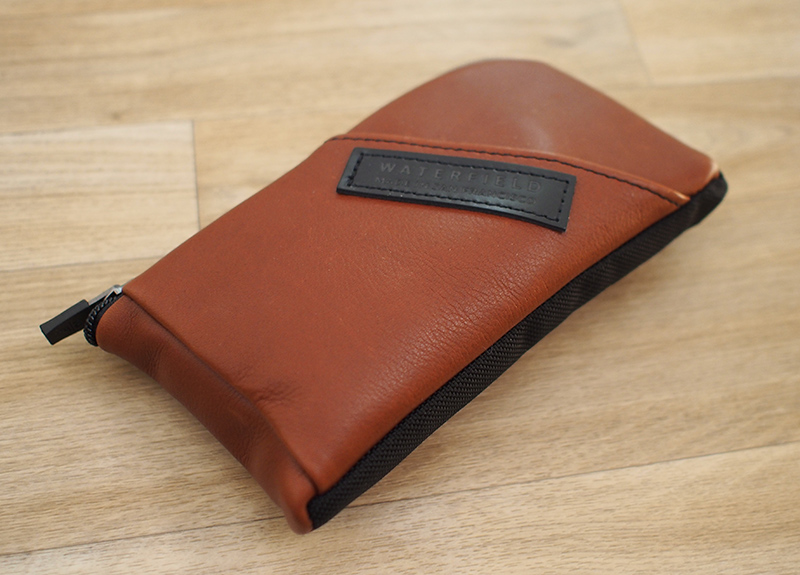
Made from either black leather or "cowboy" brown leather that's soft and supple to the touch, the Time Travel Case for the Apple Watch measures in at 7.5 inches long and 4.25 inches wide, and it's slim enough to tuck into the pocket of a purse or backpack.

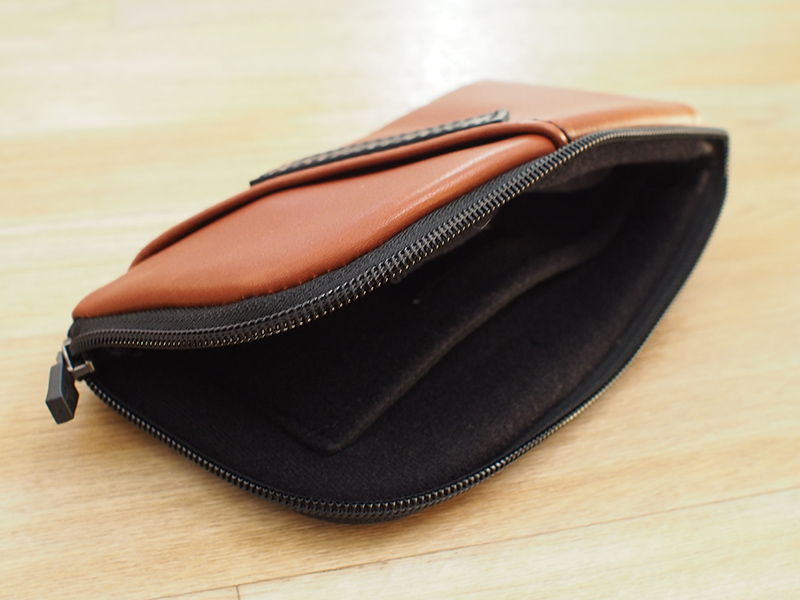
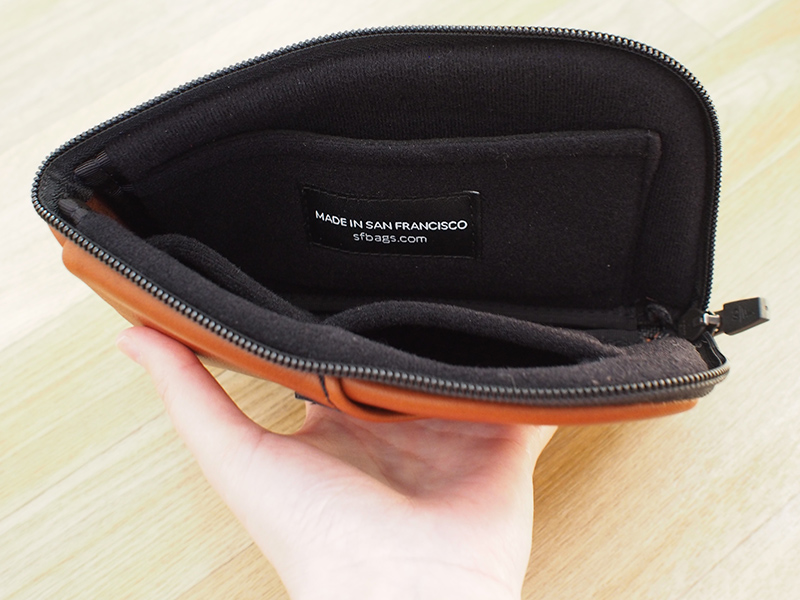
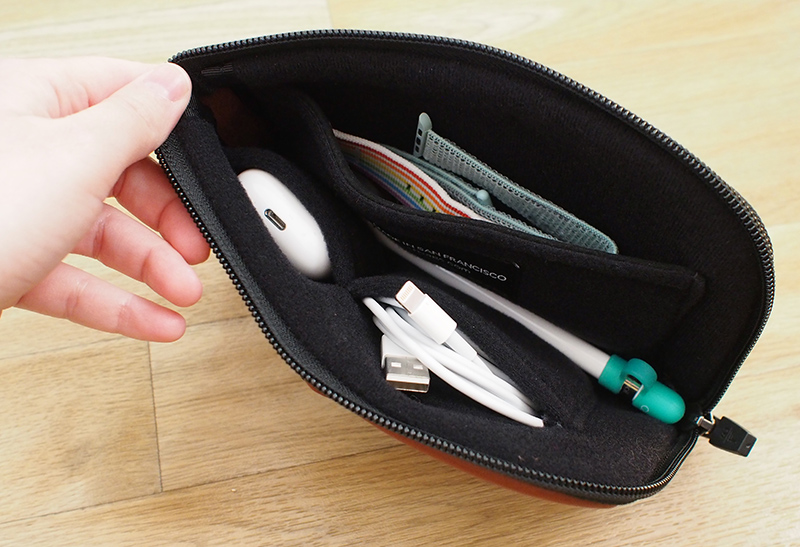
It zips along the top and one of the sides and opens up into a u-shape so that you can get to the contents inside. The entire inside is lined with a soft material that will ensure nothing gets scratched, and there's padding at the sides to keep expensive watch bands safe.


At the right side of the pouch, there's a wide side pocket that's designed to hold Apple Watch bands, and I found that you can fit three to four inside comfortably, which is ideal if you want to bring a few extra bands along when traveling.

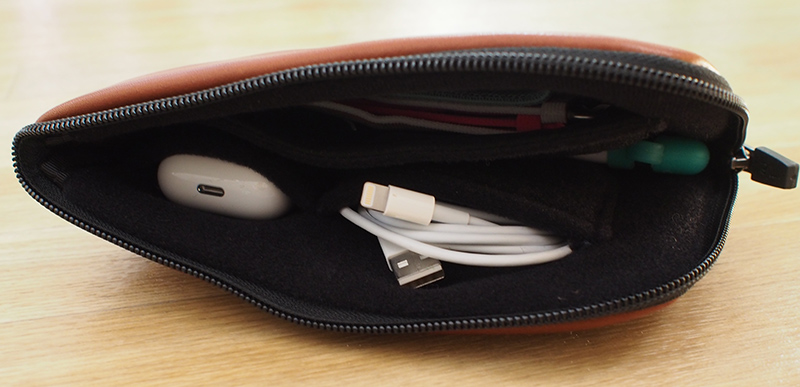
On the left side, there are two smaller pouches that can hold an Apple Watch charging puck with cable and your headphones or AirPods case. The larger left side pocket is perfect for cables, while the smaller pouch is the perfect size to house AirPods.


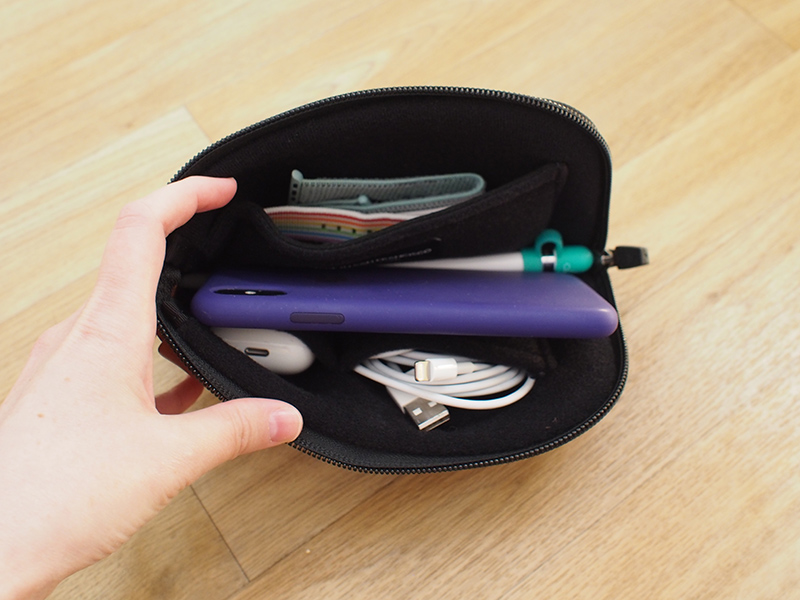
Between the two sides of the pouch, there's a middle section that can fit additional cables or accessories, or a device up to the size of an iPhone XS Max.

If desired, you can also put the Apple Watch either in this main middle pouch or in the left side pocket in place of a band when the Apple Watch is not in use, though some bulkier bands may not fit on the left side super well. My 38mm Apple Watch band with Sport Loop or Milanese Loop fit in either location.


At the outside, there's a diagonal pocket that's also perfectly sized to hold an iPhone, and it fits an iPhone XS Max in an Apple-designed case. A thicker case probably wouldn't work, but a naked iPhone certainly fits. Smaller devices like the iPhone X will also fit without falling out thanks to the grip of the leather.

The outside pocket features a large WaterField Designs logo, which is the only negative that I see to the design of the case. I'd prefer to have no visible logo, but it might not bother some people.


I was able to fit three Apple Watch bands, AirPods, an Apple Watch charging cable, a Lightning cable, an Apple Pencil, and my iPhone XS Max inside the Time Travel, with additional room available to stick something in the outside pocket, so it can hold a good amount of gear.

When packed full, though, it does expand to be about an inch and a half wide, but when limited to accessories instead of an iPhone, it's slimmer and easier to carry.


Bottom Line


Because of its higher price tag, the Time Travel Case for Apple Watch may not be for everyone, but it neatly organizes your extra Apple Watch bands and charging cable in a logical way, plus it has space for other accessories like an iPhone.


If you're looking for a high-quality storage pouch that will keep your Apple Watch gear and other bits and bobs organized in a way that cheaper pouches will not, the Time Travel Case is potentially worth checking out, and as a bonus, it will match well with other WaterField Designs gear.

How to Buy


The Time Travel Case for Apple Watch can be purchased from the WaterField Designs website for $59.

Note: WaterField Designs provided MacRumors with a Time Travel Case for the purpose of this review. No other compensation was received.


Discuss this article in our forums


from MacRumors: Mac News and Rumors - All Stories https://ift.tt/2QbbZwT