Monday, December 17, 2018

Qualcomm 9205 LTE Modem: IoT Devices Get Miniaturized High-Speed Connectivity With Backwards Compatibility


via News – MySmartPrice https://ift.tt/2BriuSK

U.S. Committee on Foreign Investment Clears T-Mobile's Sprint Purchase, but Approval is Still Needed From Other Agencies

https://ift.tt/2kW2joU

The United States Committee on Foreign Investment, aka Cfius, has approved T-Mobile's planned takeover of Sprint, reports The Wall Street Journal.

The government agency reportedly told the two companies on Monday that their planned union was approved following months of negotiations with company representatives.


The U.S. Committee on Foreign Investment reviews foreign deals for potential national security issues. Sprint is mainly owned by Japanese telecom group SoftBank, while German company Deutsche Telekom AG is a majority shareholder of T-Mobile's U.S. arm.

Under the terms of the merger, neither SoftBank nor Deutsche Telekom will be required to make significant changes to their operations.

Sprint and T-Mobile first reached a merger agreement in April 2018, which, if approved, will combine two of the four major carriers in the United States.

The new combined company, which will have nearly 100 million customers, will be named T-Mobile and current T-Mobile CEO John Legere will serve as the Chief Executive Officer.

Before the merger can move forward, it needs to be approved by the Federal Communications Commission and the Justice Department. T-Mobile executives believe the approval process will be finished by the second half of 2019.
Discuss this article in our forums


from MacRumors: Mac News and Rumors - All Stories https://ift.tt/2LoIJh8

Sphero Discontinues Disney Products Including BB-8 and R2-D2

https://ift.tt/2gvOb6V

Sphero, known for its popular BB-8, BB-9E, and R2-D2 iPhone-controlled droids, today confirmed that it is discontinuing all licensed products.

In a statement provided to The Verge, Sphero CEO Paul Berberian confirmed that Sphero is cleaning out its remaining licensed inventory and has no plans to produce more.


Sphero will no longer make BB-8, BB-9E, R2-D2, Lightning McQueen cars, or talking Spider-Man toys. None of the products are available from the Sphero website anymore, with Sphero instead selling its own Bolt, Mini, and SPRK+ products.

The licensed products are now "legacy products" no longer in production, though App Support is set to continue for at least two years.

Berberian said that Sphero is discontinuing its Disney partnership because the licensed toy business "required more resources" than it was worth, with sales waning over time after a movie was released.
"When you launch a toy, your first year's your biggest," he says. "Your second year's way smaller, and your third year gets really tiny." The opposite is true of the company's non-licensed educational robots, he says, which become more popular year after year.
With its licensed partnerships at an end, Sphero will now focus on expanding its educational ecosystem with the goal of getting more products into schools.

Tags: Disney, Sphero

Discuss this article in our forums


from MacRumors: Mac News and Rumors - All Stories https://ift.tt/2S54JAd

How to Disable Memories Alerts in iOS 12

https://ift.tt/2ik4f7V

Have you ever woken up to your iPhone or iPad alerting you to the fact that "You Have a New Memory" on this day, in the form of photos and videos you shot years ago? If the answer is yes, you've been the willing (or unwilling) recipient of a Photos feature notification called Memories.
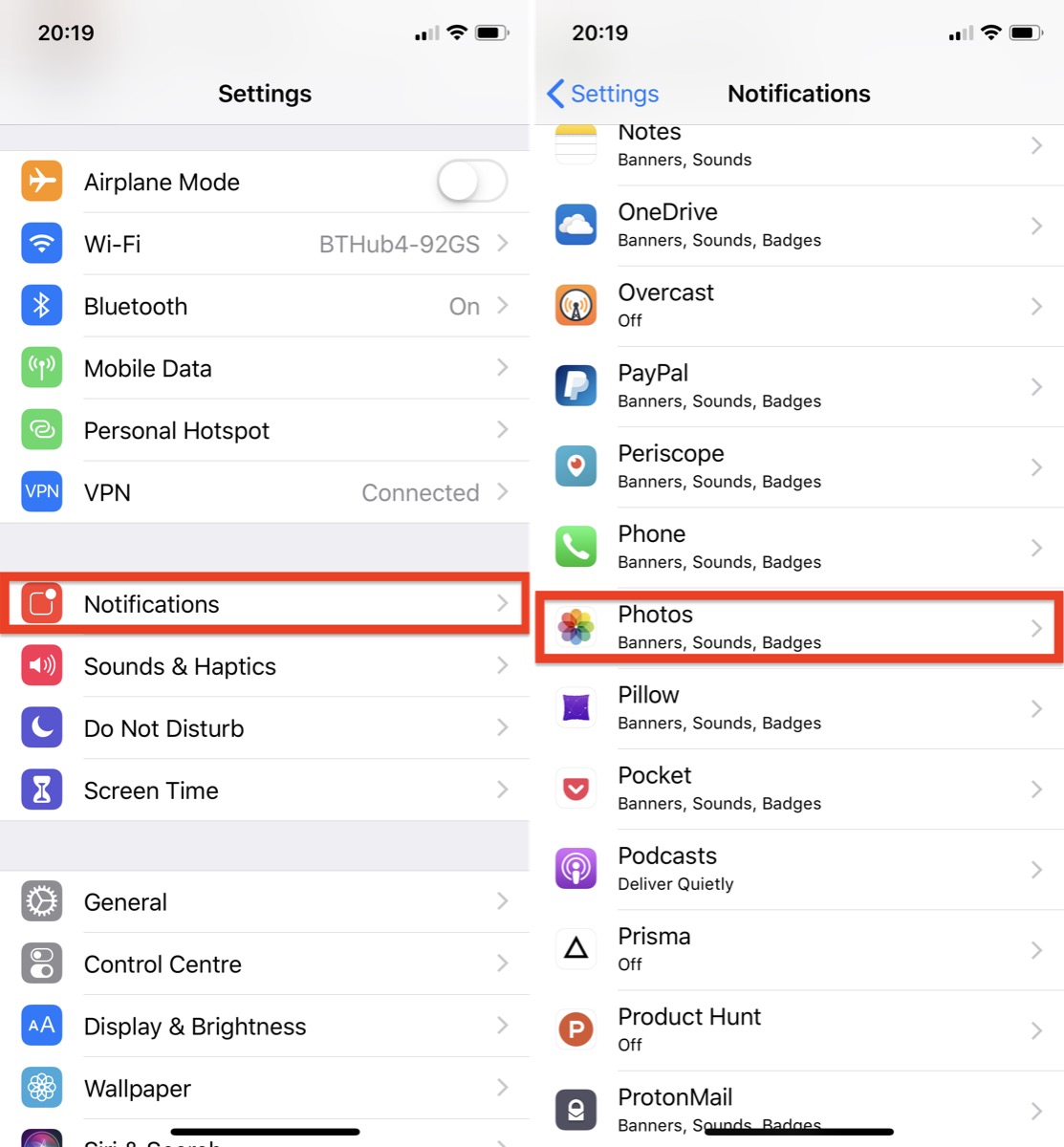
In iOS 12, the Photos app automatically curates photos and videos that you've taken into specific memory collections. Essentially, these are homemade movies of past events like family gatherings or vacations which your device generates without any input required on your part (although you can edit them). Despite Apple's good intentions, the risks inherent in its Memories feature are pretty obvious. So if you're less than enthusiastic about the idea of your iOS device digging up bygones from the annals of your Photo library, here's how to switch off those Memory alerts.

How to Disable Memories Alerts in iOS 12

  1. Launch the Settings app on your iPhone or iPad.

  2. Tap Notifications.
  3. Select Photos from the list of apps.

  4. Tap Memories.
  5. Toggle the Allow Notifications switch to the OFF position.
Note that this doesn't disable the automatic Memories feature, which will still appear in the Photos app's For You tab, but at least you won't receive unexpected reminders about events that you intentionally consigned to the history books long ago.

Related Roundup: iOS 12
Tag: Photos

Discuss this article in our forums


from MacRumors: Mac News and Rumors - All Stories https://ift.tt/2BpoknS

Apple Now Offering Free Next Day Delivery on Holiday Purchases Made by December 21

https://ift.tt/2CjzOLa

If you still need to purchase holiday gifts for friends and family, Apple is now offering free next-day delivery on any in-stock item ordered by 3:00 p.m. on Friday, December 21.

Apple was previously offering free next-business-day delivery on all items purchased before that date, but to make sure presents arrive on time, that's been upgraded to free next-day delivery, which includes weekends.


For several years now, Apple has offered upgraded shipping options over the holidays to attract last minute shoppers who may not otherwise be able to get delivery of Apple products and accessories.

Apple is also offering an extended return policy, which will let customers return products purchased between November 14, 2018 and December 25, 2018 until January 8, 2019.

If you're still seeking gift ideas for the Apple fan in your life, we've created an extensive 2018 holiday gift guide with suggestions from MacRumors readers and editors.
Discuss this article in our forums


from MacRumors: Mac News and Rumors - All Stories https://ift.tt/2ULwjUW

Apple Releasing iOS 12.1.2 With eSIM Bug Fixes Today

https://ift.tt/2zKL41A

Apple will soon release iOS 12.1.2, the fourth update to the iOS 12 operating system since its September launch. iOS 12.1.2 comes just two weeks after the release of iOS 12.1.1, and one week after Apple seeded the first iOS 12.1.2 beta to developers.

The iOS 12.1.2 update will be available on all eligible devices over-the-air in the Settings app. To access the update, go to Settings > General > Software Update. As with all iOS updates, iOS 12.1.2 is free to download.


According to Apple's release notes, iOS 12.1.2 is a bug fix update that focuses on addressing issues with eSIM activation and a cellular connectivity issue in Turkey. From Apple's release notes:
iOS 12.1.2 includes bug fixes for your iPhone. This update:

- Fixes bugs with eSIM activation for iPhone XR, iPhone XS, and iPhone XS Max

- Addresses an issue that could affect cellular connectivity in Turkey for iPhone XR, iPhone XS, and iPhone XS Max
The timing of the iOS 12.1.2 release is curious as Apple often seeds more than one beta before launching a software update. It's likely that iOS 12.1.2 is addressing a bug that Apple did not want to wait to fix.

eSIM functionality was first introduced in the iOS 12.1 update and expanded with iOS 12.1.1. In the U.S., T-Mobile, Verizon, and AT&T are all now supporting the eSIM feature, as are multiple other carriers around the world.

Related Roundup: iOS 12

Discuss this article in our forums


from MacRumors: Mac News and Rumors - All Stories https://ift.tt/2Eoxe7Y

Apple Shares Paul McCartney's New 'Who Cares' Music Video

https://ift.tt/2EBII90

Apple today announced that Paul McCartney's new music video "Who Cares" is available to watch exclusively on Apple Music.

"Who Cares" is a six-minute video starring McCartney and Emma Stone that calls for an end to bullying.


"My hope is that if there are kids being bullied, and there are, maybe by listening to this song and watching this video, they might just think it's not as bad," McCartney said. "It's the kind of thing you can just stand up to and laugh off and get through."


The video can be watched on Apple Music on an iPhone, iPad, or Mac via this link.


Discuss this article in our forums


from MacRumors: Mac News and Rumors - All Stories https://ift.tt/2EsoMEJ