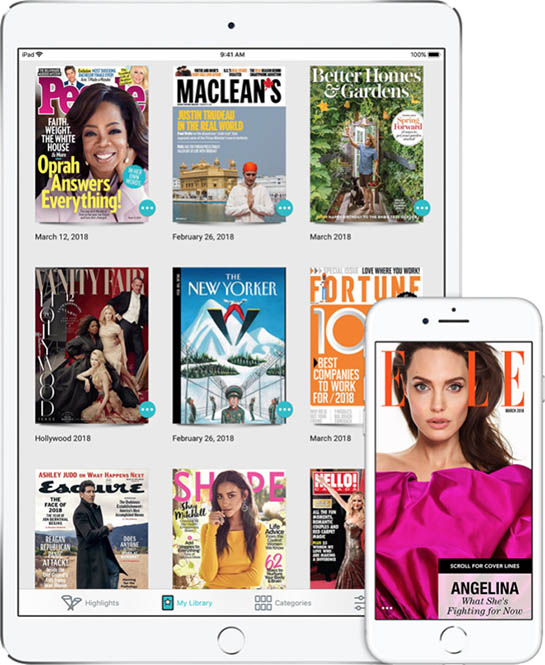
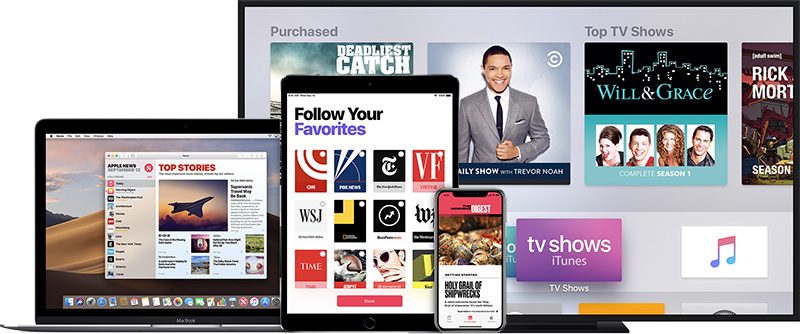
Apple is set to launch an Apple News service that will provide access to paywalled news content and magazines for one $9.99 monthly fee in March, but the company is still working to establish deals with newspapers.
Earlier this week, The Wall Street Journal said that Apple was having trouble convincing some major news publications like the Washington Post and The New York Times to sign up for the service, due to Apple wanting a 50 percent revenue split.
Apple would keep 50 percent of all subscription revenue and the other half of the revenue would be split among publishers "according to the amount of time users spend engaged with their articles."
Compared to Apple's 70/30 App Store split and the more than 70 percent of revenue that goes to Apple Music artists, the 50/50 split sounds stingy, but Recode today spoke with industry insiders and provided some insight into why Apple settled on that number.
As it turns out, there are many magazine publishers already on board with the 50/50 revenue agreement, with most convinced that Apple will get millions of people to subscribe to the new service, providing a lot of revenue to publishers despite the dramatic split. From Re/code:
And some publishers are happy to do it, because they think Apple will sign up many millions of people to the new service. And they'd rather have a smaller percentage of a bigger number than a bigger chunk of a smaller number.
In the words of a publishing executive who is optimistic about Apple's plans: "It's the absolute dollars paid out that matters, not the percentage."
Magazine publishers, though, have little to no online monetization of their content, which is not true of major newspapers. The New York Times and the Washington Post, for example, have existing digital subscription businesses that allow them to collect 100 percent of the revenue brought in by subscribers.
According to Recode, magazine publishers that have been participating in Texture, the magazine service Apple purchased, are already familiar with that kind of revenue split. Texture will form the base for the Apple News subscription service Apple is creating, with Apple planning to charge one fee for access to news and magazines.
Since Apple's Texture purchase, magazines have been receiving approximately half of the revenue the service generates, along with 100 percent of ad revenue. It's not clear if major newspapers will ultimately agree to a similar terms given that doing so could cannibalize more profitable subscription options available outside of Apple News.
Apple is telling publishers that the new Apple News service will be heavily promoted and that it has the potential to generate millions of subscribers, which, as Recode points out, is not impossible given the success of the Apple Music service. Apple Music, which launched in 2015, now has more than 50 million paid subscribers.
First released in 2016, Apple's AirPods are widely considered to be one of the company's best products in recent years, with AirPods offering great battery life, portability, simple charging, and unparalleled Bluetooth range.
AirPods are so popular that Apple still has trouble keeping them in stock at times, and two years after launch, it's not uncommon to see an abundance of AirPods out on the street, in movies, in TV shows, and everywhere else you look.
If you're new to AirPods, considering buying a pair, or just want to pick up some new tips, this guide is for you.
What are AirPods?
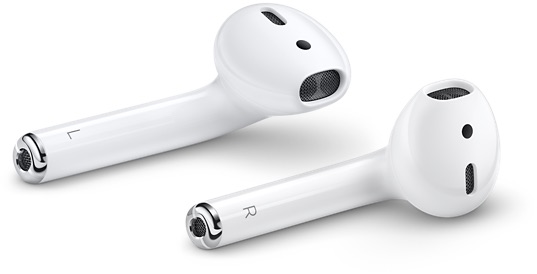
AirPods are Apple's completely wire-free headphones, which look a bit like the Apple EarPods from older devices, but without the cables. AirPods have Apple-designed tech inside like a special wireless chip called the W1, an accelerometer for ear detection, dual optical sensors, dual beamforming microphones for Siri and phone calls, and a second accelerometer for speech detection.
AirPods come with the AirPods Charging Case, which is used for both charging and storage purposes so the AirPods don't get lost. The Charging Case is about the size of a container of dental floss, so it's easily pocketable. A Lightning port at the bottom lets the AirPods and the case be charged with the Lightning cables you already have on hand.
How do I set up my AirPods?
One of the best thing about AirPods is how easy they are to set up with an Apple device. All you need to do is unlock your iPhone or iPad, pop open the top of the AirPods Charging Case, hold it near your device, and wait for a popup on your iPhone or iPad's display.
From there, you just tap the connect button and the AirPods pair like magic.
AirPods are designed to connect to your iPhone or iPad whenever you open the case lid, so all you need to do to listen to music is take them out of the case and put them in your ears.
Your AirPods are linked to your iCloud account, so once you pair them with one device, your other devices know they exist. You can switch connections between your devices through the standard Bluetooth settings options, where AirPods will be listed on any device that you're signed into with your iCloud account.
AirPods have a number of unique features when used on an Apple device, and they've been designed to work well with all of your Apple products. If you're considering AirPods you'll want to check out this list so you know just what makes them so special.
Zero wires
Comfortable fit
Five hour battery life
24 hour total battery life with Charging Case
3 hours charge from case in 15 minutes
One tap setup for Apple devices
Instant connection to iPhone, iPad, Mac, or Apple Watch
Easy switching between iOS and Mac devices
Accelerometer plays music right when you put the AirPods in your ears
Taking out an AirPod pauses music, thanks to accelerometer
Just one AirPod can be used for calls or music
Double tap access to Siri
Double tap for changing tracks or playing/pausing music
W1 chip for efficient battery and extended bluetooth range
Microphone for calls and Siri
These are all features that other headphone manufacturers have attempted to match, but haven't been able to get quite right in this combination. AirPods continue to be ahead of the competition, and they're almost universally loved by those who have Apple devices.
What devices are compatible with AirPods?
AirPods work with all iPhone, iPad, and iPod touch models that run iOS 10 or later. This includes the iPhone 5 and newer, the iPad mini 2 and newer, the fourth-generation iPad and newer, the iPad Air models, all iPad Pro models, and the 6th-generation iPod touch.
AirPods work with all Apple Watch models running watchOS 3 or later, which includes the original Apple Watch and all subsequent Apple Watch releases.
With the above listed iPhone, Apple Watch, iPad, and Mac models, all AirPods features are available. You can pair AirPods with other non-Apple devices, you just won't get to take advantage of all the bells and whistles.
You can use AirPods with Android smartphones and other devices, and for instructions, we have a handy AirPods Android guide that goes over how to use AirPods on Android, the benefits, the downsides, and how well AirPods work on non-Apple devices.
AirPods are just like other Bluetooth headphones, and will connect to any device that supports Bluetooth audio.
Are AirPods comfortable and do they stay in your ears?
Based on reviews, user anecdotes, and our own experiences here at MacRumors, most people who own AirPods find them to be relatively comfortable, even when using them for long periods of time.
That said, everyone has ears that are shaped differently, so there are some instances where AirPods might not be a good fit. With small ears, for example, AirPods can be a tight fit and can be uncomfortable for longterm wear.
We haven't seen complaints of AirPods falling out of peoples' ears with regular use, but it's worth noting that AirPods are not designed for exercising and can come out with rigorous activity.
Are AirPods sweatproof?
AirPods will unofficially hold up to a small mount of moisture without becoming unusable, but there is no water resistance rating and they are not meant to be used when working out. Future AirPods may be more water resistant, but for the current version, use caution.
Are there useful AirPods accessories?
There are quite a few accessories on the market that you can get for your AirPods, including protective cases, cases that add wireless charging, and more. We've listed a handful of the best accessories we've found below.
AirSnap from Twelve South ($30) - A handy little leather case for your AirPods, metal clip included for keeping them within reach in a bag.
HyperJuice Wireless Adapter ($20) - The HyperJuice snaps onto your AirPods case and lets you charge your AirPods using a Qi wireless charging mat.
PowerPod Wireless Charging Case ($30) - Another wireless charging case that's designed to fit over the AirPods Charging Case.
Catalyst Waterproof AirPods Case ($25) - This silicone case fits over your AirPods Charging Case and keeps it safe from water or dust. It also includes a carabiner.
Airfly from Twelve South ($40) - The Airfly is an adapter that lets you use AirPods where wired headphones would normally be required, such as at gyms or with airplane entertainment systems.
Spigen AirPods Strap ($8.99) - If you want to add a cable to your AirPods for some reason, Spigen has you covered with a strap that connects them together.
EarBuddyz Ear Hooks ($11.95) - If you want to get some ear hooks to help your AirPods stay in place, EarBuddyz offers a soft silicone option.
How do AirPods compare to other wireless headphones?
We've done a couple of comparisons that pit the AirPods against other wire-free headphones. Spoiler: the AirPods are super popular for a reason and are the best wireless headphones we've found for Apple's devices.
AirPods can be purchased from Apple for $159, but third-party retailers sometimes have them available at a discounted price. For the best possible deal on AirPods, make sure to check out our AirPods deal guide.
What's next for the AirPods?
Apple is, of course, working on a second-generation version of the AirPods, and you can see all of the details in our AirPods rumor roundup. We're expecting to see a wireless charging case, "Hey Siri" support, and perhaps even some new health features.
Our roundup also has more on the technical details of the AirPods, including the design, how they work, the internal components, and more, so make sure to check it out.
AirPods Community Discussion
If you have any specific questions or want to discuss AirPods with others in the MacRumors community, visit our iPhone Accessories sub-forum which houses many discussions about AirPods, including:
Know of an AirPod feature or how to that would make a good addition to this guide, or have an AirPods question you want answered? Email us at tips@macrumors.com.
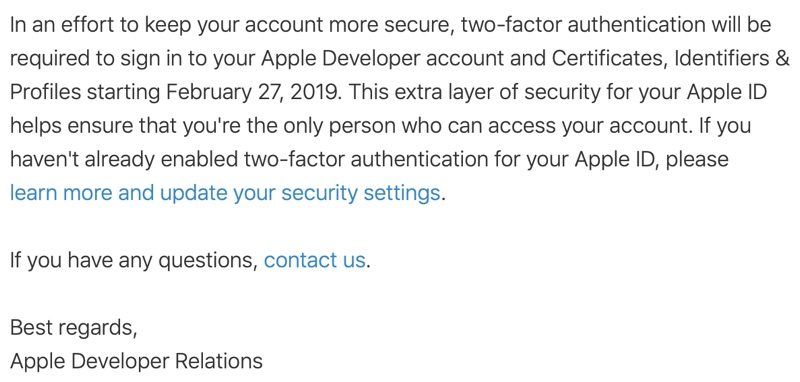
Starting on February 27, Apple will be requiring all developers to have two-factor authentication enabled for their Apple IDs, with two-factor necessary for signing into Developer accounts after that date.
Apple today told developers via email that the requirement is being implemented to help keep developer accounts more secure and to make sure that no third-parties can access a developer account.
Developers who do not have two-factor authentication enabled for their Apple IDs will need to turn it on by February 27.
Two-factor authentication can be enabled on an iPhone or Mac by following Apple's instructions. Once enabled, a verification code from a trusted device will be required when logging in to a developer account.
Popular grocery store chain Kroger has launched a new mobile payments service called Kroger Pay, which it will be using in lieu of Apple Pay.
According to a WCPO, a local Cincinnati news site, Kroger Pay launched in Columbus and Colorado today, but will be expanding to all Kroger stores by the end of the year.
Kroger Pay is QR-based, so to pay, users need to open up the app and generate a single-use QR code that's scanned at checkout when making a purchase.
Kroger customers can link any major debit or credit card to the Kroger Pay app, and it also includes a Kroger Rewards debit card for earning fuel points and other rewards with purchases.
"Kroger Pay is one of the few mobile wallets that pairs loyalty and payment," said Mary Ellen Adcock, group vice president of operations. "The application of this exciting technology is another step in our front-end experience transformation."
With Kroger embracing its own payment solution, it looks like the grocery store chain has no plans to introduce support for Apple Pay. Kroger did test support for Apple Pay in stores that support contactless payments, but reportedly discontinued the program "due to little interest by customers."
Kroger in 2018 told a Reddit user that it did not have plans to implement Apple Pay in any of its stores.
Kroger has been working on its payments service for more than two years, and has been accepting the Chase Pay digital wallet since 2017.
Apple is planning to unveil both its news service and its TV streaming service at its March 25 event, reports Bloomberg, and celebrities will be in attendance.
Apple's plans for a March 25 event were revealed yesterday, but at the time, Apple was only known to be unveiling an upcoming news subscription service in Apple News. The rumored TV service that's in the works will also reportedly be included.
Hollywood stars such as Jennifer Aniston, Reese Witherspoon, Jennifer Garner, and JJ Abrams are set to attend the event, which will be held at the Steve Jobs Theater on the Apple Park campus in Cupertino, California. All of these actresses are starring in television shows that Apple has purchased, and JJ Abrams is directing one of them.
Apple's upcoming video service is said to be similar to Amazon's Prime video option and Netflix's service. It will include TV shows and movies acquired by or funded by Apple, and Apple has more than two dozen original television shows in the works. An actual paid subscription service will launch by the summer.
There is some confusion over Apple's streaming TV plans. While Bloomberg's report suggests Apple's content will be delivered via paid streaming service, other rumors have indicated that Apple plans to provide at least some of its original content to Apple device owners for free.
These other rumors have also suggested that Apple will be teaming up with content providers like Showtime to allow Apple owners to sign up for add-on services like Showtime premium through its TV app, where the upcoming streaming service will presumably be available.
Apple's plans for its TV service will become clearer after March, when the details are officially announced.
Along with its TV service, Apple is going to unveil a premium news service that will let Apple News users sign up for a $9.99 per month subscription that will provide unlimited access to paywalled content from sites like The New York Times and the Washington Post, though Apple is said to be still negotiating deals ahead of the service's launch.
There's also a magazine subscription service in the works, which will provide unlimited access to dozens of magazines for $9.99 per month, similar to the Texture service that Apple acquired in 2018. All of these services could potentially be bundled into a single subscription package option in the future.
The March 25 event is believed to focus solely on services, with Apple not planning to introduce any hardware.
With the AirPower having already been announced and all of the other updates being relatively minor in scale based on circulating rumors, it makes sense for the new products to debut more quietly.
The iPad mini 5, for example, is expected to be quite similar in design to the iPad mini 4, with the exception of an updated processor, and the same goes for the seventh-generation iPad. That device may get a slightly bigger 10-inch screen and a new chip, but the changes won't be significant.
AirPods rumors have been a bit mixed, but it looks like we may get a wireless Charging Case and "Hey Siri" functionality with other features saved for a later update in 2019 or 2020. We're also not expecting significant design changes to the seventh-generation iPod touch, which will look similar to the sixth-generation model.