Thursday, October 10, 2019

Nokia 6.2 with 6.3-inch PureDisplay, 118-degree Ultra-Wide Lens to Launch in India on October 11


via News – MySmartPrice https://ift.tt/2AVDcKP

HP joins the fray with three “new” Chrome Enterprise devices


via Chrome Unboxed – The Latest Chrome OS News https://ift.tt/2MwssI2

Redmi Note 8 Pro to Go on Sale in India Via Amazon After the October 16 Launch: Specs, Expected Price


via News – MySmartPrice https://ift.tt/2M0F2QN

Apple Pulls Protest App From App Store Following Criticism From Chinese State Media

https://ift.tt/2oPMGUR

Apple has pulled an app from the App Store that Hong Kong protestors have been using to track police movements, saying it violates the company's guidelines and local laws.

Apple approved HKmap Live last week after reviewing its decision to initially reject the app from the  App Store .


However, on Wednesday Apple was criticized by Chinese state media for its decision to make the app available. "Letting poisonous software have its way is a betrayal of the Chinese people's feelings," said the People's Daily.

The app has since been delisted from the  App Store  and Apple has issued the following statement:
We created the  App Store  to be a safe and trusted place to discover apps. We have learned that an app, HKmap.live, has been used in ways that endanger law enforcement and residents in Hong Kong. Many concerned customers in Hong Kong have contacted us about this app and we immediately began investigating it. The app displays police locations and we have verified with the Hong Kong Cybersecurity and Technology Crime Bureau that the app has been used to target and ambush police, threaten public safety, and criminals have used it to victimize residents in areas where they know there is no law enforcement. This app violates our guidelines and local laws, and we have removed it from the  App Store .
In a series of tweets, the developers of HKmap Live said they disagreed with Apple's claim that the app endangered law enforcement and residents in Hong Kong, and argued that "there is zero evidence to support CSTCB's [the Hong Kong Police Force’s Cyber Security and Technology Crime Bureau] accusation that HKmap App has been used to target and ambush police, threaten public safety, and criminals have used it to victimize residents in areas where they know there is no law enforcement."


Earlier on Thursday, Apple also removed the app of news outlet Quartz from China’s  App Store . The news organization told The Verge that Apple has removed its mobile app after complaints from the Chinese government, and said it had received a notice from Apple that the app "includes content that is illegal in China."

Demonstrations in the city state began in March in response to an unsigned legal bill that threatened to allow extradition to mainland China. Since then, the protests have to expanded to demand that Hong Kong retains its broader democratic rights. The special administrative region maintains separate governing and economic systems from that of mainland China under the principle of "one country, two systems".

Note: Due to the political nature of the discussion regarding this topic, the discussion thread is located in our Politics, Religion, Social Issues forum. All forum members and site visitors are welcome to read and follow the thread, but posting is limited to forum members with at least 100 posts.


This article, "Apple Pulls Protest App From App Store Following Criticism From Chinese State Media" first appeared on MacRumors.com

Discuss this article in our forums


from MacRumors: Mac News and Rumors - All Stories https://ift.tt/2IEV9Bt

Wednesday, October 9, 2019

Realme X2 Pro with Snapdragon 855+ SoC, 90Hz Display Set for December Launch in India


via News – MySmartPrice https://ift.tt/2B0obXW

Apple Offers Disaster Relief Program for Apple Card Holders

https://ift.tt/2pSuXg6

The Apple Card comes with a Disaster Relief Program, according to a MacRumors reader who lives in Houston and recently experienced some flooding from tropical storm Imelda.

Apple sent MacRumors reader Frequeniquity an email suggesting that he apply for the card after Apple detected that he "may have been affected by a natural disaster."


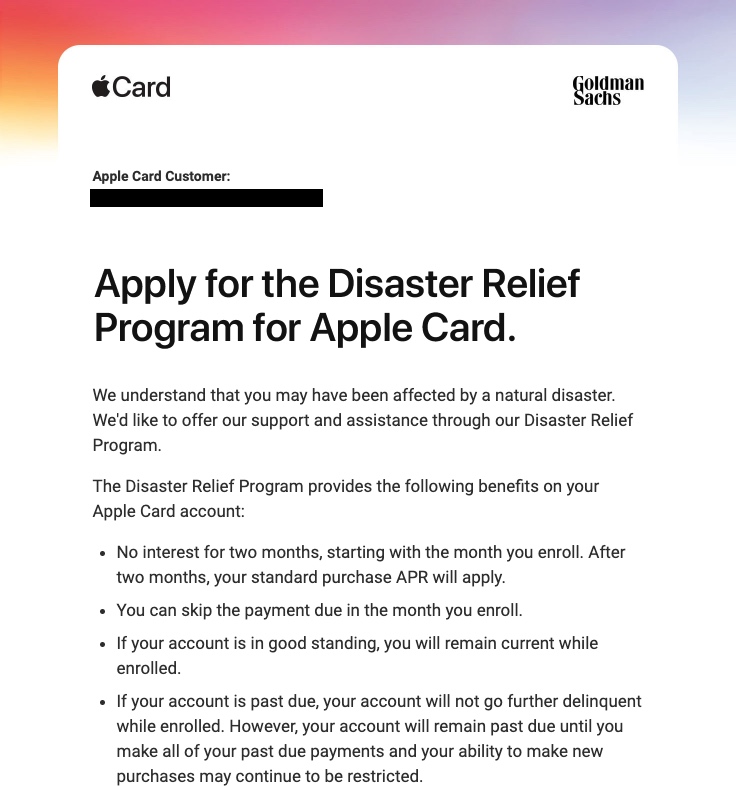
Emails sent out by Apple, which were also received by another MacRumors reader, offer the following benefits:

  • No interest for two months, starting with the month you enroll. After two months, your standard purchase APR will apply.

  • You can skip the payment due in the month you enroll.

  • If your account is in good standing, you will remain current while enrolled.

  • If your account is past due, your account will not go further delinquent while enrolled. However, your account will remain paste due until you make all of your past due payments and your ability to make new purchases may continue to be restricted.


According to the email sent out to  Apple Card  users, those interested in applying for the Disaster Relief Program should contact an  Apple Card  Specialist after receiving an email.

Apple appears to be sending out these emails to customers who have addresses registered in areas where a natural disaster has occurred, and presumably this will be a benefit offered to all  Apple Card  users who are experiencing issues like floods, fires, earthquakes, and other issues.


This article, "Apple Offers Disaster Relief Program for Apple Card Holders" first appeared on MacRumors.com

Discuss this article in our forums


from MacRumors: Mac News and Rumors - All Stories https://ift.tt/33frkPQ

macOS Catalina's Biggest Changes: What to Check Out After Upgrading

https://ift.tt/nvEILJ

macOS Catalina, which came out on Monday, is the newest version of the operating system that runs on the Mac. Catalina brings some significant changes, including the removal of the iTunes app, a new Sidecar feature, an updated Find My app, and more.

In our latest YouTube video and in the article below, we're going to go over some must-know  macOS Catalina  features that will be useful to those who have just updated and want to familiarize themselves with the changes.

Subscribe to the MacRumors YouTube channel for more videos.


  • No More iTunes - Apple removed iTunes in  macOS Catalina , splitting it up into three new apps: Music, TV, and Podcasts. These three apps offer all of the functionality that was previously in iTunes, so you can still get to your music library, access TV shows and movies you purchased, and listen to your favorite podcasts. You can still make iTunes Store purchases, too.


  • Finder Syncing - Since there's no iTunes app, you won't use iTunes to manage your devices that are plugged in. Instead, when you plug in an iPhone or iPad to your Mac, you'll see it in the left side of the Finder window where you can get to all the same controls you had in iTunes.


  • Apple Watch Password Authentication - You've long been able to unlock a Mac with an  Apple Watch , but in  macOS Catalina , the  Apple Watch  can also be used to authenticate passwords or approve app installations when you double tap on the Side button. This is especially handy on Macs that don't have Touch ID. Get to the settings by opening up System Preferences and choosing the Security and Privacy section.


  •  Sidecar  -  Sidecar  is a new feature in  macOS Catalina  that lets you use your  iPad  as a secondary display. The easiest way to activate  Sidecar  is to click on the AirPlay icon on the Mac. If you have a Sidecar-compatible  iPad , it will show up in the list of available devices.  Sidecar  is limited to newer Macs and on the  iPad , it only works with iPads that support the Apple Pencil. Make sure to check out our Sidecar guide for more info.


  •  iPad  Apps for Mac - Apple in  macOS Catalina  introduced new "Catalyst" developer tools that are designed to make it easier for developers to port their  iPad  apps to the Mac, which means you can expect some of your favorite iOS apps to be available on the Mac. Catalyst apps are still rolling out, but some high-profile options are already available like GoodNotes 5, Carrot Weather, HabitMinder, and more.


  •  Find My  - There's a new  Find My  app on the Mac, which brings a dedicated app for finding friends and devices for the first time.  Find My  combines  Find My  Mac and  Find My  Friends, so it's the one-stop shop for whatever you're looking for.  Find My  even lets you find your Mac when it's closed and has no WiFi connection by leveraging a Bluetooth connection to other iPhones and Apple devices that are nearby. The new  Find My  capabilities give you a better chance of finding a lost or stolen device.


  • No More 32-Bit Apps -  macOS Catalina  does not support 32-bit apps, which means some older apps might not work after upgrading. This mostly only applies to apps that haven't been updated in a long time, but it's still something that may take users by surprise. For more info, make sure to check out our 32-bit Mac app guide.


Many of the apps on the Mac have been overhauled with new features. Reminders, for example, has a whole new look and an easier to use interface, while Photos has a new view that organizes everything by day, month, or year. Notes lets you share folders for the first time, and there's a Picture by Picture option in Safari.

For a full rundown on all of the features that you'll find in  macOS Catalina , take a look at our macOS Catalina roundup.

Related Roundup: macOS Catalina

This article, "macOS Catalina's Biggest Changes: What to Check Out After Upgrading" first appeared on MacRumors.com

Discuss this article in our forums


from MacRumors: Mac News and Rumors - All Stories https://ift.tt/35kkmLk