Thursday, October 24, 2019

Review: Philips Hue Vintage-Style Filament Bulbs Are Perfect for Accent Lighting

https://ift.tt/2JlAKBI

Signify, the company behind the Philips Hue line of lights, recently introduced new filament bulbs, which are designed to look like vintage filament-style light bulbs.

These bulbs, which come in three sizes, are the first bulbs in the Philips Hue lineup that are meant to be used with or without a lamp shade, making them perfect for decorative-style lamps that are meant to have naked bulbs.


There's a Standard A19 bulb that's in the shape of a traditional lightbulb, an Edison ST19 bulb that's elongated and without the rounder bulb shape, and there's the Globe G25 bulb, the largest of the three, which looks like a larger version of the Standard A19.


Though designed to look like vintage filament bulbs, the Hue Filaments are LED bulbs and not incandescent bulbs so they don't get hot at all when in use. You can touch the naked bulb and not feel a thing besides a bit of warmth.

The filaments inside the Hue Filament bulbs are arranged in an attractive spiral shape, with all of the bulbs in different sizes using the same internal design.


All three of the Filament bulbs from Hue are white light only, which means colors are not supported. The default color is a soft, warm yellow, which is ideal for accent lighting and dimmer indoor lighting. For those familiar with the white lighting spectrum, these are 2100K bulbs.

There's just the one yellow shade with no option to change the white light temperature, but the Filament bulbs can be dimmed or brightened to adjust the lighting that is put off. The bulbs can get surprisingly bright, which allows them to light up a room when you're using a few.


Each of the bulbs measures in at 530 lumens, so these are not as bright as your average 60-watt bulb. For comparison's sake, some of the standard Hue bulbs are upwards of 800 lumens, so don't expect the same maximum brightness levels (though you probably wouldn't want that much brightness from a bulb without a lamp shade).

In a naked lamp that's at eye level, a full brightness Filament bulb is impossible to look at, so I appreciated the ability to dim the bulbs down from their maximum brightness. I'm using one of the bulbs in a little monster lamp that I have and at low light, it works perfectly.


Since these are mostly designed to be used without a lamp shade, the Filament bulbs are probably best used at dimmer light, but in a ceiling lamp or up hung up above, the brighter lights will work well and will put off a decent amount of light.

These bulbs are part of the Philips Hue Bluetooth line, which means you can directly control them using the Philips Hue Bluetooth app even if you don't have a Hue Bridge. If you do have a full Hue setup with a bridge, these bulbs are also compatible, and the bridge, of course, adds HomeKit so you can control the Filament bulbs with Siri.

I didn't extensively test these on a standalone basis with the Bluetooth app because I do have an existing Hue setup, but I did try them out with the Bluetooth app and found the control to work well, though response times are bit slower compared to a bridge connection.


Offering the option to connect to the newest Hue bulbs with Bluetooth is a great move by Philips because now people can experience Hue bulbs and control their lights without committing to an entire setup.

As with all Hue bulbs that are able to connect to the Hue Bridge, the Filament bulbs can be used in ‌HomeKit‌ scenes and automations alongside other ‌HomeKit‌ products, and can be controlled either through the Hue app or Apple's own Home app.

Bottom Line


If you've been waiting for a Hue bulb that's able to work in a lamp without a lamp shade, the Filaments are the bulbs for you.

The vintage look is perfect for a naked lamp, and the soft white light works well without a lamp shade. The spiral design is attractive, ‌HomeKit‌ support is included, and if you don't have a Hue Bridge, you can still control these and use dimming and on/off functionality over Bluetooth.


The bulbs are versatile, look fantastic, put off a good amount of light for a decorative bulb, and are an excellent addition to the Hue family. In the future, I'd love to see colored bulbs in this style or adjustable shades of white, but I'm not familiar with the technical details or what would be required for Signify to ultimately release such a product.

For now, though, these are a great option for those who need a more decorative bulb than the traditional Hue offerings.

How to Buy


The Hue Filament Smart Bulbs can be purchased from the Best Buy at the current time. The A19 model is priced at $24.99, the Edison ST19 is priced at $27.99, and the Globe G25 is priced at $32.99.


This article, "Review: Philips Hue Vintage-Style Filament Bulbs Are Perfect for Accent Lighting" first appeared on MacRumors.com

Discuss this article in our forums


from MacRumors: Mac News and Rumors - All Stories https://ift.tt/31KPfWi

Apple Seeds Third Beta of Upcoming macOS Catalina 10.15.1 Update to Developers

https://ift.tt/2RPgRpS

Apple today seeded the third beta of an upcoming macOS Catalina 10.15.1 update to developers, a week after seeding the second beta and a little over two weeks after releasing macOS Catalina to the public.

The new ‌macOS Catalina‌ beta can be downloaded using the Software Update mechanism in System Preferences after installing the proper software from the Developer Center.


The first update to ‌macOS Catalina‌ is minor in scale and appears to focus on performance improvements and fixes for bugs that weren't able to be addressed in the first version of Catalina. An interim supplemental update was released just two days ago with some other bug fixes that needed to be addressed before 10.15.1 was ready.

Apple's release notes for the first beta said that the update introduces support for the AMD Navi RDNA eGPU architecture and brings some changes to Photos.

You can now filter by Favorites, Edited, ‌‌Photos‌‌, Videos, or Keywords in the All ‌‌Photos‌‌ view, and you can choose View > Metadata > Titles to enable titles and filenames in the All ‌‌Photos‌‌ View.

‌macOS Catalina‌ is a major update that eliminates iTunes in favor of new Music, Podcasts, and TV apps, nixes support for 32-bit apps, adds a new Find My app, brings a new ‌Photos‌ interface, and includes multiple privacy enhancements and other app refinements.

For full details on what's new in ‌macOS Catalina‌, make sure to check out our macOS Catalina roundup.

Related Roundup: macOS Catalina

This article, "Apple Seeds Third Beta of Upcoming macOS Catalina 10.15.1 Update to Developers" first appeared on MacRumors.com

Discuss this article in our forums


from MacRumors: Mac News and Rumors - All Stories https://ift.tt/2peiWl8

Accessory Maker Releases 'AirPods Pro' Cases Matching Rumored Noise-Cancelling Design

https://ift.tt/2ouR4Zr

Last month, in the iOS 13.2 beta, MacRumors discovered an icon depicting never-before-seen AirPods with rubber ear tips, lending credence to rumors that Apple is planning to release higher-end AirPods with active noise cancellation and improved water resistance.
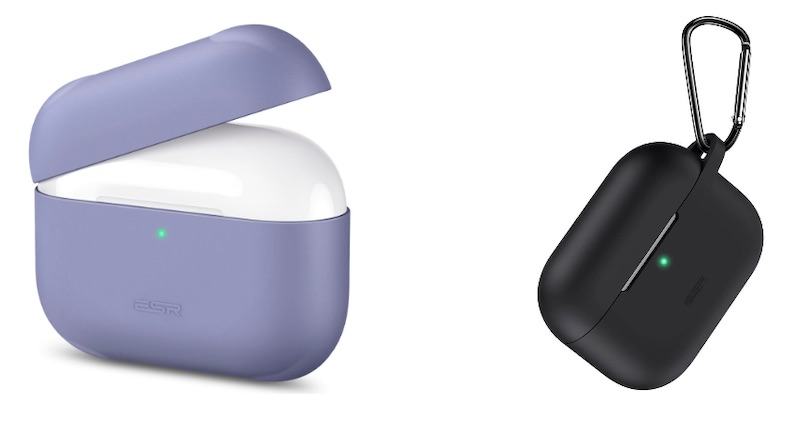


The new AirPods are expected to be released in late 2019 or early 2020. Ahead of time, accessory maker ESR has released both a cover and carrying case for the so-called "AirPods Pro", with the product images depicting a wider charging case designed to hold the AirPods with rubber ear tips.


The fact that ESR is now shipping perfectly-fitting cases for unreleased AirPods suggests that the accessory maker may have gleaned dimensions and design details from sources within Apple's supply chain. On the other hand, though, this could simply be a marketing stunt based purely on rumors.

The elongated charging case is consistent with the one that surfaced in a potential leak a few months ago:


Unsurprisingly, the higher-end AirPods are expected to have a higher price tag than the existing AirPods, which retail for $159 with a wired charging case and $199 with a wireless charging case. Exact pricing remains to be seen.

Apple typically unveils redesigned products during its keynotes, but an October event is looking unlikely this year, so it could announce the new AirPods in a press release like the redesigned Beats Solo Pro. Or, if the new AirPods are a 2020 product, they could be unveiled at Apple's usual March event.

Related Roundups: AirPods 2, AirPods Pro
Buyer's Guide: AirPods (Buy Now)

This article, "Accessory Maker Releases 'AirPods Pro' Cases Matching Rumored Noise-Cancelling Design" first appeared on MacRumors.com

Discuss this article in our forums


from MacRumors: Mac News and Rumors - All Stories https://ift.tt/33XyCbf

HONOR 20, HONOR View 20 Start Receiving Magic UI 3.0 Based on Android 10


via News – MySmartPrice https://ift.tt/2BLkc1L

Xiaomi Could Launch More Than 10 5G Smartphones Next Year


via News – MySmartPrice https://ift.tt/2PmT414

Anker's New EufyCam 2 Security Camera Will Be Able to Store Video Recordings Securely in iCloud Later This Year

https://ift.tt/33ZxLXw

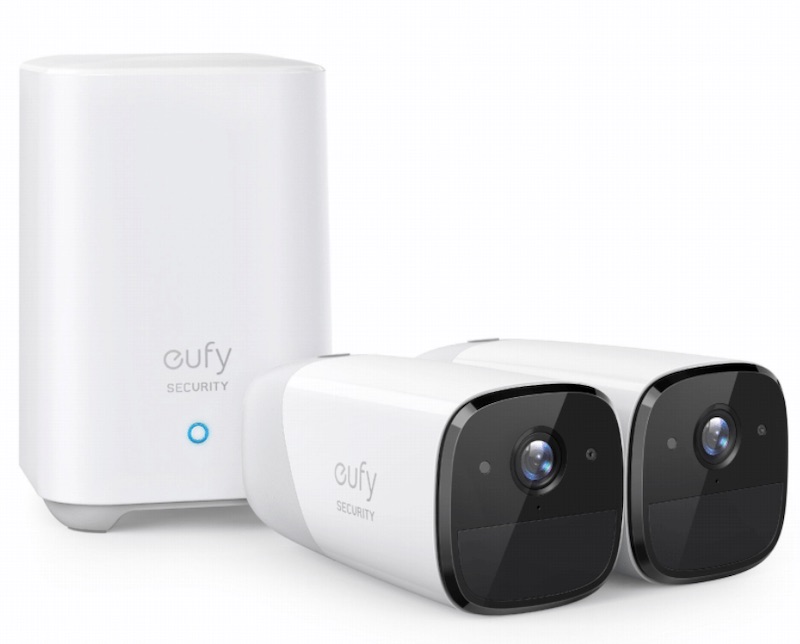
Anker this week unveiled the EufyCam 2, one of the first security cameras that will support Apple's new HomeKit Secure Video feature, allowing the camera to capture and store recordings securely in iCloud.


HomeKit Secure Video will only be available to users that pay for 200GB or more of iCloud storage, starting at $2.99 per month. Users with the 200GB plan can store 10 days of recordings from one camera in iCloud at no extra cost, while those with a 2TB plan can store 10 days of recordings from up to five cameras. HomeKit Secure Video recordings do not count towards a user's iCloud storage usage.

With an Apple TV, HomePod, or iPad as the home hub, HomeKit Secure Video uses on-device intelligence to privately analyze activity captured from the EufyCam 2 to detect whether it sees a person, vehicle, or an animal before securely sending it to iCloud, ensuring that users are only alerted to important activity.

A demo of HomeKit Secure Video from an iPad at an Apple Store was recently shared by Zach Truskowski, as noted by HomeKit Hero:


HomeKit Secure Video is billed as a safer option than storing recordings on the servers of third-party accessory makers.

With support for HomeKit in general, the EufyCam 2 can stream live video in the Home app on an iPhone or iPad. When the cameras detect motion, they automatically send a push notification to an iPhone or iPad, with users able to view live video immediately from the lock screen of their devices.

EufyCam 2 will be available for pre-order in November from Best Buy in the United States, with pricing starting at $349.99 for a two-camera kit. Key features include 1080p recording, 365-day battery life, and night vision. Google Assistant and Alexa are also supported for voice control.


This article, "Anker's New EufyCam 2 Security Camera Will Be Able to Store Video Recordings Securely in iCloud Later This Year" first appeared on MacRumors.com

Discuss this article in our forums


from MacRumors: Mac News and Rumors - All Stories https://ift.tt/32LsfaL