Tuesday, November 26, 2019

Hands-On With Wireless CarPlay on the Porsche Macan S

https://ift.tt/2KVTOY1

Five years after the launch of CarPlay, there are still very few car manufacturers supporting Apple's in-car platform wirelessly. The main benefit of wireless ‌CarPlay‌ is a nearly seamless experience of having much of your phone's core functionality available just a fingertip or voice command away on your car's infotainment system while your phone remains in your pocket.

So far, wireless ‌CarPlay‌ support is largely limited to some premium brands, and Porsche is one of those brands that recently rolled out support for it.

For a taste of that experience, Porsche invited me down to Atlanta for a day to take a look at how wireless ‌CarPlay‌ works hand-in-hand with the native infotainment system on the 2019 Macan S crossover. I also got to spend some time behind the wheel of the Macan S on the track at the Porsche Experience Center and check out the Heritage Gallery, a frequently changing display of some of the most important and collectible vehicles in Porsche's storied history.

Porsche 914 display in Heritage Gallery

While the Macan is certainly a fun crossover to drive and I had a great time putting it through its paces on the track and the other elements in the Porsche Experience Center, the primary purpose of my trip was to check out the infotainment system and how it works with ‌CarPlay‌.

2019 Porsche Macan S in Mamab Green Metallic

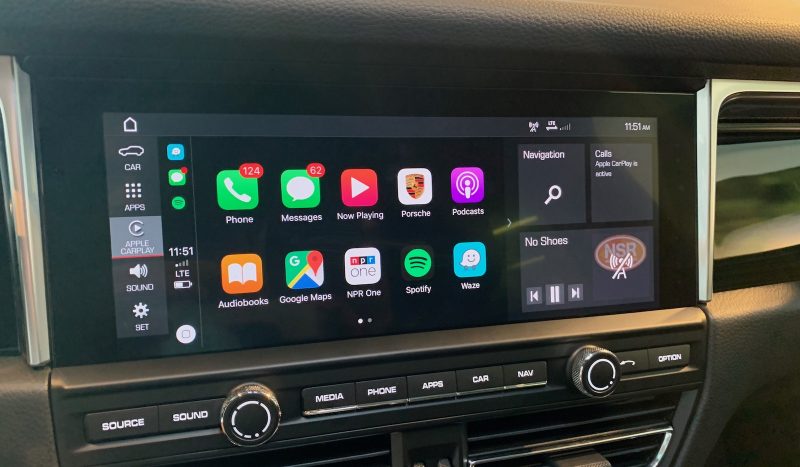
Porsche's infotainment system is known as Porsche Communication Management (PCM), and as on most cars, it's the hub for much of the technology you need to interact with on a regular basis. The Macan comes with a 10.9-inch widescreen infotainment display, which allows for terrific integration between ‌CarPlay‌ and the tile-based PCM system.

‌CarPlay‌ home screen integrated with PCM

When active, ‌CarPlay‌ takes over a significant portion of the display, but a top status bar, left-side shortcuts bar, and multiple right-side app tiles remain visible at all times, making it easy to manage both systems simultaneously.

Waze in ‌CarPlay‌

All of the home screen tiles on PCM are configurable, so you can customize things just the way you want, and support for multiple layouts makes it easy to switch between tile sets.
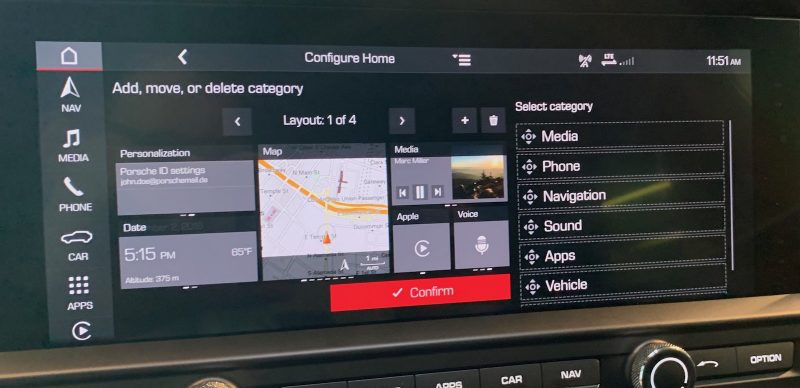
Customizing the PCM home screen layouts

The Macan offers a relatively clean center stack dominated by the widescreen display, with a handy set of hardware buttons and a couple of knobs thankfully making for quick access to a number of important functions merely by feel.

The simplicity of the center stack is made possible due to Porsche's decision to move the vast majority of hardware controls down to the center console clustered around the gearshift. There are over 30 buttons and switches located down on the center console, including climate control, heated/ventilated seat controls, and various driving mode options. It's an overwhelming experience when you first sit down in the cockpit, but you quickly discover that many of the important ones should become familiar to find by feel while others are used infrequently enough that their location isn't an issue for everyday driving.

Macan center console

With available built-in navigation capable of taking over nearly the entire widescreen display, you certainly get an expansive view of what's around you. The display sits a little lower on the dash than I prefer for visibility, but I'd say it's about average in this regard.

Widescreen built-in navigation

The persistent top and left status/navigation bars and the hardware buttons make it easy to jump between functions even while enjoying a wide fullscreen experience. A small digital display on the driver's dashboard can also serve as a configurable supplemental screen for navigation to make it easier to see directions and other vehicle information like audio, phone, settings, and more at a glance.

Driver display

While ‌CarPlay‌ is available on all Macan models, it is not a standard feature. ‌CarPlay‌ support is priced at $360 as a standalone option, or it's available as part of several premium packages.

The 2019 Macan doesn't offer wireless charging, but the recently launched 2020 model does include it as an option, allowing for an even more seamless experience. The wireless charger is included in an optional $690 smartphone compartment located in the center console, with the compartment also able to serve as an antenna booster for improved signal strength.
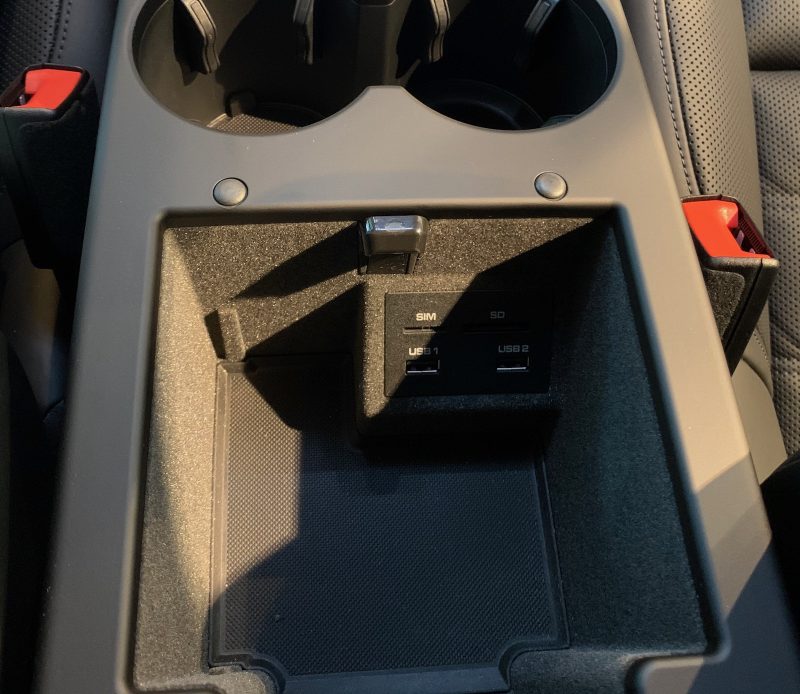
Center console compartment with USB-A ports

If you don't opt for the wireless charger or just want to plug in your phone, you'll have two available USB-A ports inside that center console. Two more USB-A charging ports are located on the rear of the console to serve passengers in the back.

Rear USB ports and controls

Wired ‌CarPlay‌ is available across the Porsche lineup, and the company is working on rolling out wireless ‌CarPlay‌ on a number of its models as the infotainment systems get refreshed, and for the 2020 model year, the Macan, Taycan Turbo/Turbo S, and all 911 Carrera variants will offer wireless ‌CarPlay‌.

One of the major points of difficulty with ‌CarPlay‌ is frequently integration with a vehicle's native infotainment system, as swapping between the two systems or seeing what's going one while using the other one can be difficult, but Porsche has done a great job making multitasking across PCM and ‌CarPlay‌ nearly seamless. The widescreen display offers plenty of room to show a traditionally sized ‌CarPlay‌ screen while still giving you access to all sorts of menus and information tiles from PCM, all visible at the same time.

To me, this is the best way to take advantage of widescreen displays with ‌CarPlay‌, rather than going to a wide fullscreen ‌CarPlay‌ interface that forces you to exit ‌CarPlay‌ in order to access native infotainment functions. On systems like this whether both ‌CarPlay‌ and the native interface are available simultaneously, you can sometimes run into conflicts where certain native functions like phone and messages are unavailable because they're currently being handled by ‌CarPlay‌, but with the extensive home screen tile customization available in PCM it's easy to configure things in just the way you like.

Wireless ‌CarPlay‌ is an extra bonus that really needs to start trickling its way down beyond a small handful of luxury car manufacturers at this point. For short trips where you don't need or want to bother plugging in your phone, it's super convenient for ‌CarPlay‌ to simply pop up on the dash even with your phone still in your pocket. The growing prevalence of wireless phone charging in vehicles even lets you top off your phone without needing to worry about cables.

The one major downside with all of this is cost, and ‌CarPlay‌ doesn't exactly come cheaply on the Macan. As noted above, ‌CarPlay‌ is a $360 option on its own, or it comes as part of some other packages. And if you want wireless phone charging as well, that's another significant cash outlay since it comes bundled as with the antenna-boosting smartphone compartment. It may not make a huge amount of difference to luxury car buyers already laying out quite a bit of cash for their purchases, but the ability to have your phone's functions and data conveniently accessible on your car's dashboard is such a benefit that I can only hope we see a trend toward ‌CarPlay‌ (and Android Auto) support being included standard on an increasing number of vehicles.

Related Roundup: CarPlay

This article, "Hands-On With Wireless CarPlay on the Porsche Macan S" first appeared on MacRumors.com

Discuss this article in our forums


from MacRumors: Mac News and Rumors - All Stories https://ift.tt/2QPl3aJ

Review: Fuse Launches New Cable Organizer Lineup for Wrangling All Your Apple Device Cords

https://ift.tt/2smmBil

Fuse, known for its Side Winder cable organizers for keeping the MacBook's cord and power adapter neat and tidy, is today launching a whole new lineup of cord management products.


There are cord winding options for Apple's MacBooks, the iPhone, the iPad, and Apple headphones, which basically covers Apple's entire lineup. Ahead of the debut of the new products, Fuse sent me a selection to test out. Below, I'll go over each option and my thoughts.


The Snap Backs ($13.99)


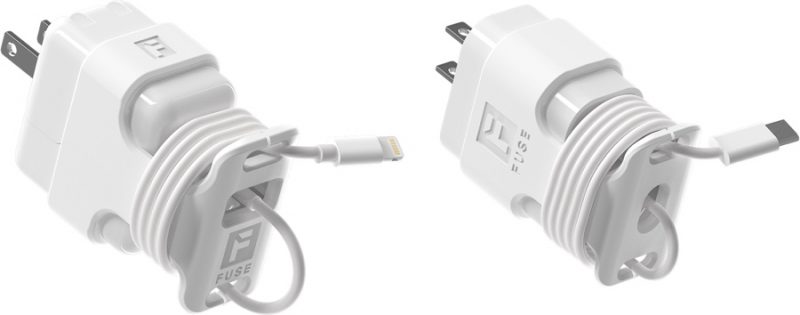
Fuse's Snap Backs are a collection of sleeve-style cable mounts that fit over various Apple chargers. There are versions for the 5W iPhone charger, the 12W iPhone/‌iPad‌ charger, the 18W ‌iPad‌ charger, and the 29W MacBook Pro charger.

Basically, you tuck a charger into the opening of the Snap Back and then wind the cord along the bottom part, securing the end of the cord in place with a little notch at the bottom.


The Snap Backs are made from a fairly malleable plastic that's easy to put on the charger and take off when needed, and they keep charging cords from coming unwrapped in a bag. There's minimal bulk added here, but they do increase the size of the charger a bit due to the extra material for winding the cord.

All of these leave the power adapters usable, so you can plug in a power adapter and unwind the exact amount of cord that you need while leaving the rest wound up and out of the way.


There's enough room on each of the Snap Backs to accommodate cables that are between one and six feet in length, which is super handy for those extra long cables you might have. The 29W model for the MacBook and MacBook Air power adapters accommodates cables up to eight feet long.

The Side Winder Mini ($9.99)


The Side Winder Mini is a little donut-shaped reel that's a little over an inch wide, and it's designed to let you wrap up your iPhone cables, corded headphones, micro-USB cables, and more.


Basically, you can wrap up any one foot to five foot cable, winding it up so it's neatly organized and out of the way. There are notches at several spots along the Side Winder Mini, which makes it convenient to tuck in the end of the cable so it won't come loose.


I've used cable wraps like this before and while the Side Winder Mini isn't anything revolutionary, it works well with minimal hassle and it has an affordable price tag.

The Side Winder Max ($10.99)


The Side Winder Max is identical to the Side Winder Mini but it's bigger and able to accommodate cables that are between one foot and 10 feet in length.


The Side Winder Mini is made for thinner iPhone cables, but this larger Side Winder Max can work with an iPhone cable or a thicker USB-C to USB-C or USB-C to Lightning cable.


The Side Winder Watch ($12.99)


The Side Winder Watch is perhaps one of the most convenient of the new cable management options from Fuse, given its utility. You can tuck the Apple Watch charging puck into the center of the Side Winder Watch, and then wrap the cord around it.


It's shaped like a little circular reel, and it lets you pull out enough cable for charging while leaving the rest of the cable out of the way. The ‌Apple Watch‌ can go right on the front of the Side Winder Watch when you need to charge it.

The Side Winder Watch is compact (about two inches across) and it's made from a flexible plastic with several notches to make sure the ends of the ‌Apple Watch‌ cable stay in place. There's enough space in the center to accommodate either the 1mm or 2mm ‌Apple Watch‌ cables, and it works with both the plastic and the metal cables.


Because of the reel design, you can pull out as much cable or as little cable as you need, and then wind it right back up again when you're done charging, tucking the Side Winder Watch into a pocket or bag.

This is perhaps one of my favorite ‌Apple Watch‌ charging and cable organizing solutions that I've tried given its simplicity and its affordable price point. Most Apple Watches should be able to charge with this design as even the wrap bands should be able to fit over the back.

The Side Kick Pro ($19.99)


Fuse's Side Kick Pro is designed to work with the 13, 15, and 16-inch ‌MacBook Pro‌ models. It's a little pop out cord wrangling socket that attaches to the side of the power adapter using adhesive.

When you need to wind up the cord, you can pop it out and wrap the cord neatly, so it tucks easily away in a bag or a drawer. When the cord is in use, you can pop the Side Kick Pro back down, and it takes up minimal space. When the cord is wound up, there are little grooves at two sides of the Side Kick Pro for tucking in the end of the cable so it stays secure.


I've been using the original version of the Side Kick Pro (for my 29W MacBook Charger) for quite some time now, and it still works as well as the day that I got it even though it's been popped up and down countless times. Even though the Side Winder Pro is slim when not in use, it pops up far enough that the entire length of the ‌MacBook Pro‌ USB-C cable can be wound up.


In my experience, it's impossible to wind up the ‌MacBook Pro‌ USB-C cable around the power adapter in a way that gets it to stay in place, which is why the Side Kick Pro is one of my favorite products in the collection. The Side Kick doesn't accommodate the extension cable for the ‌MacBook Pro‌ power cable nor does it have the reel-like winding mechanism of the Side Winder, which is something to keep in mind.

I've been using the Side Winder Pro with a USB-C power adapter, but it does also work with older MagSafe power adapters.

The Side Winder ($29.99)


The Side Winder was Fuse's first product, and while it's not new today, it's a useful option for managing a ‌MacBook Pro‌ cord.

The Side Winder is a solid option if you have a 13, 15, or 16-inch ‌MacBook Pro‌ or a ‌MacBook Air‌ (either MagSafe or USB-C) and need to use the extension cable.


The ‌MacBook Pro‌'s power adapter goes in the center and the two cables wrap up around it. The design lets the cable be pulled out as needed, so you can get the length you need to reach a power outlet while keeping the rest wound up.

It takes just a few seconds to fully wind a cable using the Side Winder, and it's a whole lot more convenient than trying to wrap up a naked cable. I don't know about anyone else, but attempting to put a ‌MacBook Pro‌ power adapter in my backpack as is just results in a cable mess when I take it out again.


I don't often need to use the extension cable with my ‌MacBook Pro‌ cord so the Side Kick isn't always my first cable management choice because it can be a bit bulky, but if you need the full length of the cable, it works great.

If you're just using the USB-C to USB-C cable portion of the ‌MacBook Pro‌ power adapter, the Side Kick Pro is a more compact choice.

Bottom Line


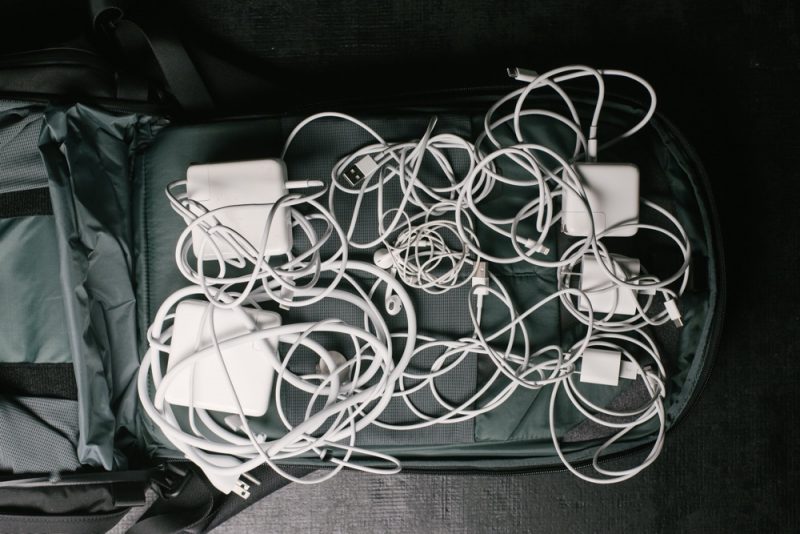
I absolutely hate cords and cables. I look forward to the day when all of our electronics operate wirelessly, but until then, cable organizers like the options from Fuse are the best way to keep cable mess under control.

Fuse's Side Winder has been popular since launch, and its new smaller Side Winder cable organizers build on that convenient reel design to let you wrangle iPhone cables, USB-C cables, and more, while the Snap Backs offer cable management options that also keep the power adapter in mind. All of these cable organization options also come in either black or white, so you can go with whichever color you prefer.

I'm a fan of Fuse's entire cable management lineup and I appreciate the affordable price points and simple, useful designs. If you're looking for new options for keeping your cables organized, Fuses's new products are worth checking out.

Fuse is offering a Black Friday deal right now with 30 percent off of all products site wide, which significantly drops the price of the new accessories.

How to Buy


All of the newly launched cable organizing products can be purchased from the Fuse website.


This article, "Review: Fuse Launches New Cable Organizer Lineup for Wrangling All Your Apple Device Cords" first appeared on MacRumors.com

Discuss this article in our forums


from MacRumors: Mac News and Rumors - All Stories https://ift.tt/33gmkdq

Black Friday 2019 Chromebook deals worth buying for budget upgraders or new Chrome OS users


via About Chromebooks https://ift.tt/33gdFrq

Black Friday 2019: Deals on Popular iPhone, iPad, and Mac Apps

https://ift.tt/2pRZdIq

Black Friday week is upon us and that means deals on many iPhone, iPad, and Mac apps, which we've rounded up below. We'll keep this list updated throughout the week, so keep checking back for additions.


iPhone and iPad Apps

  • Pixelmator Photo for iPad: free until Wednesday, November 27
  • Affinity Photo: 30% off until Tuesday, December 3
  • Affinity Designer: 30% off until Tuesday, December 3
  • 1Blocker: Upgrade to premium for up to 33% off from Wednesday, November 27 through Friday, November 29
  • Hydra: $2.99, down from $4.99, through Monday, December 2
  • Prizmo 5: Premium pack is $8.99, down from $13.99, through Monday, December 2

Mac Apps

  • Pixelmator Pro: $29.99, down from $39.99, until Tuesday, December 3
  • Affinity Photo: 30% off until Tuesday, December 3
  • Affinity Designer: 30% off until Tuesday, December 3
  • Affinity Publisher: 30% off until Tuesday, December 3
  • Fantastical 2: $39.99, down from $49.99, until Monday, December 9
  • Cardhop: $15.99, down from $19.99, until Monday, December 9
  • Chatology: $15.99, down from $19.99, until Monday, December 9
  • iStat Menus 6: $5.99, down from $11.99, from Wednesday, November 27 through Monday, December 2
  • Paste: $9.99, down from $14.99, from Wednesday, November 27 through Friday, November 29 and again on Monday, December 2
  • Parallels Desktop: 20% off until Tuesday, December 3
  • Smartmockups: 30% off all plans with discount code BLACKFRIDAY30 through Friday, November 29
  • 1Blocker: Upgrade to premium for up to 33% off from Wednesday, November 27 through Friday, November 29
  • Hydra: $24.99, down from $49.99, through Monday, December 2
  • Prizmo 3: $29.99, down from $49.99, through Monday, December 2
  • Unclutter: $9.99, down from $19.99, from Thursday, November 28 through Friday, November 29
  • SideNotes: $11.99, down from $19.99, on Black Friday
  • RapidWeaver 8: $59, down from $89, with discount code BLACKFRIDAY2019
  • CleanMyMac X: $34.95, down from $39.95

Mac All-Star Kit


A bundle of five popular Mac apps, including WALTR 2, PDF Expert 2, Fantastical 2, DaisyDisk, and Aurora HDR 2019, is on sale for $49.99 through Monday, December 2. The total value of the apps is listed as $280.

Adobe Creative Cloud


Adobe is offering a subscription to all 20+ of its Creative Cloud desktop and mobile apps, including Photoshop, Illustrator, InDesign, Premiere Pro, and XD, for $29.99 per month. After one year, the regular price of $52.99 per month applies.

This offer is available to first-time subscribers only through Black Friday.

Note: MacRumors is an affiliate partner with Parallels, Softorino, and MacPaw and may receive a small commission from sales of their software, which helps to keep the site running.

Related Roundup: Apple Deals

This article, "Black Friday 2019: Deals on Popular iPhone, iPad, and Mac Apps" first appeared on MacRumors.com

Discuss this article in our forums


from MacRumors: Mac News and Rumors - All Stories https://ift.tt/33jW6GL

Enter to win a $250 Visa Gift Card from Rakuten and Chrome Unboxed


via Chrome Unboxed – The Latest Chrome OS News https://ift.tt/2Op50yO

Moment Debuts New 14mm Fisheye Lens for iPhone, Promises Crisper Ultra Wide-Angle Shots

https://ift.tt/33lgveN

Moment, known for both its Pro Camera app and its line of professional lenses for the iPhone, today debuted its latest lens offering, the Moment Fisheye 14mm Lens.

Priced at $119.99 (though available at a discount for the first 48 hours), the Moment Fisheye Lens works with Apple's new iPhone 11, iPhone 11 Pro, iPhone 11 Pro Max, and older iPhones using one of Moment's iPhone photo cases.


While Apple's newest iPhones have an ultra wide-angle camera lens with a 13mm focal length and a 120 degree field of view, it's lacking compared to the wide-angle camera because of its higher aperture, lack of optical image stabilization, and smaller sensor.


The Moment Fisheye Lens transforms the higher-quality wide-angle camera in the newest iPhones into an ultra wide-angle lens, offering up the same general capabilities but able to take advantage of the better camera technology in the wide-angle lens.

According to Moment, the Fisheye lens also offers a 170 degree field of view, which is 30 percent wider than the ultra-wide angle lens, so it gets even more in the frame. There is distortion with a Fisheye lens, of course, but the Pro Camera app for iOS is gaining a new distortion correction option to go along with the new lens.


The app will feature a slider that will correct the bend in the image, allowing for a super wide-angle photo with less distortion. The lens screws right on to the Moment iPhone case, making it easy to attach, detach, and swap out with other lenses.

The Moment Fisheye Lens features a bi-aspherical design, which Moment says brings edge-to-edge clarity, taking advantage of 15 percent more of the image sensor than the company's previous Fisheye lens.


Because it can use the better camera in the iPhone, it's sharper than the built-in ultra wide-angle camera, especially in lower lighting conditions, and it works with Night Mode.

The new Moment Fisheye 14mm Lens can be purchased from the Moment website. For the first 48 hours after launch, it will be available for $90, and after that, it will be priced at $120.

Tag: Moment

This article, "Moment Debuts New 14mm Fisheye Lens for iPhone, Promises Crisper Ultra Wide-Angle Shots" first appeared on MacRumors.com

Discuss this article in our forums


from MacRumors: Mac News and Rumors - All Stories https://ift.tt/2OJXCgl

Realme X2 Pro to Go on First Sale in India Via Flipkart and Realme Online Store: Price, Features


via News – MySmartPrice https://ift.tt/2OnPNhg